A home security setup can look complete and still contain silent gaps. That is what makes this topic risky. A camera, a smart lock, a motion sensor, and a doorbell app can create a feeling of control, yet a weak router, a missed side gate, poor camera angle, or untested alert path may turn that system into partial coverage rather than real protection. The issue is not usually one dramatic failure. It is the small gap between what the setup seems to do and what it would do on an ordinary Tuesday night, during a power cut, or when nobody notices an alert for twenty minutes.
Search intent around this topic is mostly informational. People are usually trying to understand which setup mistakes create blind spots, false confidence, weak evidence, or missed detections. So the useful angle is not product hype. It is a clear list of errors, early warning signs, and the safer patterns that reduce avoidable exposure.
Why This Topic Gets Risky Faster Than It Looks
Home security fails in layers. One layer covers the front door. Another covers side access, garage entry, first-floor windows, Wi-Fi stability, account security, cloud storage, battery life, and how alerts are handled. When only the visible layer gets attention, the setup can resemble a raincoat with one open seam. It still looks like protection. It still leaks.
That pattern shows up in small apartments and larger houses alike. In a smaller space, a single blind spot may expose the only secondary entry route. In a larger property, the same blind spot can hide an entire approach path, especially around side yards, detached garages, fences, bins, and garden walls.
Common Assumptions That Create False Confidence
- “If I have cameras, I am covered.” Cameras record. They do not automatically detect, deter, store, or reach the right person at the right time.
- “Front door coverage is enough.” Many homes have quieter access points: side gates, back doors, garage service doors, sliding doors, and ground-floor windows.
- “Wireless means easy, so setup risk is low.” Easy installation can still fail through weak Wi-Fi, low batteries, poor placement, or account security issues.
- “The app will tell me if something matters.” Alert overload, muted notifications, storage limits, and offline devices can all create a gap between event and response.
- “Once installed, it stays solved.” Homes change. Furniture moves. Trees grow. adhesive mounts loosen. Firmware ages. Family routines shift.
What makes a gap dangerous? Not every missing layer leads to a break-in. The real problem is predictability. When an entry route, camera angle, network weakness, or response delay becomes predictable, the setup stops being uncertain for an intruder and starts being easy to read.
| Setup Area | Common Oversight | Likely Gap | Safer Check |
|---|---|---|---|
| Entry Coverage | Only the front door is treated as primary | Back, side, garage, or window access stays lightly watched | Map every practical entry route, not only the obvious one |
| Camera Placement | Wide view is valued more than facial detail or approach angle | Usable evidence is lost at the exact point of entry | Check faces, hands, approach path, and lighting together |
| Sensors | Sensors are placed where daily movement triggers them badly | False alarms lead to ignored alerts or disabled zones | Match sensor type to room behavior and traffic flow |
| Connectivity | Wi-Fi and power are assumed stable | Offline video, delayed alerts, or skipped events | Review signal strength, backup power, and backup communication |
| Accounts And Apps | Default settings, shared logins, no 2FA | Remote access becomes easier to compromise | Harden accounts before trusting remote control |
| Response | No one decides who checks alerts and when | Events are recorded but not acted on | Set a simple alert and review routine |
| Maintenance | System is never re-tested | Dead batteries, shifted angles, expired storage go unnoticed | Run short routine checks on a schedule |
9 Home Security Setup Mistakes That Leave Gaps
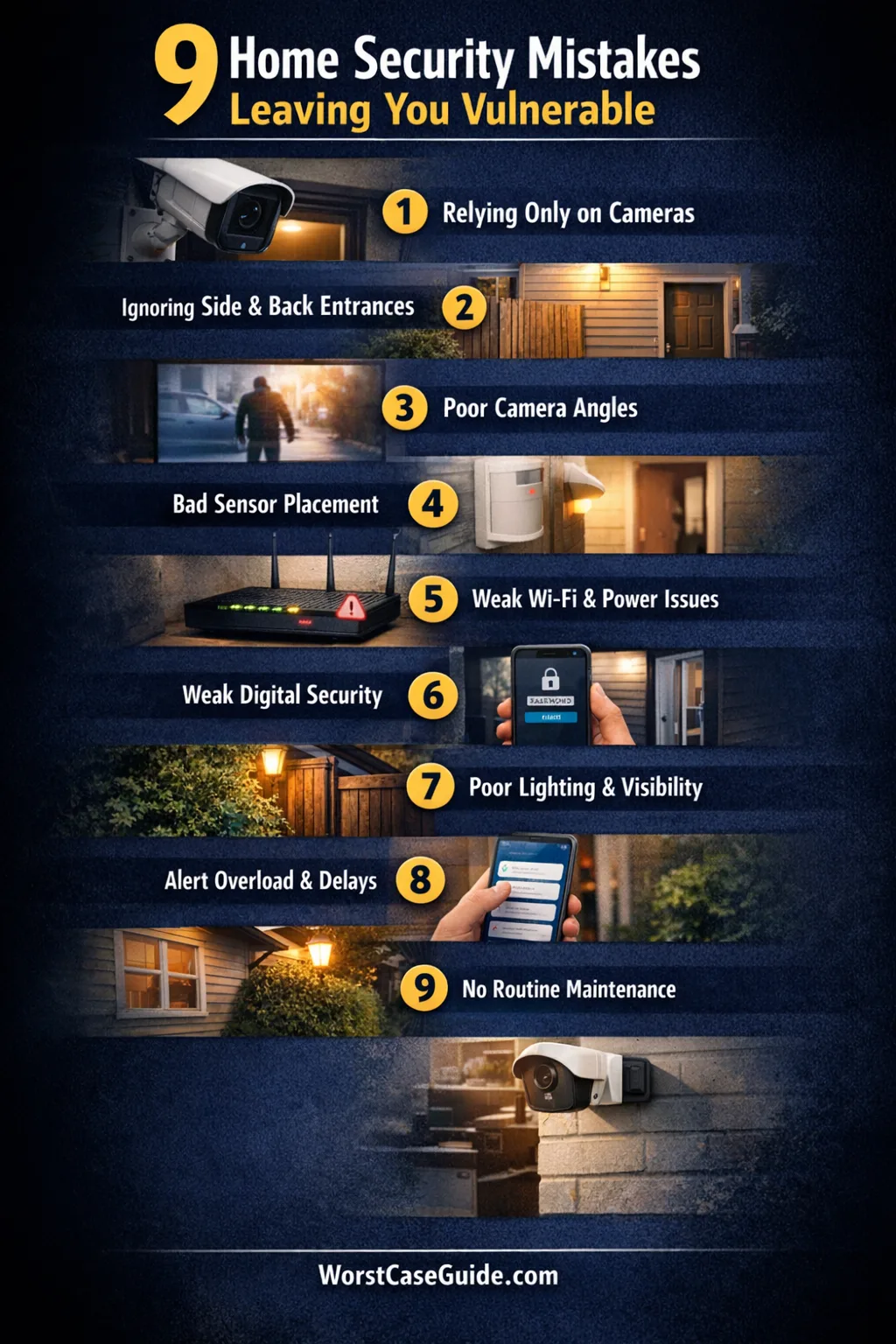
Mistake 1: Treating Cameras As The Whole Security Plan
A camera often becomes the star of the setup because it is visible, easy to explain, and easy to check from a phone. That can push entry sensors, lock strength, lighting, glass-break detection, and alert handling into the background.
Why It Happens
- Cameras feel tangible and modern.
- Retail marketing often leads with video, not layers.
- People tend to picture security as watching, not detecting and responding.
Early Warning Signs
- There are cameras, but no entry sensors on key doors or windows.
- The setup records events but does not reliably notify anyone.
- Indoor valuables are visible, while access points are lightly monitored.
Worst-Case Outcome
The home gets entered through a quiet route, the footage is late, unclear, or stored too briefly, and the first real discovery happens after the person is already gone. The system saw something, yet it did not close the gap.
A Safer Approach
A more reliable setup treats cameras as one layer among several: door and window contacts, motion coverage, lighting, physical lock reinforcement, and a simple response plan. If the property is small, that layered approach may still stay simple. If the property is larger, layering matters even more because one missed route becomes harder to notice.
Mistake 2: Covering The Obvious Front Door But Missing Side Routes
Many setups focus on the front entrance because it is the most used entry point in daily life. Security risk does not always follow daily convenience. Side gates, back doors, garage service doors, patio sliders, and ground-floor windows can become the quieter path.
Why It Happens
- Front-door hardware and video doorbells get the most attention.
- People think in terms of main entrance, not practical access route.
- Garages and side yards are often treated as utility spaces, not security zones.
Early Warning Signs
- The front door has video coverage, but the side yard has none.
- A detached or attached garage is used daily but has no sensor or camera review habit.
- Ground-floor windows are hidden by bins, shrubs, fences, or parked vehicles.
Worst-Case Outcome
The most polished part of the system protects the least likely route, while the quieter route stays thinly watched. That kind of setup can look finished from the street and still leave a clean approach path at the side or rear of the home.
A Safer Approach
Think in paths, not products. If a person wanted to reach the home without being seen by neighbours or passersby, where would that path run? In apartments, this may mean hallway sightlines, balcony access, or shared entry doors. In houses, it often means side gates, rear fencing, and garage transition doors.
Mistake 3: Mounting Cameras For A Wide View Instead Of Useful Evidence
A broad camera view can feel reassuring. It captures “everything.” Sometimes that really means it captures too much distance and too little detail. A camera that sees a driveway but not a face, a lock, or a hand at the latch may produce weak evidence when it matters.
Why It Happens
- Wide-angle views look impressive in the app.
- People mount cameras high to keep them out of reach.
- Lighting, glare, night vision range, and backlight are often checked last.
Early Warning Signs
- Faces become silhouettes at night.
- Entry points are visible, but approach paths are not.
- Glare from porch lights, headlights, or sunrise washes out the image.
- There is a view of the area, yet not a clear record of the act.
Worst-Case Outcome
A recorded event exists, but it offers little certainty: a hoodie, a shape, a time stamp, not much more. That is a hard lesson because the camera was there the whole time.
A Safer Approach
Check camera placement against three questions: Can it see the approach? Can it see the entry action? Can it hold detail in the lighting conditions that are actually common there? A pretty overhead shot is nice. A usable shot is better.
Mistake 4: Placing Motion And Entry Sensors Where Daily Life Defeats Them
Sensors often fail through ordinary household behavior. A motion detector watches the wrong angle. A contact sensor sits on a secondary door that is often propped open. A pet, ceiling fan, heater draft, or furniture change turns one room into a source of nuisance alerts.
Why It Happens
- DIY placement is done quickly, without testing traffic flow.
- Rooms change after setup: shelves move, plants appear, storage grows.
- People try to cover too much with one sensor.
Early Warning Signs
- Frequent false alerts lead to muted notifications or disabled modes.
- One room triggers too often, while another never seems to trigger at all.
- Adhesive-mounted devices shift, loosen, or fall over time.
Worst-Case Outcome
The household stops trusting its own alerts. Once that happens, even a valid alarm can arrive in the same mental bucket as a false one. The setup has not only a technical gap, but a credibility gap too.
A Safer Approach
Sensor placement works better when matched to how people actually move through the home. If a space is busy, active, or pet-heavy, that may call for a different sensor type, zone choice, or arm mode. If the home has a garage entry used like a main door, it deserves the same attention as the front entrance.
Mistake 5: Assuming Wi-Fi, Power, And Storage Will Hold Up When Needed
This is one of the most missed areas in search results, even though it creates some of the most frustrating failures. A smart home security system depends on more than cameras and sensors. It depends on signal strength, router health, upload speed, battery condition, storage retention, and sometimes cellular backup.
Why It Happens
- Connectivity is assumed to be stable because streaming apps work “most of the time.”
- Battery warnings get delayed or ignored.
- People check live view but rarely check what happens during outages, weak signal, or full storage.
Early Warning Signs
- Video history has random gaps.
- The app occasionally shows a device as offline.
- Alerts arrive late, or not at all, when several devices use the network.
- Outdoor battery devices struggle in very cold or very hot spots.
Worst-Case Outcome
An event happens during the exact window when the device is offline, the router is overloaded, or the storage plan has already rolled older footage away. From the user’s point of view, it feels like the system chose the worst possible time to blink.
A Safer Approach
It helps to review the setup under less friendly conditions: weak Wi-Fi corners, heavy evening bandwidth, low battery, and short outages. If remote access matters, backup power and backup communication deserve a place in the plan. If local storage matters, retention length matters just as much as image quality.
Mistake 6: Leaving Digital Defaults In Place
Some homes are physically secured and digitally loose. That mismatch is easy to miss because the risk is invisible. A smart camera or doorbell account with reused passwords, no two-factor authentication, outdated firmware, or casual account sharing can open a side door of its own.
Why It Happens
- Digital setup feels separate from “real” home security.
- Shared household access grows informally over time.
- Updates and privacy settings are treated as optional admin work.
Early Warning Signs
- One login is used by several people.
- Old phones, tablets, or ex-household members may still have access.
- Default usernames, weak passwords, or disabled security features remain in place.
- Cameras sit on the same weak network as everything else in the house.
Worst-Case Outcome
Video feeds, account controls, or door access become easier to reach than expected. The system still looks secure on the wall, while the real weakness sits inside the app and router settings.
A Safer Approach
Digital hardening belongs in the initial setup, not in a later “tech cleanup” session. Strong unique passwords, 2FA, current firmware, review of shared access, and a more secure Wi-Fi setup can reduce a very modern kind of gap. It is not glamorous work. It matters anyway.
Mistake 7: Ignoring Lighting, Visibility, And Landscaping
Security devices do not work in a vacuum. A dark side path, overgrown hedge, poorly placed floodlight, or strong backlight can make cameras, neighbours, and passersby less useful. Homes are not only protected by devices. They are also shaped by what can be seen, from where, and by whom.
Why It Happens
- People focus on devices and ignore environmental design.
- Privacy choices sometimes create hiding places.
- Outdoor lighting is added for comfort, not for camera performance or line of sight.
Early Warning Signs
- Cameras switch to night mode too early or too late.
- Shrubs, fence panels, bins, and parked cars block sightlines.
- A bright porch light creates glare while the actual path stays dim.
- Packages, tool storage, or bike visibility advertise value from outside.
Worst-Case Outcome
The setup gives a false sense of exposure while the approach area remains sheltered. In plain terms, the property can end up better lit for the homeowner’s arrival than for the camera’s evidence.
A Safer Approach
Think about visibility as a shared layer. What does the camera see? What does a neighbour see? What stays hidden by design choices that looked harmless in daylight? In tighter urban homes, even a small hedge or storage box can change that answer. In larger plots, lighting and landscaping can create long quiet pockets.
Mistake 8: Failing To Plan For Alert Fatigue And Slow Response
A system that sends too many alerts can become strangely similar to a system that sends none. People swipe them away. Sound gets muted. Shared household responsibility becomes vague. “I thought you were checking it” is not a response plan.
Why It Happens
- Default notification settings are left untouched.
- Motion zones are too broad.
- Routine delivery traffic, pets, cars, and family movement flood the app.
- No one defines who reviews which alert type and when.
Early Warning Signs
- Dozens of daily alerts with little value.
- Important alerts blend in with ordinary ones.
- Cloud storage fills with irrelevant clips.
- Household members silence notifications or leave them unread.
Worst-Case Outcome
A valid event is technically captured, yet nobody reacts in time because the signal is buried inside noise. That is a human-layer gap, and it tends to grow quietly.
A Safer Approach
Alerts work better when they are selective, predictable, and tied to a simple rule: which events matter, who sees them, and what happens next. In households with children, older relatives, or mixed schedules, that clarity matters more than extra features.
Mistake 9: Installing Once And Never Testing Again
This may be the most ordinary mistake of all. The setup goes live, the app works, the lights blink, and the project quietly leaves the to-do list. Months later, the camera angle has shifted, one battery is weak, a sensor was removed during painting, storage rules changed, and no one really knows what still works.
Why It Happens
- Security is treated like a one-time purchase, not a living setup.
- Testing feels boring when nothing is wrong.
- Small household changes are not seen as security changes.
Early Warning Signs
- No one remembers the last test date.
- New furniture, appliances, or vehicles altered lines of sight.
- Household access changed, but app permissions did not.
- Record retention, zones, or schedules were never reviewed after setup.
Worst-Case Outcome
The system that exists on paper is no longer the system that exists in real life. That gap is easy to miss because it grows slowly, like a hairline crack in glass.
A Safer Approach
Short review cycles tend to work better than occasional big overhauls. A simple walk-through, a live alert check, a storage check, and a permission review can reveal small failures before they become expensive ones.
Recurring Risk Patterns Behind Most Setup Failures
Most home security gaps come from the same few patterns:
- Visible layer bias: the setup looks secure from the main entrance but misses quieter routes.
- Tool-first thinking: devices are chosen before routes, habits, and failure scenarios are mapped.
- Normal-day testing: the system is judged under easy conditions, not at night, during outages, or under notification overload.
- Human drift: routines change, access changes, and no one updates the setup.
- Digital neglect: physical security gets attention while passwords, firmware, Wi-Fi, and shared access stay loose.
If the home is small, the pattern may look simple: one secondary entry, one weak signal corner, one ignored alert stream. If the home is larger, the same pattern spreads across more ground and more devices. Either way, risk usually grows through unexamined assumptions, not through one dramatic mistake.
FAQ
Are cameras alone enough for home security?
Cameras help with visibility and evidence, but they do not replace layered detection, lock strength, lighting, account security, and a response plan. A camera-only setup can still leave entry and timing gaps.
Where do home security blind spots usually appear?
Blind spots often appear along side paths, back doors, garage access, patio sliders, ground-floor windows, corners, and approach routes that are not visible from the front. Digital blind spots also matter: weak Wi-Fi corners, shared logins, old firmware, and missed offline warnings.
Is a wireless home security system reliable enough?
Wireless systems can work very well, though they depend more heavily on signal quality, battery condition, router security, and backup planning. Reliability is less about the label “wireless” and more about how the whole setup is tested and maintained.
How often does a home security setup need to be reviewed?
A short recurring check tends to work better than waiting for a problem. Reviews are especially useful after changes in furniture, landscaping, internet equipment, household members, access permissions, or daily routines.
What is the most forgotten part of a small-home setup?
In small homes and apartments, people often forget the less obvious route: balcony access, shared hallway exposure, patio doors, or the door that is used every day and therefore trusted too much. Small spaces still develop blind spots; they just hide them in plain sight.