Cloud storage often feels safe by default because the interface is clean, access can be shared in seconds, and files seem to sit behind account logins. That feeling can be misleading. A bucket, container, drive, or object store can move from private to exposed through one rushed permission change, one long-lived link, one copied dataset, or one forgotten backup. What goes wrong most often is not advanced intrusion. It is ordinary setup work done with weak visibility.
Sensitive data exposure in cloud storage is rarely a single mistake in isolation. It is more often a chain: a team uploads data, another team shares it, an old copy remains, monitoring is thin, and nobody notices that the storage location has become readable far beyond the original audience. The result can be customer data leaks, internal document exposure, source code disclosure, compliance trouble, or quiet data scraping that goes on for months.
Why This Topic Carries More Risk Than It First Appears
Cloud storage is flexible, and that flexibility is exactly where the risk starts. A file store can serve a public website, hold finance exports, receive app uploads, keep backups, and support analytics jobs at the same time. Those use cases do not want the same access model. When they are mixed together, the storage layer stops behaving like a locked cabinet and starts behaving like a glass room with a few curtains.
Smaller teams usually feel the risk when speed wins over review. Larger systems feel it when ownership becomes blurred, inherited permissions spread quietly, and copied data lives in more places than anyone can name from memory. Different scale, same pattern.
Plain-English Risk Pattern: exposure tends to happen where access decisions, data sensitivity, and storage sprawl are managed separately. When those three things are not tied together, teams can protect the storage account while still exposing the data inside it.
Common Wrong Assumptions Before The Mistakes Start
- “It is private unless I make it public.” Many storage problems come from inherited rules, old links, cross-account access, or object-level sharing.
- “Encryption means the data is safe.” Encryption helps, yet it does not fix overbroad access, exposed links, or weak key handling.
- “Only production matters.” Test copies, exports, backups, and analyst workspaces often contain the same data with less protection.
- “Nobody can guess this URL.” Long URLs reduce casual discovery, but leaked links travel fast through tickets, logs, chat, code, and browser history.
- “We would notice if it was exposed.” In many environments, there is no alert tied to risky sharing, object downloads, or policy drift.
Mistakes That Expose Sensitive Data
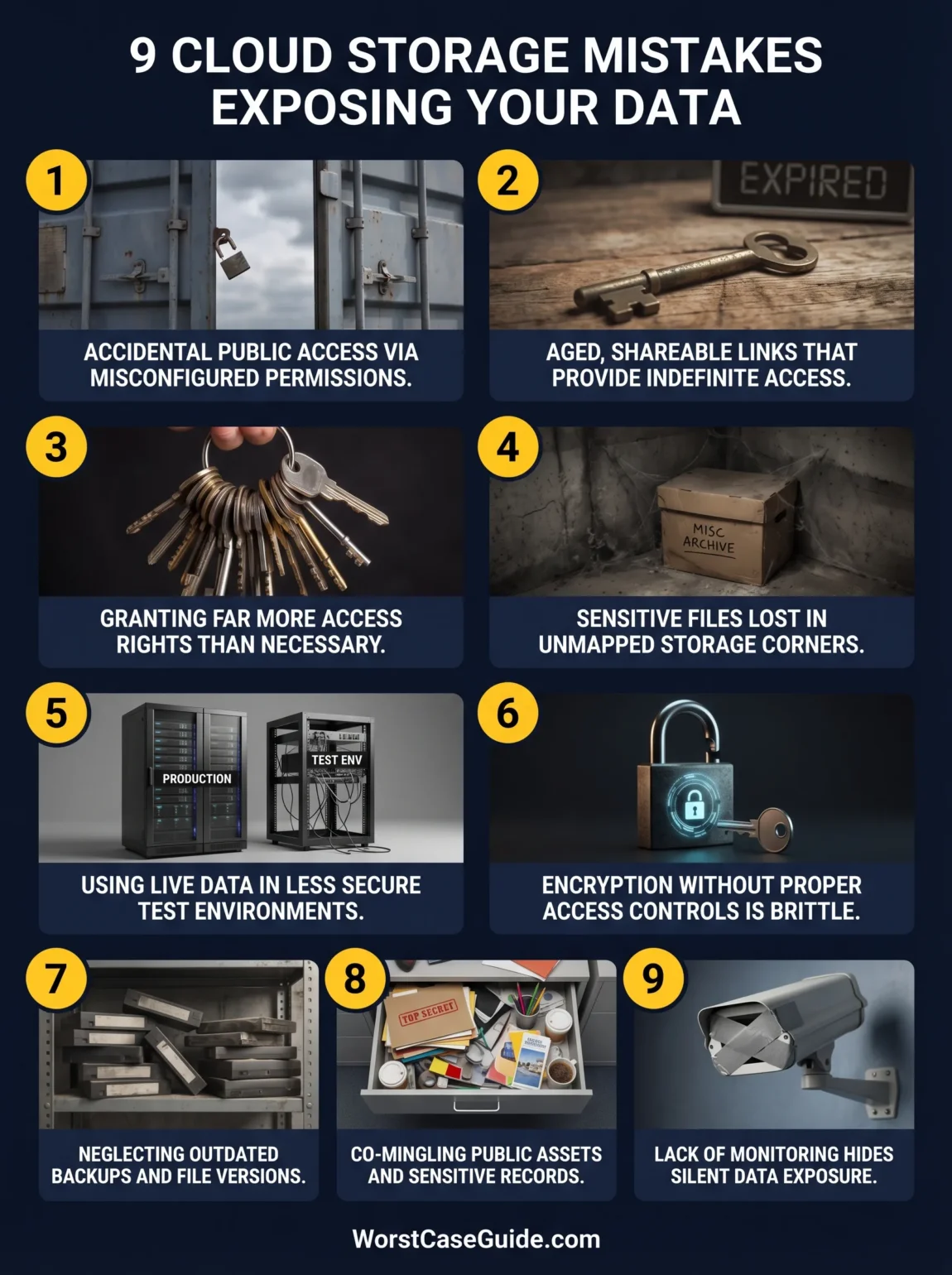
Mistake 1: Leaving Storage Public Or Effectively Public
Why It Happens
Teams often create public storage for valid reasons: static assets, downloads, media delivery, or partner access. Trouble starts when public access and sensitive content end up in the same location, or when a bucket policy, ACL, container setting, or inherited permission is broader than intended. Sometimes the storage itself is not marked “public” in plain language, yet it is still reachable by unauthorised users through an access rule that nobody reads closely.
Early Warning Signs
Anonymous reads, public listing, overly broad “all users” style permissions, or security findings that keep getting archived without ownership are all warning signs. So is the sentence many teams say after an audit: “That bucket was only meant for web assets.”
Worst-Case Result
The obvious outcome is direct exposure of customer records, invoices, ID images, contracts, or internal documents. Less obvious is object tampering. If write access is open or badly scoped, uploaded files can be replaced, poisoned, or used as a delivery path for malicious content. In public-facing systems, that turns a storage mistake into a trust problem.
Safer Approach
A safer setup usually separates public-serving storage from private data stores at the architecture level, not just by folder name. It also helps when account-level public access controls, policy review, and periodic validation are treated as normal maintenance rather than one-time setup.
Mistake 2: Sharing Files With Long-Lived Links, Signed URLs, Or SAS Tokens
Why It Happens
Temporary links feel tidy. They solve real workflow problems. A vendor needs one file, a customer needs one export, a browser needs one upload URL. The risk begins when “temporary” quietly becomes long-lived, reusable, or too broad in scope. Anyone who holds the link can often use it, even without a normal account identity behind the request.
Early Warning Signs
Links pasted into tickets, email threads, chat channels, spreadsheets, deployment logs, or browser bookmarks are a strong clue that access has escaped the original context. Another sign is when nobody can quickly answer which signed links or tokens are still active, what they allow, and how they would be revoked.
Worst-Case Result
Files thought to be “shared with one person” spread far beyond that one person. Old links can surface in copied documents, cached systems, support tools, or leaked repos. In some cases, the issue is not mass public exposure but quiet unauthorised retrieval that leaves very little visible damage until the data shows up elsewhere.
Safer Approach
A lower-risk pattern limits link lifetime, permissions, and object scope as tightly as the use case allows. For repeated business sharing, identity-based access with expiration and review usually ages better than a growing pile of link-based exceptions.
Mistake 3: Giving People, Apps, And Services More Access Than They Need
Why It Happens
Least-privilege design sounds neat on paper and messy in real delivery work. Under deadline pressure, teams often grant broad read or write access because it avoids broken jobs and support tickets. Then those rights stay in place. A backup service can read everything. A developer role can browse finance exports. An internal app account can list whole buckets when it only needs one prefix. Access grows faster than review.
Early Warning Signs
Shared service accounts, wildcard permissions, inherited roles nobody wants to touch, and app credentials reused across environments all signal drift. So does any access model where nobody is certain which human or workload really needs the broadest rights.
Worst-Case Result
One compromised identity gets far more data than the attacker should ever have been able to reach. The blast radius becomes the story. Instead of one object exposure, the whole storage estate becomes searchable, downloadable, or destructible.
Safer Approach
A safer route narrows access by dataset, prefix, task, and time. In smaller projects, even a simple role split between upload, read, and admin access can reduce exposure. In larger systems, periodic effective-permission reviews matter more than clean-looking policy documents.
Mistake 4: Not Knowing Where Sensitive Data Actually Lives
Why It Happens
Many teams protect storage as infrastructure but do not classify the contents with the same care. That leaves a blind spot: private data is not only in the “sensitive” bucket. It can sit in exports, user uploads, log archives, generated reports, compressed bundles, old migration dumps, and partner delivery folders. You cannot protect what you cannot locate.
Early Warning Signs
Labels such as “misc”, “archive”, “tmp”, “uploads-old”, or “data-final-final” are not funny once audits begin. Another warning sign is when security review is based on where the team thinks personal or regulated data should live, rather than where scanners and actual inventory say it does live.
Worst-Case Result
Highly sensitive files end up in low-control areas that were never designed for them. A storage path built for convenience becomes a leak path. That can create a strange failure mode: the primary protected dataset stays locked down, while the forgotten copy is the one that gets exposed.
Safer Approach
A lower-risk approach ties storage review to data discovery and classification, not only account hardening. That often means mapping data types to storage locations, scanning for sensitive content, and treating “unknown data” as a risk worth reducing.
Mistake 5: Copying Production Data Into Test, Analytics, Or Support Workspaces
Why It Happens
This is one of the most common quiet errors. Real data is convenient. It helps debugging, demo prep, analytics validation, and support reproduction. So production snapshots, CSV exports, object copies, and image archives get moved into less controlled places. Then they stay there. The copy is usually weaker than the source.
Early Warning Signs
Engineers asking for “just a quick export”, analysts keeping raw extracts in personal work areas, test buckets named after short-term projects, and support teams holding attachments outside the main system all point to copy sprawl. Another sign: retention rules exist for production but not for side copies.
Worst-Case Result
The breach comes from the place nobody thought mattered. A staging bucket, analyst folder, or support archive exposes the same names, emails, documents, or IDs as production, but with softer access control and almost no monitoring. It is the spare key under the mat problem, only at cloud scale.
Safer Approach
A safer pattern uses masked, synthetic, or minimised data where possible, and sets shorter retention for operational copies. If real data must move, the destination usually deserves equal or stronger controls, not lighter ones because the copy feels temporary.
Mistake 6: Assuming Encryption Solves The Exposure Problem
Why It Happens
Encryption at rest and in transit is good practice, and teams know that. The misunderstanding begins when encryption is treated as the whole answer. A file can be perfectly encrypted while stored and still be exposed through an open permission, a leaked signed link, a compromised key path, or a system that decrypts it for anyone who can reach the object. Encrypted does not always mean inaccessible.
Early Warning Signs
People talk about storage as “safe because it is encrypted” while struggling to explain access paths, key scope, decryption permissions, or how secrets are handled in the apps touching the data. That gap matters. So do encryption keys, config files, or credentials stored right beside the data they unlock.
Worst-Case Result
The organisation believes the exposure is contained because the storage control panel shows encryption enabled, while the real path to the data stays wide open. That false confidence delays detection and stretches response time.
Safer Approach
A safer view treats encryption as one control among several: access boundaries, identity hygiene, key management, secret handling, and audit visibility still decide whether sensitive data is practically reachable.
Mistake 7: Forgetting Old Versions, Backups, Snapshots, And Deleted-But-Retained Objects
Why It Happens
Cloud storage rarely contains only “current files”. It also contains versions, archives, replication targets, disaster recovery copies, old exports, quarantine folders, retention holds, and synced copies across regions or accounts. Teams often secure the active path and forget the rest. Data tends to outlive the project that created it.
Early Warning Signs
Versioning enabled without review, old backup locations with unclear owners, migration folders marked temporary for a year, and nobody knowing which copy is authoritative are classic warning signs. The same applies when deleted content remains recoverable but unmonitored.
Worst-Case Result
A “deleted” or “old” object becomes the exposed one. It may hold rawer, messier, or broader data than the live system because older copies often predate current controls. In investigations, these are the files that make teams say, a bit too late, “We forgot that path even existed.”
Safer Approach
A lower-risk model treats storage lifecycle and storage security as one subject. Retention, version review, backup ownership, and secure deletion logic all shape exposure risk just as much as active access policies do.
Mistake 8: Mixing Public Assets, Internal Files, And Sensitive Records In The Same Storage Layout
Why It Happens
Teams like fewer moving parts. One bucket for assets, uploads, exports, and generated files seems easier than several storage domains. It usually is easier at first. Then one public CDN path, one partner integration, or one app permission exception starts touching a namespace that also contains sensitive files. Shared layout creates shared risk.
Early Warning Signs
Directory names trying to do the work of security boundaries are a bad sign: /public, /private, /archive, /customers, /tmp all inside one broad storage account with overlapping access rules. Another sign is when developers say the separation is “logical” rather than enforced.
Worst-Case Result
A rule added for a harmless use case exposes a harmful one. Public images and private identity documents do not belong in a storage model where the same policy engine or delivery path can touch both without strong separation.
Safer Approach
Safer designs usually split storage by risk profile, not just by file type. Public content, transient uploads, internal documents, and regulated data tend to age better when they do not share the same blast radius.
Mistake 9: Skipping Logging, Alerting, And Access Review Because “No One Has Reported A Problem”
Why It Happens
Storage exposure can be quiet. A file download does not always break anything. A link leak does not always trigger a ticket. If logging is partial and alerts are weak, teams can mistake silence for safety. Lack of visible damage is not proof of control.
Early Warning Signs
No alert for public sharing changes, no review of unusual object downloads, no periodic look at dormant but privileged identities, and no path to validate whether unauthorised reads are possible. Even simple checks are skipped because the storage “has always worked”.
Worst-Case Result
Exposure remains open for weeks or months. Data is copied quietly, indexed by outsiders, or reused in fraud and phishing later. Incident response becomes slower because nobody knows when the exposure started, which objects were touched, or whether the issue is still active.
Safer Approach
A safer operating model watches for policy drift, suspicious access, unusual download volume, long-lived sharing artefacts, and identities with broad reach. In small teams this can be a short recurring review. In larger systems it usually needs alerting tied to storage events and effective access changes.
Risk Table: Where The Damage Usually Starts
| Mistake | Typical Trigger | Likely Exposure Path | Damage Pattern |
|---|---|---|---|
| Public Or Effectively Public Storage | Broad bucket or container policy | Anonymous read or write | Immediate data disclosure or object tampering |
| Long-Lived Shared Links | Signed URL or token shared widely | Link reuse outside intended audience | Quiet retrieval of specific files |
| Overbroad Access Rights | Wildcard roles and inherited access | Compromised user or service identity | Large blast radius across many objects |
| Unknown Sensitive Data Locations | No classification or scanning | Private data stored in low-control paths | Exposure through forgotten storage areas |
| Production Copies In Side Environments | Exports for testing or analytics | Weaker control around copied data | Leak from non-production systems |
| Encryption As The Only Safeguard | Focus on storage encryption alone | Access path remains open | False confidence and late response |
| Old Versions And Backups | Unreviewed retention and replication | Exposure through stale copies | Leak of older, broader datasets |
| Mixed-Risk Storage Layout | Public and private content share space | Policy exception spills across datasets | One harmless rule exposes sensitive records |
| Weak Monitoring And Review | No event-based visibility | Exposure remains unnoticed | Long dwell time and hard investigation |
General Patterns Behind These Mistakes
The same patterns appear again and again.
- Convenience overrides boundary design. Sharing, copying, and broad access feel efficient until they cross data sensitivity lines.
- Storage is treated as a utility, not a data risk surface. Teams harden the account but do not examine the contents, copies, and downstream links.
- Temporary decisions become long-term architecture. Short-lived exports, emergency permissions, and one-off links settle into normal operation.
- Ownership is unclear. One team manages the platform, another owns the data, a third shares it, and nobody owns the full exposure story.
- Review is weaker than change velocity. Cloud storage changes quickly. Access review often does not.
A practical reading of the pattern: most sensitive data exposure in cloud storage is not about one bad setting. It is about mismatch — the wrong data in the wrong place, with the wrong sharing method, under the wrong review cycle.
FAQ
Is a private bucket enough to keep sensitive data safe?
Not always. Private by default helps, yet exposure can still happen through overbroad roles, copied datasets, signed links, application paths, backups, or old versions that were never reviewed.
Are signed URLs safer than making a folder public?
Usually yes, though they still create risk if the link lasts too long, grants too much access, or spreads through tickets, chat, logs, or email. A narrow, short-lived link is very different from a broad token with no clear revocation plan.
Why do non-production environments cause so many storage leaks?
Because they often contain real data with softer controls. Test, analytics, support, and migration workspaces are treated as temporary, so retention, access review, and monitoring are often weaker than in production.
Does encryption remove the main cloud storage risk?
No. Encryption protects data in valuable ways, but it does not cancel out weak access control, exposed sharing links, poor key handling, or copied files left in lightly controlled locations.
What kind of files are most often forgotten in cloud storage reviews?
Old exports, backup archives, generated reports, user-uploaded documents, migration dumps, log bundles, and versioned objects are often missed. Those files may carry sensitive content even when their folder names look harmless.
What is the common thread across most cloud storage exposure incidents?
The common thread is drift: access grows, copies multiply, old paths remain, and nobody has a current map of who can reach which data. The technical details vary, but the pattern is usually the same.