Email marketing messages rarely reach the spam folder because of one forbidden word. Modern filters assess sender reputation, authentication, recipient behavior, list quality, message structure and sending patterns together. A campaign may look professional yet still be filtered when the technical identity is unclear or too many recipients treat the message as unwanted.
Spam filtering also differs across Gmail, Yahoo, Outlook, corporate gateways and smaller mailbox providers. Passing one test does not guarantee inbox placement everywhere. The safer goal is to create a consistent and permission-based sending pattern that mailbox providers can recognize over time.
Why Legitimate Campaigns Can Still Be Filtered
A sender does not need to be distributing scams to develop a spam problem. Old subscriber records, sudden volume changes, authentication errors and difficult unsubscribe processes can create signals that resemble unwanted bulk mail.
Filters may respond by placing messages in spam, limiting delivery speed, temporarily deferring mail or rejecting it during the SMTP transaction. The outcome depends on the provider, the recipient and the sender’s recent history.
Common Assumptions That Create Deliverability Risk
- “The subscribers joined once, so permission never expires.” People change jobs, forget brands and abandon addresses.
- “Avoiding a few sales words guarantees inbox placement.” Reputation and engagement usually carry more weight than isolated vocabulary.
- “SPF alone authenticates everything.” SPF, DKIM and DMARC perform different jobs, and domain alignment also matters.
- “A successful send means the setup is healthy.” Messages can be accepted by a receiving server and still be placed in spam.
- “Removing the unsubscribe link protects the list.” Friction often pushes recipients toward the spam button instead.
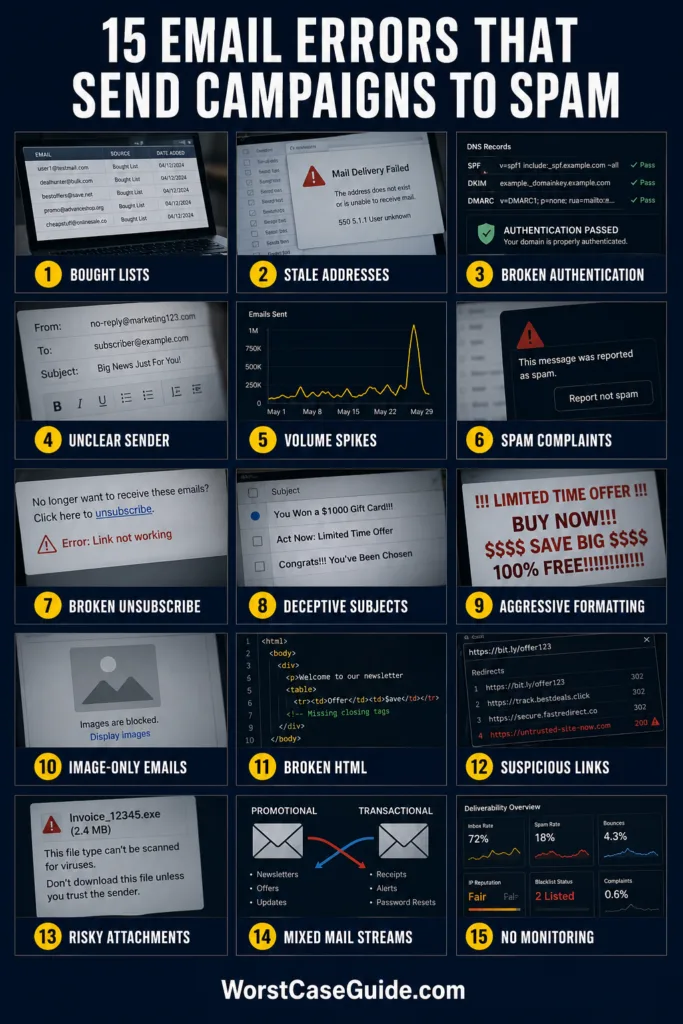
15 Email Marketing Mistakes That Trigger Spam Filters
| Mistake | Early Warning Sign | Possible Outcome |
|---|---|---|
| Using purchased contacts | Unknown recipients and immediate complaints | Spam traps, blocks and reputation loss |
| Keeping stale addresses | Rising hard bounces and no engagement | Poor list-quality signals |
| Misconfiguring authentication | SPF, DKIM or DMARC failures | Spam placement or rejection |
| Using an unclear sender identity | Changing domains or reply addresses | Reduced recipient and provider trust |
| Creating volume spikes | Sudden delivery deferrals | Rate limiting or temporary blocks |
| Ignoring complaint rates | More spam reports after each campaign | Domain-wide delivery damage |
| Making opt-out difficult | Unsubscribe requests become complaints | Filtering and sender-rule failures |
| Using deceptive subject lines | Opens followed by complaints | Negative engagement signals |
| Overusing aggressive formatting | Low trust and low engagement | Higher combined spam score |
| Sending image-only messages | Blank previews or unreadable content | Content-quality concerns |
| Using broken HTML | Rendering errors and malformed headers | Filtering or rejection |
| Including suspicious links | Redirect warnings or blocked domains | Phishing-related filtering |
| Attaching unnecessary files | Security warnings and blocked downloads | Gateway quarantine |
| Mixing message categories | Receipts begin receiving complaints | Damage across transactional mail |
| Skipping monitoring | Repeated failures without diagnosis | Long-term deliverability decline |
Mistake 1: Sending to Purchased, Scraped or Shared Lists
Why it happens: A purchased database can appear to offer immediate reach. Yet the people on it did not clearly request messages from the sender, and some addresses may have been collected years earlier.
Early warning signs: The first campaign produces hard bounces, almost no engagement, unfamiliar complaints or responses asking how the address was obtained.
Worst-case result: A third-party list may contain spam traps, recycled accounts or fabricated addresses. Sending to them can damage both domain and IP reputation, leading to blocks that affect later campaigns.
Safer approach: A list built through clear, voluntary registration provides a defensible permission record. Confirmed opt-in can also reduce typing errors and unauthorized subscriptions.
Mistake 2: Keeping Stale and Invalid Addresses Indefinitely
Why it happens: Removing contacts can feel like giving up potential reach. Teams may continue emailing every record even when an address has bounced or shown no activity for years.
Early warning signs: Hard-bounce rates rise, large audience segments never open or click, and delivery reports contain repeated “user unknown” responses.
Worst-case result: Abandoned accounts can later become recycled spam traps. Continual delivery attempts also tell mailbox providers that the sender is not maintaining its audience.
Safer approach: Hard bounces can be suppressed immediately, while inactive subscribers can enter a limited re-engagement process. If interest remains absent, suppression is generally safer than endless sending.
Mistake 3: Missing or Misaligned SPF, DKIM and DMARC
Why it happens: Authentication is often treated as a one-time DNS task. Problems appear when a new email platform is added, an SPF record exceeds technical limits, a DKIM signature breaks or DMARC alignment is misunderstood.
- SPF identifies servers permitted to send for the envelope domain.
- DKIM applies a cryptographic signature linked to a domain.
- DMARC checks alignment with the visible From domain and defines reporting or handling instructions.
Early warning signs: Message headers show authentication failures, DMARC reports list unknown services, or receiving servers return errors mentioning sender policy.
Worst-case result: Messages may be sent to spam or rejected. High-volume senders face stricter authentication requirements at major consumer mailbox providers.
Safer approach: Every authorized platform can be inventoried and tested for alignment. SPF, DKIM and DMARC should be checked again after changes to domains, vendors or sending routes.
Mistake 4: Using an Inconsistent or Unclear Sender Identity
Why it happens: Campaigns may rotate between free mailbox addresses, unrelated subdomains, unfamiliar display names and reply addresses that nobody monitors.
Early warning signs: Recipients ask who sent the message, replies bounce, or the displayed From domain does not resemble the linked website.
Worst-case result: The message can resemble impersonation or phishing. Even when authentication technically passes, confused recipients may report it as spam.
Safer approach: A stable From name, an owned and authenticated domain, and a working reply mailbox make the identity easier to verify. Separate subdomains may be useful when their ownership and purpose remain obvious.
Mistake 5: Creating Sudden Sending-Volume Spikes
Why it happens: A new domain or IP may remain quiet for weeks and then send a large promotion in a few hours. Similar jumps can happen after importing a legacy database.
Early warning signs: Delivery slows, temporary 4xx deferrals increase, or one mailbox provider accepts far fewer messages than others.
Worst-case result: The pattern can resemble a compromised account or newly activated spam operation. Providers may throttle traffic, place messages in spam or temporarily block the source.
Safer approach: Sending volume can grow gradually among recently engaged subscribers. Stable frequency and predictable traffic are easier for receiving systems to evaluate than abrupt peaks.
Mistake 6: Ignoring Spam Complaints and Recipient Fatigue
Why it happens: A campaign may be legally permitted but still feel irrelevant or too frequent. Permission is not the same as permanent interest.
Early warning signs: Complaint rates rise after frequency changes, engagement falls across several sends, or specific acquisition sources produce more reports than others.
Worst-case result: Repeated complaints can harm the reputation of the sending domain, IP and message stream. Gmail advises senders to remain below a 0.1% user-reported spam rate and avoid reaching 0.3% or higher.
Safer approach: Preference controls, relevant segmentation and frequency limits can reduce fatigue. Complaints are more useful when examined by campaign, source and audience segment rather than as one account-wide number.
Mistake 7: Hiding or Breaking the Unsubscribe Process
Why it happens: Some senders use tiny footer links, require account login or add several confirmation screens because they fear losing subscribers.
Early warning signs: People reply with removal requests, opt-out links return errors, or contacts continue receiving mail after unsubscribing.
Worst-case result: Recipients choose the easier spam button. Promotional senders may also fail mailbox-provider requirements for one-click unsubscribe.
Safer approach: A visible footer link and a working RFC 8058 one-click mechanism serve different purposes and can coexist. The header-based method uses List-Unsubscribe and List-Unsubscribe-Post; the request should remove the subscriber without login or another confirmation step.
Mistake 8: Writing Deceptive Subject Lines or From Names
Why it happens: Artificial urgency and imitation reply markers may raise short-term opens. Examples include using “Re:” when no conversation exists or implying an account problem that is not real.
Early warning signs: Open rates rise while clicks, conversions and replies deteriorate. Complaints may mention that the message was misleading.
Worst-case result: Filters and recipients may associate the sender with deceptive behavior. Future campaigns can suffer even when their subject lines are accurate.
Safer approach: The subject, preview text, display name and body can describe the same offer or update. Curiosity is possible without disguising the message’s origin or purpose.
Mistake 9: Overusing Capitals, Punctuation and Sales Phrases
Why it happens: Teams sometimes try to make every line compete for attention through all-capital text, repeated exclamation marks, excessive currency symbols and exaggerated claims.
Early warning signs: The message resembles a loud advertisement before its meaning is clear. Mobile previews become difficult to scan, and engagement weakens.
Worst-case result: Aggressive formatting can add another negative signal to an already weak sender profile. One phrase rarely decides placement by itself, but several suspicious elements can accumulate.
Safer approach: Plain, specific language usually communicates urgency more credibly. Claims can match what the landing page actually provides, with emphasis reserved for information that deserves it.
Mistake 10: Sending Image-Only or Visually Unbalanced Emails
Why it happens: A complete advertisement may be exported as one image because it preserves the design across email clients.
Early warning signs: The message appears blank when images are disabled, the preview reveals almost no useful text, or screen-reader users receive little information.
Worst-case result: Filters cannot interpret much of the message, while recipients may distrust a large clickable image. Slow loading and poor accessibility further reduce engagement.
Safer approach: Real HTML text can carry the main meaning, with images providing support. Descriptive alt text, sensible image dimensions and a readable text version help the message remain understandable when visual assets fail.
Mistake 11: Using Broken, Bloated or Malformed Email Code
Why it happens: Copying from word processors, repeatedly editing old templates or combining several builders can leave hidden tags, unsupported CSS and malformed markup.
Early warning signs: Layouts break in Outlook, raw code appears in the message, required headers are duplicated, or test tools report RFC formatting errors.
Worst-case result: A receiving server may interpret the email as poorly formed or deliberately obfuscated. Delivery can be filtered or rejected before the content is shown.
Safer approach: A maintained template, valid message structure and a matching plain-text part reduce uncertainty. Tests across several mailbox providers can expose damage that a browser preview misses.
Mistake 12: Using Shortened, Mismatched or Unsafe Links
Why it happens: URL shorteners make links compact, while complex tracking systems may route clicks through several unrelated domains.
Early warning signs: Hover text reveals an unfamiliar destination, security software blocks a redirect, or the tracking domain lacks a stable reputation.
Worst-case result: Shared shorteners may already be associated with abuse. A compromised landing page or denylisted tracking domain can affect every message containing that URL.
Safer approach: Branded tracking domains and transparent link text allow recipients to understand the destination. Redirect chains, expired certificates and landing-page security can be checked before each send.
Mistake 13: Adding Unnecessary Attachments to Bulk Campaigns
Why it happens: A sender may attach a catalogue, form or document because it feels more direct than hosting the file online.
Early warning signs: Corporate gateways quarantine the message, file scanning delays delivery, or the campaign becomes too large for some receiving systems.
Worst-case result: Executable, macro-enabled, encrypted or unusual file types can activate security controls. Even a harmless attachment may resemble malware delivery when combined with a new sender domain.
Safer approach: Marketing material can usually be hosted on a trusted HTTPS page with a clear download link. When attachments are genuinely needed, familiar file types and accurate descriptions reduce ambiguity.
Mistake 14: Mixing Promotional and Transactional Messages
Why it happens: A receipt or password notice has high visibility, so a business may add unrelated promotions to it or send every message through the same domain and IP pool.
Early warning signs: Customers mark receipts as spam, promotional campaigns affect password-reset delivery, or complaint data cannot be separated by message type.
Worst-case result: Poor engagement from marketing mail can damage time-sensitive operational messages. A customer might then miss an account alert, confirmation or reset email.
Safer approach: Transactional and promotional streams can use distinct subdomains, templates and monitoring. Separation does not excuse poor practices, but it makes reputation and failures easier to diagnose.
Mistake 15: Sending Without Testing or Monitoring Delivery Signals
Why it happens: Teams often measure opens and revenue while overlooking authentication reports, bounce codes, complaint data and inbox placement.
Early warning signs: A provider’s engagement drops suddenly, temporary errors repeat, DMARC reports show an unknown source or test messages land differently across services.
Worst-case result: A minor configuration error can continue through many campaigns. By the time revenue falls, the sender may have weeks of poor reputation history to repair.
Safer approach: Pre-send checks can cover authentication, links, rendering, headers, unsubscribe behavior and message size. After sending, bounce categories, complaint rates, domain reputation and provider-level engagement reveal different parts of the problem.
Risk Patterns Behind Most Spam-Filter Problems
The mistakes above usually belong to four connected patterns. A campaign can survive one minor weakness, but several weaknesses often reinforce each other.
Identity Problems
Authentication failures, unstable From addresses and mismatched links make it difficult to establish who sent the message. Clear identity is the envelope around every other signal.
Permission and Audience Problems
Purchased contacts, stale records and unwanted frequency produce bounces, complaints and inactivity. These signals indicate that the audience does not expect the mail.
Technical Quality Problems
Broken HTML, malformed headers, unsafe links and missing unsubscribe functions reduce trust before a recipient reads the offer.
Behavioral Inconsistency
Large volume jumps, frequent platform changes and mixed message categories create an unstable history. Predictable sending gives mailbox providers more reliable evidence.
When a Campaign Suddenly Starts Going to Spam
If placement changes after months of normal delivery, rewriting every subject line may hide the real cause. The timing often points toward a recent change: a new sending service, DNS edit, imported list, volume increase, tracking domain or template.
- Compare results by mailbox provider rather than relying only on the combined campaign average.
- Review SMTP responses and separate hard bounces from temporary deferrals.
- Inspect SPF, DKIM and DMARC results in received-message headers.
- Check whether complaint, unsubscribe or bounce rates changed after a particular campaign.
- Review recent changes to lists, domains, IP addresses, templates and links.
Frequently Asked Questions
Do certain words automatically send an email to spam?
Usually not. Modern filters combine sender reputation, authentication, engagement, links, formatting and recipient behavior. Aggressive wording can add risk, but a single ordinary sales term rarely decides placement alone.
Can authenticated email still go to the spam folder?
Yes. SPF, DKIM and DMARC establish identity and alignment; they do not guarantee that recipients want the message. Complaints, poor list quality, unsafe links or weak engagement can still lead to spam placement.
What is an acceptable spam complaint rate?
Lower is safer. Gmail advises keeping the user-reported spam rate below 0.1% and avoiding 0.3% or higher. Other providers may calculate complaints differently or apply unpublished limits.
Does an unsubscribe link improve deliverability?
A visible and functional opt-out reduces the chance that an uninterested recipient will report the message as spam. Bulk promotional mail may also need header-based one-click unsubscribe in addition to the footer link.
How long does recovery from poor sender reputation take?
There is no fixed recovery period. The outcome depends on the cause, the scale of the damage and the quality of later traffic. Removing risky contacts and correcting technical faults may stop further harm, while reputation usually improves through a continued history of wanted mail.
Should marketing and transactional email use separate subdomains?
Separation can make monitoring and reputation management easier, especially for larger programs. Smaller senders may use one domain successfully when authentication, audience quality and message classification are well controlled.