A customer support backlog rarely grows because one person replied too slowly. It usually grows because the workflow makes small delays repeat: unclear triage, weak ownership, messy ticket categories, poor internal handoffs, and customers who have to ask twice because the first answer did not solve the issue. The queue becomes like a kitchen sink with a slow drain. Water still moves, but not fast enough.
For a support team, the real risk is not simply “too many tickets.” The harder problem is unresolved work aging in the system while new requests keep arriving. Old tickets become harder to understand. Customers add more replies. Agents switch context more often. Managers see the number, but not always the workflow choices feeding it.
Practical risk note: a backlog is not always a staffing problem. It may be a routing problem, a knowledge problem, a priority problem, or a product feedback problem. Hiring more agents can help in some cases, but a broken workflow can turn extra capacity into extra confusion.
Why Customer Support Backlog Becomes Risky
A ticket backlog becomes risky when the support team can no longer tell which work is urgent, which work is old, which work is blocked, and which work keeps returning because the root issue was never fixed.
In smaller support teams, this may look like one shared inbox where everyone “helps when they can.” In larger systems, it may look more polished: multiple queues, automation rules, dashboards, macros, escalation paths, and SLA labels. The risk can still be the same. Work enters faster than the workflow can absorb it.
The damage is usually slow and plain:
- First response time stretches because new tickets wait longer before an agent sees them.
- Resolution time grows because tickets bounce between people or teams.
- SLA breaches become normal instead of exceptional.
- Duplicate tickets rise because customers send another message when they feel ignored.
- Agent burnout increases because every day starts with yesterday’s unfinished work.
- Customer trust weakens because support feels uncertain, even when agents are trying hard.
Common Wrong Assumptions About Ticket Backlog
Backlog problems often survive because the team is working from the wrong assumption. These assumptions sound reasonable in a busy week, which is why they are easy to miss.
| Wrong Assumption | Why It Creates Risk | Safer View |
|---|---|---|
| “We just need to close more tickets.” | It may reward speed over true resolution, causing reopened tickets and follow-up replies. | Track solved quality, repeat contacts, and ticket aging, not only closure count. |
| “All old tickets are low priority.” | Some old tickets are blocked, complex, or poorly owned, not unimportant. | Separate old tickets by age, customer impact, blocker type, and owner. |
| “Automation will fix the queue.” | Bad automation can misroute tickets faster and hide urgent work. | Use automation only where rules, exceptions, and ownership are clear. |
| “A bigger knowledge base means fewer tickets.” | Unclear articles can create more confusion and more contacts. | Measure whether self-service answers actually reduce repeat questions. |
| “Backlog is only a support issue.” | Product bugs, billing gaps, onboarding confusion, and unclear policies can all create ticket volume. | Treat backlog data as an early warning signal for the whole business. |
11 Customer Support Workflow Mistakes That Increase Ticket Backlog
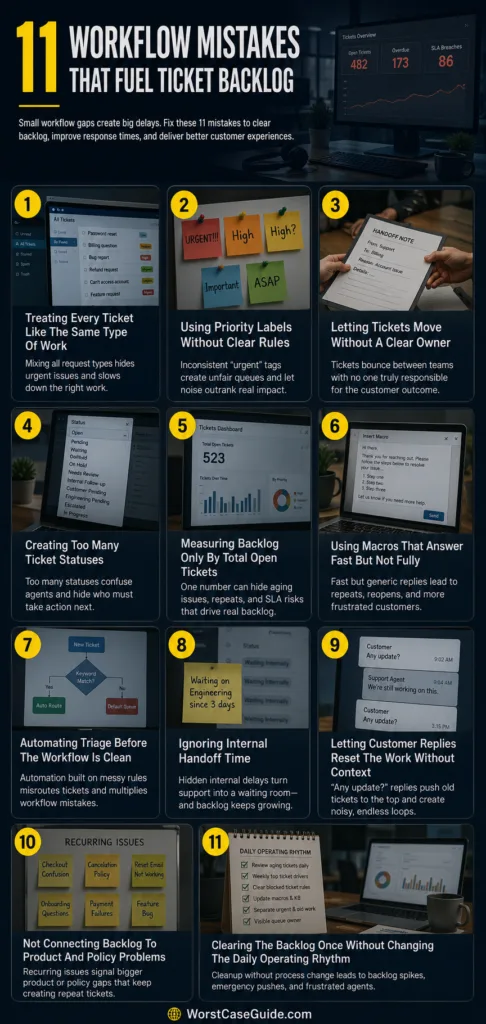
Mistake 1: Treating Every Ticket Like The Same Type Of Work
Many teams begin with a single queue because it feels simple. Every request lands in one place: password resets, billing questions, bug reports, refund requests, angry complaints, account access issues, feature questions, and onboarding confusion.
Why This Happens
This often happens when the team grows faster than the support process. A shared inbox works when volume is low. Later, the same setup becomes a crowded hallway where every ticket has to push past every other ticket.
Early Warning Signs
- Agents choose tickets based on what looks easiest.
- High-impact problems sit behind simple requests.
- Managers cannot quickly see which ticket types are creating the most delay.
- Customers with urgent account or payment issues wait behind low-risk questions.
Worst-Case Result
The backlog fills with a mixed pile of work that cannot be managed cleanly. Agents spend time scanning instead of solving. Urgent cases may wait too long, while easy tickets get cleared first because they are visible and quick.
Safer Approach
A safer workflow separates tickets by issue type, impact, urgency, and required skill. The goal is not to create too many categories. It is to make the next step obvious enough that tickets do not sit in the wrong place.
If the team is small, even a simple split can help:
- Access and login issues
- Billing and account changes
- Technical bugs
- How-to questions
- Complaints or sensitive customer cases
Mistake 2: Using Priority Labels Without Clear Rules
Priority labels are useful only when people apply them the same way. If “urgent” means one thing to one agent and something else to another, the label becomes decoration.
Why This Happens
Support teams often add priority labels early but do not define them well. Over time, agents start using judgment, customer tone, customer tier, ticket age, or personal pressure to decide what gets marked high priority.
Early Warning Signs
- Too many tickets are marked urgent.
- VIP customers receive high priority even when the issue is minor.
- Silent customers are ignored while loud customers move faster.
- Agents debate priority instead of following a shared rule.
Worst-Case Result
The queue becomes unfair and unstable. Some customers learn that repeated replies get faster help. Agents begin to chase noise. The team may still be busy, but the work order no longer matches customer impact.
Safer Approach
Priority should be based on impact plus urgency, not emotion alone. A simple model can work:
- High priority: account access blocked, payment failure affecting use, service outage, data issue, time-sensitive customer impact.
- Medium priority: degraded function, unresolved product confusion, billing clarification, repeated contact.
- Low priority: general how-to, non-urgent feature question, minor cosmetic issue.
There will always be exceptions. That is normal. The risk drops when exceptions are visible instead of hidden inside personal judgment.
Mistake 3: Letting Tickets Move Without A Clear Owner
A ticket can be assigned and still have no real owner. It may move from support to billing, from billing to product, from product back to support, and no one feels fully responsible for the customer’s outcome.
Why This Happens
Ownership becomes unclear when teams focus on departments instead of ticket progress. One group answers part of the question, then passes the ticket along. The customer sees one company. Internally, the ticket has already crossed three borders.
Early Warning Signs
- Tickets have many internal notes but no customer update.
- Agents ask, “Who owns this now?”
- Escalated tickets return without a clear answer.
- Customers receive repeated requests for the same information.
Worst-Case Result
The backlog grows with orphaned tickets. These tickets are not exactly ignored, but they are not moving either. They wait between teams. Customers may reopen, complain, or leave because the support process feels like a locked room with several doors and no handle.
Safer Approach
Every ticket should have one visible owner at each stage. That owner does not need to solve every part personally. They do need to keep the ticket moving, collect internal answers, update the customer, and decide the next action.
For larger systems, ownership can be supported with:
- Escalation owner fields
- Internal response deadlines
- Blocked-ticket views
- Clear handoff notes
- Rules for who updates the customer after escalation
Mistake 4: Creating Too Many Ticket Statuses
Status labels are meant to show where work stands. Too many statuses can do the opposite. “Open,” “pending,” “waiting,” “on hold,” “needs review,” “internal follow-up,” “customer pending,” and “engineering pending” may look detailed, but the team may not use them consistently.
Why This Happens
Teams add statuses whenever a new situation appears. The list grows one exception at a time. Nobody removes old labels because someone might still need them.
Early Warning Signs
- Agents ask which status they should use.
- Some statuses mean nearly the same thing.
- Reports show many tickets in vague categories.
- Managers cannot tell whether a ticket is waiting on the customer, the company, or a third party.
Worst-Case Result
Backlog reports become hard to trust. Tickets hide inside soft statuses that do not demand action. A queue may look controlled because tickets are labeled, while customers are still waiting.
Safer Approach
Statuses should answer one plain question: who must act next?
- New: not reviewed yet.
- In progress: support is working on it.
- Waiting on customer: the customer needs to reply.
- Waiting internally: another team needs to respond.
- Solved: the issue is resolved or the next step is complete.
Some teams need more detail. That can be fine, but every extra status should have a clear owner, next action, and aging rule.
Mistake 5: Measuring Backlog Only By Total Open Tickets
Total open tickets are easy to count. They are also easy to misunderstand. A team with 500 simple tickets may be in a different situation from a team with 80 old, complex, high-impact tickets.
Why This Happens
Open-ticket count is a simple dashboard number. It feels clear. It also hides age, complexity, repeated contacts, customer segment, channel, SLA risk, and blocked work.
Early Warning Signs
- The backlog number goes down, but customer complaints stay high.
- Old tickets remain untouched while new tickets get cleared.
- Managers celebrate closures without checking reopen rates.
- No one reviews tickets by age bucket or issue category.
Worst-Case Result
The team may optimize the wrong number. Agents close easy work to reduce the visible backlog, while older and harder tickets become heavier. The queue looks smaller, but the risk is concentrated.
Safer Approach
A healthier backlog view includes several measures:
- Ticket age: how long tickets have been unresolved.
- First response time: how long customers wait before the first human or useful response.
- Resolution time: how long the issue takes to solve.
- Reopen rate: how often “solved” tickets return.
- Repeat contact rate: how often customers ask again about the same issue.
- Blocked tickets: how many are waiting on internal teams.
Small but useful detail: age buckets often reveal what total backlog hides. A queue with many tickets older than 14 or 30 days may need a different response than a queue mostly filled with yesterday’s tickets.
Mistake 6: Using Macros That Answer Fast But Not Fully
Macros and saved replies can protect the team from repetitive typing. They can also create a quiet backlog problem when they send customers a fast answer that does not actually fit the case.
Why This Happens
When agents are under pressure, a macro feels safe. It is approved, fast, and familiar. The issue begins when the macro answers the category but not the customer’s actual situation.
Early Warning Signs
- Customers reply with “That’s not what I asked.”
- Tickets close quickly but reopen often.
- Agents rely on long templates without editing them.
- Customers receive repeated instructions they have already tried.
Worst-Case Result
The backlog increases through repeat replies. The ticket may appear handled, but the customer comes back with more frustration and more context. A poorly fitted macro saves one minute now and may cost ten minutes later.
Safer Approach
Macros should be treated as drafts, not final answers. A safer reply usually includes:
- A direct answer to the customer’s specific question
- Only the steps that apply to that case
- A clear next step if the first fix does not work
- A human note when the situation is sensitive or confusing
In larger teams, macros should be reviewed when product flows, pricing, policies, or known issues change. Old templates are one of the easiest ways to keep an old backlog alive.
Mistake 7: Automating Triage Before The Workflow Is Clean
Automation can reduce manual sorting. It can also move bad decisions faster. If ticket categories, priority rules, routing paths, and ownership are unclear, automation may create a larger version of the same problem.
Why This Happens
Teams often add automation when the backlog already feels painful. The pressure is real. The risk is that automation gets built around messy tags, vague keywords, or outdated assumptions.
Early Warning Signs
- Tickets are routed to the wrong team because of one keyword.
- Agents spend time correcting automation decisions.
- Customers receive automated replies that do not match their issue.
- High-impact tickets enter low-priority queues.
Worst-Case Result
The backlog becomes harder to diagnose. A human mistake is visible. A workflow mistake hidden inside automation may repeat hundreds of times before someone notices.
Safer Approach
Automation is safer when it starts with narrow, well-understood patterns. For example:
- Routing billing keywords to a billing queue after checking account context
- Tagging known outage phrases for review
- Sending simple status updates for clearly identified cases
- Escalating tickets that hit a certain age or SLA risk
A regular audit helps. If agents keep manually undoing the same automation rule, the rule is not saving work. It is creating hidden work.
Mistake 8: Ignoring Internal Handoff Time
Many support dashboards measure customer-facing time, but not the time a ticket spends waiting inside the company. That hidden waiting time can be one of the main reasons a backlog grows.
Why This Happens
Support teams often depend on product, engineering, finance, fulfillment, operations, or account management. If those teams do not have clear response expectations, support becomes the waiting room for every unresolved internal question.
Early Warning Signs
- Tickets wait days for internal confirmation.
- Agents send repeated internal pings.
- Customers receive vague updates because support has no answer yet.
- Escalation channels become crowded and noisy.
Worst-Case Result
Customers blame support for delays that support cannot control. Agents lose confidence because they are responsible for the customer experience but not empowered to move the blocker. The backlog grows with tickets that are open, active, and stuck.
Safer Approach
Internal handoffs need a simple agreement:
- Which team owns which type of question
- What information support must include before escalation
- How soon the internal team should respond
- Who gives the final answer to the customer
- What happens if the internal response is late
If you are in a smaller company, this may be a shared spreadsheet or a weekly review. In a larger system, it may be a formal queue with service targets. The format matters less than the visibility.
Mistake 9: Letting Customer Replies Reset The Work Without Context
Some ticket systems push a customer reply back to the top of the queue. That can be useful. It can also create a loop where old tickets keep reappearing without a clear reason, especially when the customer adds “Any update?” after waiting too long.
Why This Happens
The workflow treats every customer reply as fresh work, even when the real issue is internal delay, missing ownership, or an incomplete previous answer.
Early Warning Signs
- Tickets with many replies keep returning to the queue.
- Agents handle “checking in” messages instead of the underlying blocker.
- Customers ask for updates because no one gave a clear timeline.
- Older tickets become long threads that are hard to scan.
Worst-Case Result
The queue becomes noisy. Agents spend more time reading history, apologizing, and rechecking status than solving the original issue. Long threads also increase the chance that someone misses a detail.
Safer Approach
Customer replies should be separated by intent where possible:
- New information: the customer added details needed for resolution.
- Status request: the customer is asking because the team has not updated them.
- Escalation signal: the customer reports higher impact, repeated failure, or urgency.
- Duplicate contact: the customer created a new ticket for the same problem.
For aging tickets, proactive updates can reduce “Any update?” replies. The update does not need to overpromise. It should say what is known, what is still pending, and when the customer can expect the next check-in.
Mistake 10: Not Connecting Backlog To Product And Policy Problems
Support backlogs often contain product feedback in disguise. A confusing checkout step, unclear cancellation rule, broken reset email, weak onboarding screen, or vague error message can create hundreds of tickets.
Why This Happens
Support teams may report ticket volume, but not always in a way product or operations teams can act on. The backlog is seen as support work instead of a map of recurring friction.
Early Warning Signs
- The same issue appears every week.
- Agents keep explaining a policy customers do not understand.
- Knowledge base articles receive traffic but do not reduce tickets.
- Bug reports are handled one by one instead of grouped.
Worst-Case Result
The team becomes skilled at answering the same problem without reducing the source of the problem. It is like mopping the floor while the faucet is still open. Everyone is working, but the queue keeps returning.
Safer Approach
Backlog review should include recurring issue patterns, not only ticket count. Useful groupings include:
- Top ticket drivers by category
- Known bugs creating support demand
- Policies that customers often misunderstand
- Onboarding steps that create repeated confusion
- Account or billing flows that lead to duplicate contacts
When a repeated ticket type is reduced at the source, the backlog improves without asking agents to work faster.
Mistake 11: Clearing The Backlog Once Without Changing The Daily Operating Rhythm
Backlog “cleanup days” can help, especially after a launch, outage, staffing gap, or seasonal spike. The mistake is treating cleanup as the solution while the daily workflow stays the same.
Why This Happens
A visible backlog creates pressure. Teams may schedule a push, close stale tickets, bring in extra help, or ask everyone to focus on the queue for a few days. That can bring relief. Then normal work resumes, and the same process begins again.
Early Warning Signs
- The backlog drops after a cleanup, then returns within weeks.
- Old tickets are closed without learning why they aged.
- Managers review volume but not workflow failure points.
- Agents feel the cleanup was temporary, not corrective.
Worst-Case Result
The team enters a cycle of backlog spikes and emergency cleanup. Customers experience inconsistent support. Agents feel like they are always catching up, never improving the system.
Safer Approach
A cleanup should leave behind a better operating rhythm. That may include:
- A daily review of aging tickets
- A weekly review of top ticket drivers
- Clear rules for blocked tickets
- Regular macro and knowledge base updates
- Separate handling for urgent, old, duplicate, and reopened tickets
- A visible owner for each queue
The point is not to reach zero tickets forever. A healthy support system usually has some open work. The safer goal is a queue where tickets age for known reasons, urgent work is visible, and repeated problems are not silently accepted.
General Risk Patterns Behind A Growing Ticket Backlog
When ticket backlog keeps returning, the same patterns tend to show up. They are not always dramatic. They are ordinary workflow gaps that repeat until they become expensive.
Pattern 1: The Team Confuses Activity With Movement
A ticket can have many notes, tags, replies, and handoffs without moving closer to resolution. High activity may hide low progress.
Pattern 2: The Queue Rewards Easy Work
If agents are measured mainly by closure count, easy tickets can crowd out hard tickets. This does not mean agents are careless. It means the workflow points them toward visible output.
Pattern 3: Customers Create Backlog When They Lack Confidence
When customers do not know whether anyone is working on their issue, they reply again, open another ticket, or contact another channel. The workflow then has to manage both the original problem and the customer’s uncertainty.
Pattern 4: Internal Teams Create Waiting Time That Support Must Carry
Support may own the customer relationship while another team owns the answer. Without internal response rules, the ticket remains open and support becomes the messenger for delay.
Pattern 5: The Backlog Contains Product And Process Signals
Recurring tickets are often evidence. They may point to unclear documentation, confusing product design, billing friction, weak onboarding, policy gaps, or known bugs that have not been fixed.
How To Review A Backlog Without Making The Workflow Worse
A backlog review can help if it avoids blame and focuses on the path each ticket takes. The review does not need to be large. Even a small weekly sample can show where the system slows down.
Useful review question: “Where did this ticket stop moving?” That question is often more useful than “Who handled this ticket?” It points to the workflow, not only the person.
A Simple Backlog Review Checklist
- Which ticket categories create the most unresolved work?
- Which tickets are older than the team’s normal resolution window?
- Which tickets are waiting on another internal team?
- Which tickets have multiple customer replies?
- Which tickets were reopened after being marked solved?
- Which macros or help articles appear in tickets that still require follow-up?
- Which product, billing, onboarding, or policy issue is creating repeat demand?
Safer Workflow Habits That Reduce Backlog Pressure
The safest support workflows usually do not depend on heroic effort. They make the next action clear, keep aging tickets visible, and prevent repeated issues from being treated as one-off problems.
Separate New Work From Aging Work
New tickets and aging tickets need different attention. New work protects first response time. Aging work protects customer trust and resolution quality. If both live in the same view with no age filter, old tickets may quietly lose.
Give Blocked Tickets Their Own Review Path
A blocked ticket is not the same as a normal open ticket. It needs a reason, an owner, and a next check-in. Without that, blocked work becomes backlog furniture: always there, rarely moved.
Review Reopened Tickets As Quality Signals
A reopened ticket may mean the customer had a new problem. It may also mean the first answer was incomplete, too generic, or sent before the issue was truly resolved.
Use Self-Service Carefully
FAQs, help centers, chatbots, and guided forms can reduce ticket volume when they are accurate and easy to use. They can also increase frustration if customers feel pushed away before their issue is understood.
A safer self-service flow gives customers a clear path to contact support when the article does not solve the problem. Deflection is useful only when it helps the customer, not when it hides demand.
Keep Ticket Categories Small Enough To Trust
Categories should help the team see patterns. If categories are too broad, every issue becomes “general.” If they are too detailed, agents stop using them well. A good category system is boring, clear, and reviewed often.
FAQ
What causes a customer support ticket backlog to grow?
A ticket backlog grows when new customer requests arrive faster than the team can resolve existing work. Common causes include poor triage, unclear ownership, weak routing, slow internal handoffs, repeat contacts, product bugs, confusing policies, and support workflows that hide aging tickets.
Is a ticket backlog always a staffing problem?
No. Staffing can be part of the issue, especially during volume spikes, but backlog may also come from workflow design. A team may need better categorization, clearer priority rules, improved internal escalation, cleaner macros, stronger self-service, or product fixes that reduce repeated contacts.
How can a support team tell if its backlog is becoming risky?
Risk rises when old tickets keep aging, SLA breaches become common, customers send repeated follow-ups, agents cannot see who owns blocked work, and managers only track total open tickets. Ticket age, reopen rate, repeat contact rate, and internal waiting time give a clearer view.
Should support teams aim for zero backlog?
Zero backlog may not be realistic for every team, especially in complex products or high-volume support environments. A safer goal is a controlled backlog where urgent work is visible, old tickets are reviewed, blocked tickets have owners, and recurring issues are fixed at the source.
Can automation reduce ticket backlog?
Automation can reduce backlog when the rules are clear and the workflow is already understood. It can help with routing, tagging, reminders, simple updates, and escalation triggers. If the workflow is messy, automation may send tickets to the wrong place faster.
Why do solved tickets reopen?
Solved tickets often reopen when the answer was incomplete, too generic, sent too early, or based on a macro that did not fit the customer’s case. Reopened tickets can also point to unclear product behavior, missing documentation, or customers needing a clearer next step.
What is the safest first step for reviewing a ticket backlog?
A safe first step is to group the backlog by ticket age, issue type, owner, status, and blocker reason. This helps the team see whether the problem is new volume, old unresolved work, poor routing, internal delay, or repeat demand from the same customer issue.