A server can look calm right before it falls over. That is what makes configuration work tricky: many changes seem small, reversible, even routine, until a restart, a cache refresh, a traffic spike, or a dependency timeout turns them into visible downtime. In smaller projects, this may mean a site that stays down for thirty minutes. In larger systems, the same pattern can spread across a reverse proxy, load balancer, database, queue, and DNS layer fast enough that recovery takes longer than the original mistake.
Why This Topic Is Risky
Configuration mistakes are not only “wrong settings.” They are often timing problems, dependency problems, or rollback problems. A setting can be correct in isolation and still break production because another system expects a different port, a different certificate chain, a different timeout, or a different startup order.
Common Wrong Assumptions Before A Change
- “It worked in staging, so production should be fine.” Production usually has different traffic patterns, secrets, network rules, certificates, and data volume.
- “The service started, so the change is safe.” A process being up is not the same as users being able to log in, upload files, search, or check out.
- “We can always roll back.” Rollback gets messy once schemas, caches, feature flags, or DNS records have already moved.
- “Redundancy covers us.” Two servers with the same broken config can fail like one server.
- “It is only one small edit.” A config file can behave like a row of dominoes when several systems read it differently.
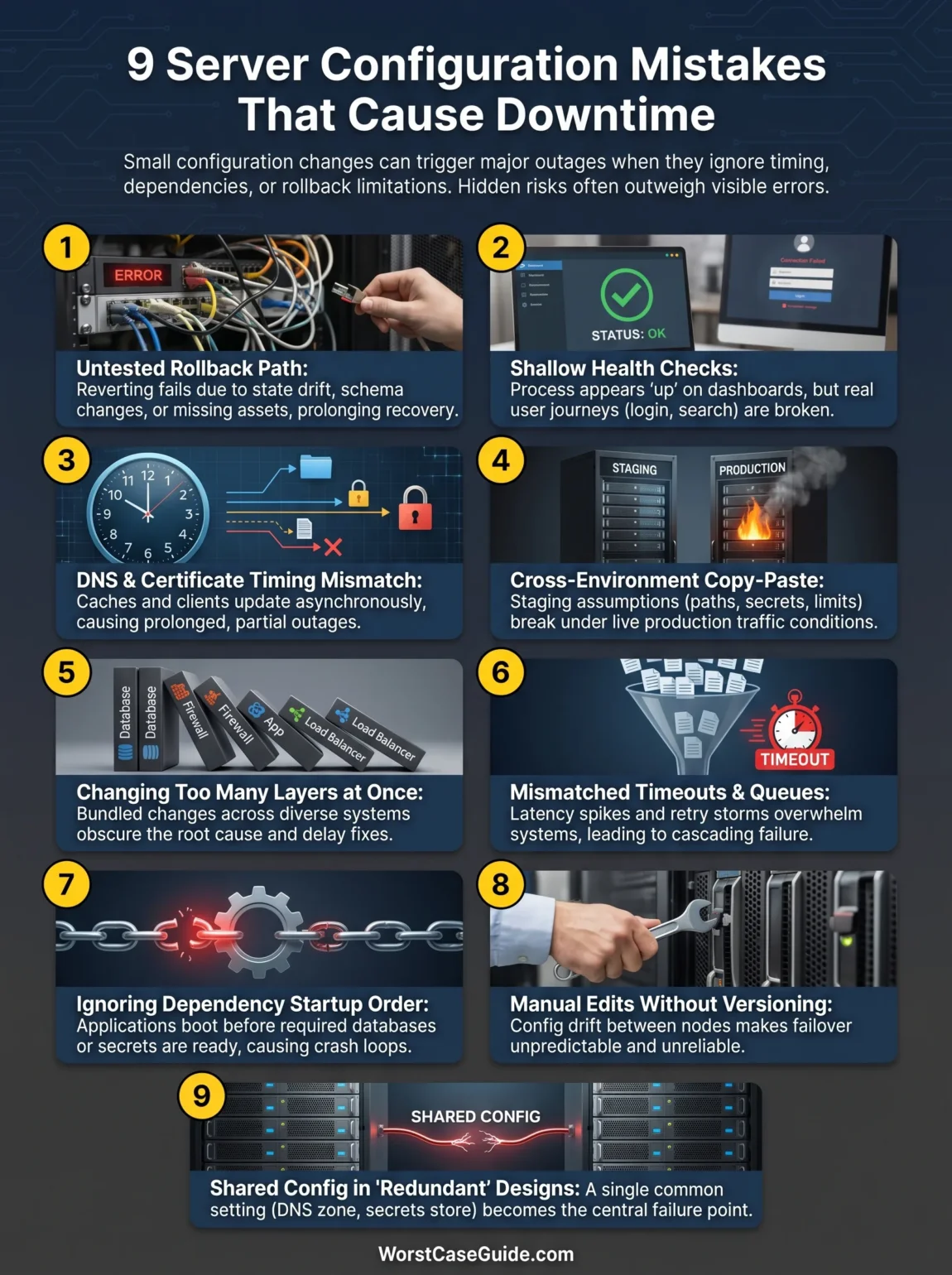
| Mistake | First Symptom | Downtime Path |
|---|---|---|
| No tested rollback | Change looks successful for a few minutes | Hidden failure appears after reload, cache refill, or traffic rise, then rollback also fails |
| Health checks too shallow | Dashboards stay green | Users hit broken login, search, checkout, or API paths while operations assume the system is healthy |
| DNS or certificate timing mismatch | Some users can connect, others cannot | Partial outage stretches because caches and clients update at different times |
| Cross-environment copy-paste | Restart loops or missing dependencies | Production inherits staging assumptions that do not exist in live traffic |
| Too many layers changed at once | Unclear root cause | Recovery slows because teams do not know which layer actually broke first |
| Timeout and limit mismatch | Latency spikes before errors | Queues fill, retries stack up, then the service tips into refusal or crash |
| Dependency order ignored | Cold starts fail | Application comes up before database, secrets, or message broker are ready |
| Manual edits without versioning | State drift between nodes | One node works, one fails, then a failover moves traffic to the wrong one |
| Shared configuration in a “redundant” design | Simultaneous errors across nodes | Load balancer, secrets store, DNS zone, or storage path becomes the single break point |
Mistake 1: Changing Production Without A Tested Rollback Path
Why It Happens
Teams often prepare the forward change and treat rollback as an idea rather than a tested path. That gap gets bigger when the change touches a database schema, container image, environment variables, TLS settings, feature flags, or cached objects. The forward change may be one command. The trip back is not.
Early Warning Signs
- The rollback step exists only in a ticket or someone’s memory.
- No one has checked whether the old version still works with the new data shape.
- There is no clear list of what must be reverted: config file, secret, image tag, firewall rule, DNS record, queue consumer, cron job.
Worst-Case Outcome
A short incident becomes a long outage because the team discovers that rollback is blocked by state drift. Old code cannot read new data. Old certificates are gone. A cache has already propagated the new behavior. The change window closes, but the system does not recover with it.
Safer Approach
A safer pattern is to treat rollback as part of the same release, not a separate rescue step. In smaller projects, that may mean a verified previous image, a database backup taken close to the change, and a plain rollback checklist. In larger systems, it often means staged rollout, canarying, feature flags, and a clear point where rollback stops being safe and a forward fix becomes the better option.
Mistake 2: Treating Health Checks As Proof That Users Are Fine
Why It Happens
Health checks are usually narrow. They answer, “Is the process alive?” not “Can a real user finish a real task?” A server can return 200 OK on /health while login fails, image uploads hang, search returns empty results, or the API rejects requests because a secret, proxy header, or database permission changed.
Early Warning Signs
- Dashboards are green while support tickets start appearing.
- The synthetic check hits one endpoint that does not use authentication, storage, or a third-party dependency.
- Load balancer checks only confirm that a port is open.
Worst-Case Outcome
Operations keeps routing traffic to “healthy” nodes that are only healthy on paper. The outage becomes harder to see and slower to isolate. Monitoring becomes a flashlight pointed at the wrong wall.
Safer Approach
It helps when checks mirror the user path that matters most. For one system, that may be login plus database read. For another, it may be checkout plus queue publish plus email handoff. Readiness checks, liveness checks, synthetic transaction tests, and real user monitoring each answer a different question. Mixing them up is where trouble starts.
Mistake 3: Ignoring DNS, TTL, And Certificate Timing
Why It Happens
Some server changes are really timing changes. DNS records keep old answers in caches. Certificates expire on a schedule that may not match the deployment plan. A load balancer may pick up a new certificate before every backend trusts the same chain. Teams think in minutes; resolvers and clients may behave on a very different clock.
Early Warning Signs
- Some regions, devices, or ISPs work while others fail.
- Old and new endpoints both receive traffic longer than expected.
- Support reports browser-specific or mobile-only certificate errors.
Worst-Case Outcome
The service enters a partial outage that is easy to underestimate. One part of the audience reaches the new server, another keeps hitting the old one, and a third sees TLS warnings or connection failures. Partial outages are messy because they create mixed signals: the team sees traffic, yet users still report a broken service.
Safer Approach
A safer approach usually includes checking TTL values before the change window, validating certificate expiry and chain behavior, mapping where DNS is actually hosted, and planning for overlap rather than a clean switch. If a migration depends on “everyone moving at once,” the plan is already fragile.
Mistake 4: Copying Configuration Between Environments As If They Were The Same
Why It Happens
Copy-paste is tempting because it feels fast and tidy. Yet production is rarely a clone of staging. Paths differ. Secrets differ. CPU and memory limits differ. Real traffic exposes timeouts and queue depth in ways test traffic does not. Even small differences in Nginx, Apache, systemd, container runtime settings, or cloud networking rules can change behavior.
Early Warning Signs
- Staging uses mock services while production uses live dependencies.
- Production has extra security headers, firewall rules, or IAM boundaries.
- The team says “it is the same except for a few environment variables.”
Worst-Case Outcome
The system passes pre-release checks, then fails under real traffic because the copied config carries hidden assumptions. This is common in file paths, proxy headers, connection pools, object storage permissions, and hostname validation. The outage does not look dramatic at first. It just refuses to behave.
Safer Approach
Environment parity matters, though exact sameness is not always possible. Safer teams document the known differences and test the parts most likely to diverge: secrets loading, network access, storage paths, proxy behavior, session handling, and resource ceilings. If you are in a container-heavy setup, startup probes and mounted secret paths deserve special attention.
Mistake 5: Changing Too Many Layers In One Window
Why It Happens
One release often carries several “small” changes: web server config, firewall updates, database pool settings, application variables, CDN rules, and a certificate refresh. Each one may be low risk on its own. Put together, they make root cause blurry. That is where downtime stretches.
Early Warning Signs
- One ticket bundles proxy, app, database, and network changes.
- Several teams approve different parts of the release, but no one owns the full blast radius.
- Logs live in different places with no shared event timeline.
Worst-Case Outcome
The service fails and the team cannot tell whether the break started at DNS, the load balancer, the application server, the firewall, or the database. Recovery slows because each group verifies its own layer and assumes the problem is elsewhere. Meanwhile, user-facing downtime keeps ticking.
Safer Approach
In smaller projects, this may mean splitting infrastructure edits from application edits. In larger systems, it often means sequence control: network first, then backend readiness, then traffic shift, then cleanup. Fewer moving parts per window does not look glamorous, though it usually looks better in the incident timeline later.
Mistake 6: Leaving Timeouts, Connection Limits, And Queues Mismatched
Why It Happens
Servers fail not only from wrong addresses and wrong ports, but from wrong waiting behavior. A reverse proxy times out at 30 seconds, the app server holds requests for 60, the database pool is too small, and the client retries aggressively. None of those numbers may be “wrong” alone. Together, they form a trap.
Early Warning Signs
- Latency rises before outright failure.
- Error spikes appear only during bursts, deployments, or cache warmups.
- CPU looks acceptable while connection counts and queue length climb.
Worst-Case Outcome
Traffic does not stop; it stacks. Requests pile up, retries multiply, workers stay busy longer, and the service tips from slow to unavailable. This is one of the more frustrating outage paths because the first symptom may look like “performance issues,” not an outage in progress.
Safer Approach
Safer setups line up timeout budgets across the client, CDN, load balancer, reverse proxy, app server, and database pool. They also decide which layer should fail fast and which layer should wait. Without that choice, every layer makes its own guess.
Mistake 7: Ignoring Dependency Startup Order And Failure Behavior
Why It Happens
A server is often only one piece of a service chain. It may need secrets from a vault, schema access in a database, routes from a service mesh, a message broker, shared storage, external identity, or object storage. During normal hours, these pieces look steady. During restart or failover, order matters a lot.
Early Warning Signs
- The app starts before its dependencies are reachable.
- Automatic restarts loop because a dependency is slow, not dead.
- One failed service causes a flood of retries to another.
Worst-Case Outcome
A restart that was meant to restore service makes the incident wider. The application boots into error, exhausts connection attempts, fills logs, and adds load to the very dependency that was already struggling. One weak dependency can turn routine recovery into a chain reaction.
Safer Approach
It helps to distinguish between hard dependencies and degradable dependencies. If a background job queue is down, maybe the site can still serve reads. If identity is down, maybe some internal paths can still work while login stays closed. The more explicit that behavior is, the less likely a restart becomes guesswork.
Mistake 8: Relying On Manual Edits Instead Of Versioned Configuration
Why It Happens
Manual edits feel harmless when the team is small or the incident is urgent. One person changes a file on one node, another copies it later, a third forgets a step, and suddenly the fleet no longer matches. When failover happens, traffic lands on a node with a different config, and the outage “comes back” after looking fixed.
Early Warning Signs
- No one can say with confidence which node has the final config.
- There is no single history showing who changed what and when.
- Recovery depends on SSH access and terminal memory.
Worst-Case Outcome
The service enters config drift. One server behaves, another breaks, and the load balancer spreads the pain around. This is especially rough in clusters, auto-scaling groups, and multi-region setups where old instances may reappear with stale settings.
Safer Approach
Versioned configuration, peer review, and repeatable deployment matter here because they reduce uncertainty. Not every team needs full infrastructure-as-code from day one, though every team benefits from one source of truth and a way to rebuild the intended state without hand-editing production under pressure.
Mistake 9: Assuming Redundancy Removes Single Points Of Failure
Why It Happens
Redundancy is often counted by server number: two app nodes, three database replicas, multiple availability zones. Yet a service may still share one DNS zone, one certificate automation path, one secret store, one storage mount, one CI variable set, or one broken template. The servers are many. The configuration source is one.
Early Warning Signs
- All nodes consume the same secret, image tag, or generated config without an approval gate.
- Disaster recovery tests restore infrastructure but not the dependent configuration state.
- Failover works in theory, though it has not been run under realistic load.
Worst-Case Outcome
A team expects graceful failover and gets synchronized failure instead. Every node stays up, yet all of them reject traffic because the same bad config or missing dependency reached each one. Redundancy without independence can be a spare tire with no air in it.
Safer Approach
Safer designs ask a blunt question: What do these “independent” systems still share? In smaller projects, the answer may be a DNS provider or a single secrets file. In larger systems, it may be shared automation, shared templates, shared observability, or a shared control plane. That answer often reveals where downtime will begin.
Risk Patterns That Keep Repeating
Pattern 1: The change looked safe because the wrong thing was measured.
Port open. Process running. CPU normal. Users still blocked.
Pattern 2: The outage started before anyone called it an outage.
Latency rise, partial failures, cache inconsistency, or region-specific errors often show up first.
Pattern 3: Recovery failed because the system had already moved on.
Rollback assumes yesterday’s state. Production often moved past that state the moment the change landed.
Pattern 4: Shared assumptions hide inside “distributed” systems.
Multiple nodes do not help when they depend on one broken config source.
What A Safer Change Usually Includes
- Blast radius awareness: which services, ports, certificates, secrets, jobs, and user paths are affected.
- Real rollback thinking: not only “can we revert the file,” but “will the previous state still work with the new world.”
- Checks that match user reality: login, search, API write, queue publish, or file access.
- Timing awareness: DNS propagation, certificate reload order, cache refill, autoscaling lag, warmup time.
- One event timeline: config change, deploy time, alert time, user reports, mitigation time.
Downtime from server configuration mistakes rarely comes from one dramatic typo. More often, it comes from a small edit meeting the wrong assumption at the wrong time. That is why the safest teams do not only ask, “Will this config load?” They also ask, “What will still be true five minutes later, after traffic, retries, caches, and dependencies have all had a chance to react?”
FAQ
Which server configuration mistake causes downtime most often?
There is no single winner in every environment, though shallow health checks, untested rollback, timeout mismatch, and DNS or certificate timing issues are common outage starters because they hide trouble until production traffic hits.
Can a server be up while the service is still down?
Yes. A process can be running while users cannot log in, upload files, complete checkout, or reach an API endpoint. “Server up” and “service available” are different states.
Why do partial outages last so long?
Partial outages create mixed signals. Some users succeed, others fail, dashboards stay partly green, and DNS caches or certificate behavior may differ by client, region, or network path. That makes the incident harder to define and slower to close.
Is staging enough to catch configuration problems before production?
It helps, though it is rarely enough on its own. Production often differs in traffic level, secrets, security controls, third-party integrations, and data volume. Those differences are where many configuration mistakes finally appear.
Does redundancy remove downtime risk from configuration changes?
No. Redundancy lowers risk only when the redundant parts are not all dependent on the same broken template, certificate path, secret source, DNS record, or rollout mechanism.