Remote team management can reduce output in quiet ways. The problem is not always lazy people, weak tools, or a lack of meetings. More often, output drops because work becomes hard to see, decisions are scattered, priorities shift without warning, and people spend their best energy figuring out what they are supposed to do instead of doing the work itself.
A remote team can look busy on the surface. Messages are moving. Calendars are full. Project boards have cards. Yet delivery slows down, rework grows, and small questions sit unanswered for too long. That is the risk: remote management problems often look like normal work until the lost output becomes hard to ignore.
This article looks at the mistakes that commonly reduce output in remote teams, especially in teams that rely on chat, video calls, async updates, project management tools, shared documents, and cross-time-zone collaboration.
Safe Read Before You Start: Low output in a remote team is rarely caused by one broken habit. It is usually a chain: unclear ownership, unclear priorities, unclear communication, and unclear feedback. Fixing one part helps. Fixing the chain helps more.
Why Remote Team Management Can Quietly Reduce Output
In an office, a manager may notice confusion through small signals: people waiting near a desk, a tense conversation after a meeting, or someone stuck for half a day. In a remote team, many of those signals disappear. The work still has friction, but the friction becomes less visible.
That creates a simple management trap. If the team is online, responding, and attending meetings, it can feel like the system is working. But output is measured by completed work, quality, speed of decision-making, customer impact, and fewer handoff errors. A busy remote team can still be a slow remote team.
Remote work also changes how people spend attention. A short unclear message can create a long thread. A missing decision can block three people. A vague task can turn into two versions of the same work. It is like driving with a foggy windshield: the road is there, but everyone moves slower because they cannot see far enough ahead.
Common Wrong Assumptions About Remote Team Output
Many remote management mistakes start with reasonable assumptions. They sound harmless. Some even sound efficient.
- “If people are online, they are available.” Online status does not show focus, workload, time zone pressure, or task complexity.
- “More meetings will solve unclear work.” Meetings can help, but they can also hide weak documentation and weak decision tracking.
- “A project tool means everyone knows the priority.” A tool stores work. It does not automatically create clarity.
- “Remote workers need more supervision.” Often they need better context, clearer outcomes, and fewer surprise changes.
- “Async work means no urgency.” Async work still needs service levels, response expectations, escalation paths, and ownership.
- “Culture will take care of itself.” Remote culture is built through repeated habits, not occasional virtual events.
| Wrong Assumption | What Often Happens | Safer Management Lens |
|---|---|---|
| Responsiveness equals productivity | People answer messages quickly but do less focused work. | Measure completed outcomes, not chat speed. |
| Everyone understands the task | Different people interpret the same request differently. | Define owner, output, deadline, and decision rules. |
| Meetings create alignment | Decisions are spoken once, then forgotten or misremembered. | Record decisions in a shared place. |
| Autonomy means silence | Blocked people wait too long before raising issues. | Create clear check-in points and escalation paths. |
| Tools fix workflow | The team uses too many apps without a shared operating habit. | Keep fewer tools with clearer rules. |
Mistake 1: Managing Activity Instead of Output
The first mistake is treating visible activity as proof of real progress. In remote teams, activity is easy to see. Output is harder. A manager may notice who replies fast, who joins calls, who posts updates, and who seems present throughout the day. That can become a poor substitute for judging work quality and finished outcomes.
Why This Happens
Remote managers often lack natural visibility. Without hallway updates or casual desk-side conversations, they may look for signals they can measure quickly: message frequency, meeting attendance, status updates, or green online icons. These signals are easy to observe, but they are not the same as real delivery.
In smaller projects, this may only create mild frustration. In larger systems, it can distort the whole team. People learn to perform busyness instead of protecting deep work.
Early Warning Signs
- Team members send many updates but finish fewer important tasks.
- People feel pressure to respond instantly, even during focus work.
- Managers praise availability more often than completed outcomes.
- Work expands into evenings because the day is filled with reactive communication.
- High performers become quieter because they are protecting concentration.
Worst-Case Result
The team can become responsive but slow. People appear engaged while important work moves in small pieces. Output drops because attention is spent proving availability, not finishing work. Over time, strong team members may feel punished for doing focused work quietly.
Safer Approach
A safer approach is to define output in concrete terms. For example: shipped feature, resolved customer issue, reviewed document, approved design, completed report, closed dependency, or reduced backlog. The manager can still care about communication, but communication should support the work, not replace the work.
Risk Check: If a team member can explain what they did all day but cannot point to what moved forward, the management system may be rewarding motion instead of progress.
Mistake 2: Leaving Ownership Too Vague
Remote teams lose output when work has many participants but no clear owner. A task may be discussed by five people, mentioned in two meetings, and placed on a board. Still, no one is sure who is responsible for moving it to the next step.
Why This Happens
In remote work, shared responsibility can feel collaborative. It also feels polite. Nobody wants to sound too rigid by asking, “Who owns this?” Yet remote work needs sharper ownership because people cannot rely on physical proximity to notice what is slipping.
This mistake is common in cross-functional work. Product, design, operations, support, engineering, marketing, and leadership may all touch the same project. Without one named owner for the next move, the task becomes a shared suitcase left in the hallway. Everyone sees it. Nobody picks it up.
Early Warning Signs
- Tasks use phrases like “team to review” or “someone should follow up.”
- People ask the same ownership question in more than one channel.
- Deadlines pass because each person thought another person was handling it.
- Project boards show many “in progress” items with no single accountable person.
- Managers step in often because ownership is not clear at the working level.
Worst-Case Result
The worst realistic outcome is not only delay. It is quiet duplication and quiet neglect. Two people may solve the same problem separately, while another important task receives no attention at all. Trust drops because people start to feel that work disappears unless they personally chase it.
Safer Approach
Each meaningful task benefits from one visible owner, even when many people contribute. A simple ownership line can reduce confusion: owner, next action, due date, decision maker, and where updates live. It is not bureaucracy. It is a map.
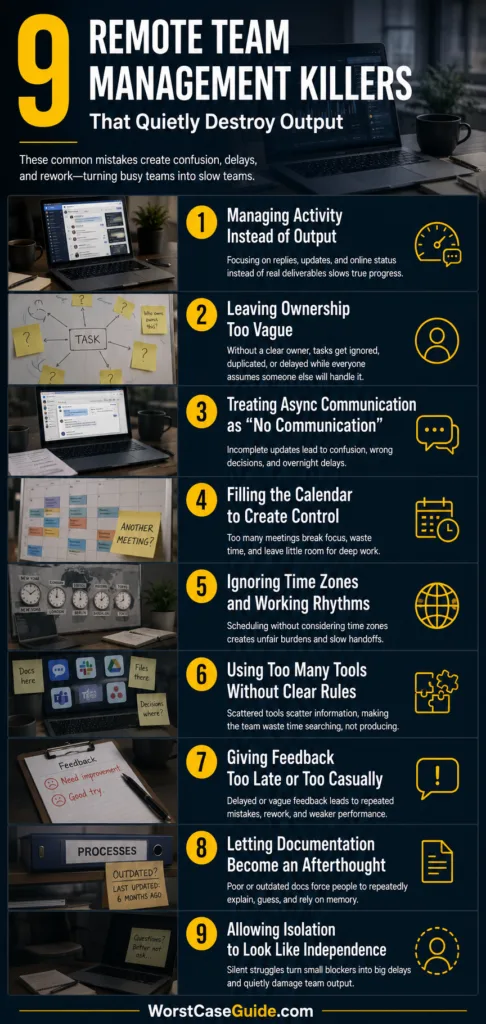
Mistake 3: Treating Async Communication as “No Communication”
Async communication is one of the strongest advantages of remote work when it is done well. It lets people work across time zones, protect focus time, and avoid unnecessary calls. The mistake is assuming async means people can post incomplete updates and leave others to decode the rest.
Why This Happens
Teams often move from office habits to remote tools without changing the way they write. In an office, a vague note can be corrected with a quick conversation. In a remote team, vague writing may sit for hours. The next person wakes up, reads it, guesses, and moves in the wrong direction.
Async work needs more context upfront. That does not mean long essays for every update. It means the right minimum: what changed, what is needed, who is blocked, what decision is requested, and by when.
Early Warning Signs
- Threads contain many clarifying questions after the first message.
- People reply with “What do you mean?” or “Can you send more context?” often.
- Updates say “done” without explaining what was done.
- Decisions are buried inside long chat threads.
- Work waits overnight because one sentence was missing.
Worst-Case Result
Output can drop through slow misunderstanding. Nothing looks broken in one moment, but every handoff carries a little uncertainty. After a week, the team has lost hours to clarification, rework, and waiting. In customer-facing work, this can also create inconsistent answers and slower response times.
Safer Approach
Async updates work better when the team has shared message habits. A useful update often includes:
- Current status: what changed since the last update.
- Blocker: what is stopping progress, if anything.
- Decision needed: the choice that must be made.
- Owner: who is expected to act next.
- Time sensitivity: when the answer is needed.
If the message is sensitive, ambiguous, or likely to be read in several ways, a short call or recorded explanation may protect output better than another text thread.
Mistake 4: Filling the Calendar to Create Control
Remote managers sometimes use meetings to regain the control they feel they lost when the team became distributed. More check-ins, more status calls, more syncs. The calendar starts to look organized, but the workday becomes chopped into pieces too small for real work.
Why This Happens
Meetings give immediate reassurance. People are present. Questions can be answered live. Problems feel visible. That comfort can hide a cost: every meeting takes time, but it also breaks attention before and after the meeting.
In creative, technical, analytical, and operational work, output often needs uninterrupted time. If the day is sliced into short windows, people may only handle shallow tasks. The harder work gets pushed later.
Early Warning Signs
- Team members say they need evenings or weekends for focused work.
- Meetings end with no recorded decision or owner.
- Status meetings repeat information already available in tools.
- People attend calls where they are not needed.
- The team has many recurring meetings but still asks, “What did we decide?”
Worst-Case Result
The team may become meeting-rich and output-poor. Focus work moves to personal time, burnout risk rises, and people stop preparing because meetings feel repetitive. The manager gets more visibility, but the team gets less capacity.
Safer Approach
A safer meeting habit starts with a purpose test. Is the meeting for a decision, a conflict, a complex explanation, or relationship repair? If not, an async update may be enough. For meetings that stay, the output should be clear: decision made, owner named, deadline set, risk surfaced, or next step agreed.
Mistake 5: Ignoring Time Zones and Working Rhythms
Remote teams often include people in different cities, countries, or working schedules. The mistake is managing as if everyone shares the same day. A message sent at 4 p.m. for one person may arrive after dinner for another. A meeting that feels reasonable to headquarters may be early morning or late night elsewhere.
Why This Happens
Teams tend to organize around the loudest time zone, the largest office, or the manager’s calendar. This may happen without bad intent. Still, output suffers when some people are always the ones adapting.
Working rhythm also matters. Some people do their best focused work early. Others handle collaboration better later in the day. Remote management becomes weaker when it treats every hour as equally useful for every person.
Early Warning Signs
- The same people regularly attend meetings outside normal working hours.
- Decisions happen while part of the team is offline.
- People wake up to urgent requests that were not actually urgent.
- Handoffs between regions are unclear or incomplete.
- Some team members become quiet because they are rarely present for live decisions.
Worst-Case Result
The team can develop a hidden center and a hidden edge. People near the manager’s time zone get context early. Others receive decisions late and spend time catching up. Output becomes uneven, and remote employees outside the main rhythm may feel like guests in their own team.
Safer Approach
For distributed teams, working agreements help. These may include overlap hours, response expectations, emergency channels, meeting rotation, async decision windows, and handoff templates. If the team crosses many time zones, written decisions become more than documentation; they become access.
Mistake 6: Using Too Many Tools Without Clear Rules
Remote teams need tools. Chat, video, documents, project boards, calendars, whiteboards, knowledge bases, ticketing systems, and file storage may all serve a purpose. The mistake is adding tools without defining where different types of work belong.
Why This Happens
A new tool often feels like a clean fix. If projects are messy, add a project tool. If meetings are messy, add an agenda tool. If knowledge is scattered, add a wiki. The issue is that tools do not remove old habits by themselves. The clutter simply moves to more places.
People then spend time searching instead of producing. Was the decision in Slack, Teams, email, the project board, the shared doc, or the meeting notes? The work slows before it even starts.
Early Warning Signs
- People ask where the latest version is.
- Different tools contain different task statuses.
- Important decisions live only in chat.
- Documents are duplicated with slightly different names.
- Team members create side channels because the main process feels too noisy.
Worst-Case Result
The worst practical result is tool fragmentation. No one trusts the system, so everyone builds personal workarounds. Managers lose visibility. Team members lose confidence. Output drops because the team must first locate the work before doing the work.
Safer Approach
A remote team benefits from simple rules, such as:
- Chat is for fast discussion, not final decisions.
- The project board shows current task status.
- The knowledge base stores stable process information.
- Shared documents hold drafts and working notes.
- Decisions are recorded in one visible place.
The exact tools matter less than the team’s shared habits around them.
Mistake 7: Giving Feedback Too Late or Too Casually
In remote teams, feedback can become delayed, softened, or lost inside quick messages. Managers may avoid feedback because it feels awkward over video. They may also give feedback in a short chat message that lacks tone and context. Both patterns reduce output.
Why This Happens
Feedback needs timing and care. Remote work makes both harder. A manager cannot always see when someone is stressed, confused, or ready for a conversation. Written feedback can sound colder than intended. So feedback is postponed until a formal review, or delivered too quickly in a way that creates defensiveness.
There is another problem: when feedback is missing, people repeat the same output pattern. They may think the work is acceptable because silence feels like approval.
Early Warning Signs
- Managers rewrite work instead of explaining what needs to change.
- Performance issues appear suddenly in formal reviews.
- Team members say, “I wish I had known earlier.”
- Feedback is vague: “This needs to be better” or “Please improve quality.”
- People avoid asking for review because past feedback felt unclear or sharp.
Worst-Case Result
Late feedback creates repeated rework. Casual feedback creates confusion. In both cases, output drops because people cannot improve the work pattern early enough. Trust may also weaken if feedback arrives only when frustration has already built up.
Safer Approach
Remote feedback works better when it is specific, timely, and tied to the work rather than the person. A manager might separate three things: what happened, what effect it had, and what a better next version would look like. For sensitive feedback, a live conversation may be safer than a long written message.
Mistake 8: Letting Documentation Become an Afterthought
Documentation may sound slow, but weak documentation is often slower. In remote teams, repeated explanations consume time. New hires ask the same questions. Project history disappears. Decisions depend on memory. The team may keep moving, but the same knowledge gaps keep returning.
Why This Happens
People avoid documentation when it feels too formal or too large. They imagine a polished manual, then write nothing. The better remote habit is smaller: decision notes, short process pages, checklists, project briefs, handoff notes, and “how we do this” pages that are useful even when imperfect.
Documentation also fails when it is not maintained. A stale page can be worse than no page because it creates false confidence.
Early Warning Signs
- New team members depend mostly on calls to learn the work.
- People ask the same process questions every month.
- Decisions are remembered differently by different people.
- Old documents are not trusted.
- Important knowledge lives with one person.
Worst-Case Result
The team becomes fragile. If one experienced person leaves, takes vacation, or becomes overloaded, output drops sharply. Work slows because knowledge is stored in people’s heads instead of shared systems.
Safer Approach
Useful documentation is practical, not perfect. A remote team may start with pages for recurring decisions, onboarding steps, common errors, project ownership, review rules, and escalation paths. The safer habit is to update documentation when the work changes, not months later when nobody remembers why it changed.
Mistake 9: Allowing Isolation to Look Like Independence
Remote work gives people space. That can be healthy. The mistake is confusing isolation with independence. A person may stop asking questions, avoid raising blockers, skip informal conversations, and still appear calm in written updates. Output may fall because the person is working alone against problems that should be shared.
Why This Happens
Some remote workers do not want to look needy. Others may not know who to ask. In teams with a heavy chat culture, asking for help can feel like adding noise. Managers may also assume silence means confidence. Sometimes it means the opposite.
This is especially risky for new hires, junior team members, people working in different time zones, and employees who joined after the team’s habits were already formed.
Early Warning Signs
- A team member gives short status updates but little detail.
- Work arrives late with avoidable mistakes.
- The person rarely asks questions in public or private channels.
- They miss informal context that others seem to know.
- One-on-one meetings focus only on tasks, never blockers or working conditions.
Worst-Case Result
Isolation can turn small blockers into large delays. A person may spend days solving the wrong problem, duplicate existing work, or disengage quietly. The team loses output, and the manager may notice only after the problem has become harder to repair.
Safer Approach
A safer remote culture makes help-seeking normal. This may include regular one-on-ones, pairing sessions, office hours, buddy systems for new hires, and clear language around blockers. The point is not to force constant social interaction. It is to make sure nobody has to guess alone for too long.
General Risk Patterns Behind Low Remote Output
The mistakes above often share the same roots. Once those patterns are visible, it becomes easier to diagnose output problems without blaming the nearest person.
Pattern 1: Visibility Replaces Clarity
Remote managers may seek more visibility when the real need is clearer work design. More updates will not fix a task that has no owner, no acceptance standard, and no decision path.
Pattern 2: Communication Becomes Scattered
When chat, email, calls, documents, and boards all contain different versions of the truth, people waste energy reconstructing reality. Output slows because the team has to solve the same context problem again and again.
Pattern 3: The Team Confuses Trust With Absence
Trust does not mean leaving people alone without support. It means giving people enough context, authority, and feedback to work without being watched every minute.
Pattern 4: Managers React After Output Has Already Dropped
Remote output problems often send weak signals first: slower replies, repeated questions, vague updates, fewer finished tasks, and more rework. If those signals are ignored, the team may need a larger reset later.
A Safer Remote Team Output Checklist
This checklist is not a rulebook. It is a practical way to test whether the team’s remote setup supports actual delivery.
- Each priority has one visible owner.
- Tasks define the expected output, not only the activity.
- Important decisions are recorded outside chat.
- Meetings have a clear reason and a clear result.
- Async updates include enough context for someone in another time zone.
- Tools have defined purposes, and the team knows where the latest truth lives.
- Feedback is specific, timely, and connected to work quality.
- Documentation is short, useful, and updated when work changes.
- People have safe ways to raise blockers before delays grow.
Useful Operating Rule: If a remote team keeps losing output, the first question does not need to be “Who is underperforming?” A better first question is often, “Where is the work unclear, scattered, delayed, or unsupported?”
FAQ
What is the most common remote team management mistake that reduces output?
One of the most common mistakes is managing visible activity instead of real output. Fast replies, full calendars, and frequent updates can look productive while finished work, decision speed, and quality are declining.
Do remote teams need more meetings to stay productive?
Not always. Some meetings help with decisions, conflict, planning, and complex work. Too many meetings can reduce focus time and push real work into the edges of the day. Remote teams usually need clearer meeting purpose, not simply more meetings.
How can a manager tell if a remote team is losing output?
Warning signs include repeated clarification questions, missed deadlines, unclear ownership, duplicated work, delayed decisions, too many tasks marked “in progress,” and team members needing extra time outside normal hours to finish focused work.
Why does async communication fail in some remote teams?
Async communication fails when messages lack context, ownership, deadlines, or decision requests. A short update can save time, but only when it gives the next person enough information to act without guessing.
Can remote team tools reduce output?
Yes, when tools are used without clear rules. If decisions, files, task status, and process notes are spread across too many places, people lose time searching and verifying information before they can work.
How can remote managers improve output without micromanaging?
They can define clear outcomes, name task owners, document decisions, protect focus time, set response expectations, give timely feedback, and make blockers easier to raise. This supports autonomy without leaving people unsupported.