Password failures rarely remain limited to one login. A reused credential, an exposed recovery email, or an unprotected password vault can turn one small breach into access to shopping accounts, cloud files, private messages, and work systems. Password management therefore involves more than choosing a difficult password. It also includes storage, recovery, sharing, breach response, multifactor authentication, and the devices that hold those credentials.
The worst-case path is often a chain: one password is stolen, the same or a similar password works elsewhere, and the compromised email account is then used to reset the remaining logins. The first breach opens the door; weak account relationships allow someone to keep walking.
Risk distinction: A password can be long and unique yet still be stolen through phishing, malware, an exposed recovery channel, or an unlocked device. Strong passwords reduce guessing and reuse attacks, but they do not replace multifactor authentication, secure recovery, and device protection.
Why Password Problems Spread Between Accounts
Online accounts are connected through email addresses, phone numbers, browser synchronization, app stores, cloud backups, and payment profiles. An email inbox may receive password-reset links for dozens of other services. A password manager may hold every credential. A phone may store passkeys, authentication codes, and active sessions.
This means account value is not determined only by what the account contains. It also depends on what the account can unlock. An old email address with little personal content may still control the recovery process for a current social account or cloud drive.
Common Assumptions That Create Risk
- Adding a number or symbol makes a familiar password unpredictable.
- Using a slightly different version on each website counts as using unique passwords.
- Multifactor authentication makes password reuse harmless.
- A password manager removes the need to protect the primary password and recovery method.
- A password should be changed every month even when there is no evidence of exposure.
- No breach warning means a credential has never been stolen.
- Recovery codes are unimportant because they are used only in emergencies.
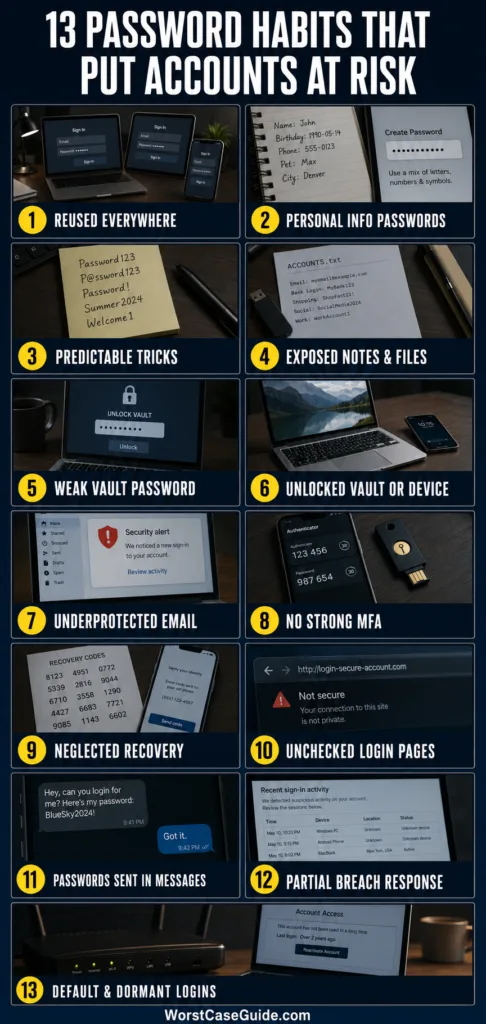
| Mistake | Main Exposure Path | Early Warning Sign |
|---|---|---|
| Password reuse | Credential stuffing | Unfamiliar sign-ins across several services |
| Predictable password | Guessing or password spraying | Repeated failed login notifications |
| Routine variations | Pattern-based guessing | Passwords differ only by a site name, number, or year |
| Unsafe storage | File, message, or device exposure | Passwords appear in notes, email, chat, or exported files |
| Weak vault protection | Password manager takeover | The primary password is reused or MFA is absent |
| Unlocked sessions | Local device access | The vault remains open after the device is left unattended |
| Weak email security | Password-reset interception | Recovery messages or forwarding rules appear unexpectedly |
| Missing MFA | Password-only account access | A stolen password is enough to complete a login |
| Poor recovery planning | Lockout or recovery takeover | Old phone numbers and inaccessible email addresses remain listed |
| Phishing approval | Credential and session theft | Unexpected login pages or MFA prompts appear |
| Unsafe sharing | Untracked credential copying | Passwords are sent through ordinary messages |
| Incomplete breach response | Persistent unauthorized access | Sessions, app tokens, or forwarding rules remain active |
| Forgotten credentials | Default-password or dormant-account access | Old devices and unused accounts remain reachable |
Mistake 1: Reusing the Same Password Across Accounts
Why it happens: Remembering a separate credential for every service is difficult. Reuse feels practical, especially for accounts considered unimportant.
Early warning signs: The same password appears in several saved logins, or a breach notification is followed by failed login attempts on unrelated services. Passwords such as RiverDesk27 and RiverDesk28 also indicate reuse because their shared pattern is easy to test.
Worst-case result: Attackers can test a breached email-and-password pair against other websites through credential stuffing. Access to one minor account may lead to email, shopping, cloud storage, or workplace accounts.
Safer approach: Each account can have a randomly generated, unrelated password stored in a trusted password manager. If password generation is unavailable, a long and genuinely random passphrase offers a more manageable option for the small number of passwords that must be remembered.
Mistake 2: Building Passwords From Personal Information
Why it happens: Names, birthdays, teams, locations, and family details are memorable. They also feel private even when they appear in public profiles, old posts, data-broker records, or previous breaches.
Early warning signs: A person who knows the account owner could estimate the password within a few attempts. Common examples include a pet name followed by a birth year or a surname with an exclamation mark.
Worst-case result: Targeted guessing may succeed without malware or a technical exploit. Common passwords can also be tested across many usernames in a password-spraying attack, often at a slow rate intended to avoid account lockouts.
Safer approach: Human-created passwords can be based on unrelated words selected without a personal theme. Password managers can produce longer random strings for accounts where memorization is unnecessary. Predictability matters more than whether the password looks unusual to its creator.
Mistake 3: Trusting Complexity Tricks and Routine Changes
Why it happens: Older advice emphasized capital letters, symbols, and frequent password changes. People adapted by using familiar substitutions and sequences such as replacing an “o” with zero or changing a year every few months.
Early warning signs: Passwords follow patterns such as Summer2026!, Summer2027!, or CompanyName1!. A strength meter may approve them even though password-guessing tools already account for these habits.
Worst-case result: Once one version is exposed, nearby versions become easy to predict. Forced calendar-based changes may also encourage written reminders and reuse across services.
Safer approach: Length, uniqueness, and resistance to known-password lists provide more protection than cosmetic complexity. A password generally needs changing when it is exposed, suspected of exposure, shared improperly, or used on an account that suffered a breach. A service may still impose its own rotation policy, especially in managed workplaces.
Mistake 4: Storing Passwords in Exposed Notes, Files, or Messages
Why it happens: A spreadsheet, draft email, contact entry, or chat message is convenient and searchable. Password-manager exports may also remain in a downloads folder after migration.
Early warning signs: Searching a device for terms such as “password,” “login,” or “account” reveals readable credentials. Unencrypted CSV exports, screenshots, and shared documents are especially easy to overlook.
Worst-case result: Malware, cloud-sharing mistakes, workplace administrators, stolen devices, or another person using the same computer may expose several accounts at once. A password list can function like a map of someone’s digital identity.
Safer approach: A reputable password manager can keep credentials encrypted and provide controlled autofill. A paper record is not automatically unsafe when stored in a private, physically protected location; a sticky note beside the device is a different situation. Temporary plaintext exports need careful deletion from the original folder, recycle bin, backups, and shared storage.
Mistake 5: Using a Weak or Reused Password for the Vault
Why it happens: The primary password must usually be remembered, so a familiar password may be reused. Some users assume vault encryption alone will compensate for a weak primary secret.
Early warning signs: The vault password also opens email, device, or social accounts. It contains personal information, follows an old password pattern, or is short enough to guess repeatedly.
Worst-case result: If encrypted vault data is obtained, a weak primary password may make offline guessing more practical. If the same password is stolen elsewhere, an attacker may attempt a direct password-manager login and obtain many credentials in one place.
Safer approach: The primary password can be long, unique, and used nowhere else. A memorable passphrase made from unrelated words may suit this role. Vault MFA, login alerts, trusted-device review, and the provider’s emergency recovery options reduce dependence on a single secret.
Mistake 6: Leaving the Vault or Device Unlocked
Why it happens: Long vault timeouts and automatic browser sessions reduce interruptions. On a private computer, repeated unlocking may feel unnecessary.
Early warning signs: Saved passwords can be viewed after the device wakes without fresh authentication. A browser profile remains open on shared computers, or a password-manager extension never relocks during the working day.
Worst-case result: Someone with brief physical or remote access may read, copy, export, or autofill credentials. Active sessions can sometimes provide access even without revealing the password itself.
Safer approach: Device encryption, screen locking, biometric or PIN protection, and a reasonable vault timeout create separate barriers. Shorter timeouts may suit travel and shared environments, while a private home device may use a different balance. Password managers, browsers, operating systems, and extensions also benefit from timely security updates.
Mistake 7: Protecting Email Like an Ordinary Account
Why it happens: Email is often viewed as another messaging service. Its role as the recovery center for other accounts is easy to miss.
Early warning signs: The email password is reused, MFA is absent, recovery details are outdated, or unfamiliar forwarding rules and filters appear. Deleted password-reset messages can also indicate that someone is hiding account changes.
Worst-case result: An intruder may reset passwords, intercept security alerts, impersonate the account owner, and maintain access through forwarding rules or added recovery methods. Securing other accounts becomes much harder while the inbox remains compromised.
Safer approach: Primary email accounts deserve a unique password, a stronger available authentication method, current recovery information, and periodic review of active sessions, connected apps, forwarding rules, and delegated access. Older email accounts still used for recovery need similar attention.
Mistake 8: Depending on Passwords Without Strong MFA or Passkeys
Why it happens: Extra login steps can seem inconvenient, and some people expect a strong password to cover every attack method.
Early warning signs: Important accounts accept only a password even though additional protection is available. Repeated push notifications or unexpected one-time codes may indicate that someone already knows the password.
Worst-case result: A phished or breached password may provide immediate access. Email-based verification may offer little separation when the email account itself is the target or has already been compromised.
Safer approach: A passkey or hardware security key offers phishing-resistant authentication when supported. Authenticator apps provide another option. SMS verification still adds a barrier when stronger methods are unavailable, although phone-number takeover and message interception remain possible. MFA reduces risk, but it does not make reused passwords safe.
Mistake 9: Treating Account Recovery as an Afterthought
Why it happens: Recovery settings are rarely visited while everything works. Backup codes, secondary email addresses, and trusted phone numbers may remain unchanged for years.
Early warning signs: Recovery points to an old employer, expired phone number, inaccessible inbox, or former household member. Every backup code is stored only inside the vault it is meant to recover.
Worst-case result: An attacker who controls an old recovery channel may reset the password. In another scenario, the legitimate owner may be locked out after losing a phone or forgetting the vault password. Recovery can become either a side door or a dead end.
Safer approach: Recovery details can be reviewed alongside other account security settings. Backup codes may be kept in a protected location that remains available if the phone or password manager is lost. Where a service permits multiple methods, independent recovery options reduce circular dependence on one device or inbox.
Mistake 10: Entering Credentials Without Checking the Destination
Why it happens: Phishing pages often copy familiar sign-in screens and create urgency through messages about suspended accounts, deliveries, invoices, or shared documents.
Early warning signs: A password manager does not offer the expected autofill, the domain name differs from the real service, or an MFA prompt appears without a login attempt. A request to read a one-time code aloud is another warning.
Worst-case result: A fake site may capture the password and relay an MFA code in real time. Some attacks also steal session tokens, allowing access after authentication has been completed.
Safer approach: Password-manager autofill can act as a useful domain check because credentials are associated with specific websites. An unexpected failure to autofill deserves attention rather than manual entry by habit. Passkeys and hardware security keys offer stronger resistance because authentication is tied to the legitimate service domain.
Mistake 11: Sharing Passwords Through Ordinary Messages
Why it happens: Families and teams sometimes need shared access to subscriptions, utilities, social profiles, or business tools. Email and messaging apps are the fastest familiar channels.
Early warning signs: Credentials remain visible in old chat histories, several people use one administrator account, or nobody knows who still has a copy. Password changes are delayed because they would disrupt multiple users.
Worst-case result: Access becomes difficult to revoke or attribute. A former worker, contractor, or household member may retain the credential. If one recipient’s message history is exposed, the shared account may follow.
Safer approach: Individual accounts with appropriate permissions provide clearer control when a service supports them. A family or business password manager can share selected entries without exposing the whole vault. When a shared password is unavoidable, membership changes can trigger a password change and a review of active sessions.
Mistake 12: Responding to a Breach by Changing Only One Password
Why it happens: A password change feels like the natural end of an incident. Yet account access may persist through sessions, recovery changes, connected apps, app-specific passwords, or email-forwarding rules.
Early warning signs: New login alerts continue after the password change. Messages are marked as read, unfamiliar devices remain listed, profile details change again, or the account sends content without the owner’s involvement.
Worst-case result: The intruder may retain access or regain it through a modified recovery channel. Reused and closely related passwords may expose other accounts even after the original credential is replaced.
Safer approach: A fuller response may include changing the password from a trusted device, ending other sessions, reviewing MFA and recovery methods, removing unknown devices and connected apps, checking inbox rules, and replacing reused variants elsewhere. The order matters most when email or a password vault is involved because those accounts can control many others.
Mistake 13: Keeping Default, Dormant, and Unmanaged Credentials
Why it happens: Old accounts, routers, cameras, apps, test systems, and smart devices disappear from daily attention. Their credentials may remain unchanged because the systems still appear to work.
Early warning signs: A device still uses a factory password, an unused account accepts an old credential, or security notices arrive for a service that is no longer remembered. Former staff accounts and abandoned browser profiles create similar exposure in organizations.
Worst-case result: A default credential may permit device or network access. Dormant accounts can hold personal records, payment data, cloud files, or recovery links while receiving less monitoring than active accounts.
Safer approach: Periodic account inventories can identify what remains necessary. Unused accounts may be closed where deletion is available, while retained accounts can receive unique credentials and current recovery details. Network devices and smart products also need changed defaults, supported software, and restricted administrative access.
Risk Patterns Behind These Mistakes
Convenience Creates Credential Concentration
Password managers, email accounts, phones, and browser profiles concentrate access because they make daily authentication manageable. Concentration is not automatically unsafe. It means the account or device holding that access deserves stronger protection, independent recovery, and closer monitoring.
Small Accounts Can Control Larger Ones
An old inbox, phone account, or cloud profile may seem low value while serving as a recovery channel. Account importance is better judged by its connections than by how often it is used.
Predictable Human Coping Methods Become Attack Patterns
People add years, repeat base words, store passwords in familiar places, and approve unexpected prompts to end interruptions. Attackers know these habits. A safer system reduces the number of secrets a person must invent and remember.
Recovery Security Is Part of Login Security
A protected password offers limited value if an old phone number can reset it. Recovery channels, backup codes, trusted devices, and support procedures belong within the same security review as the password itself.
A Safer Order for Repairing Password Problems
When many accounts need attention, starting with the accounts that control others can reduce exposure sooner. The following order may suit a personal account set, though workplace procedures and incident-response instructions can require a different sequence.
- Secure the device: Address suspected malware, unknown remote access, missing updates, and weak screen protection.
- Protect the password vault: Use a unique primary password, stronger available MFA, and verified recovery options.
- Protect primary email: Review sessions, forwarding rules, recovery methods, connected apps, and authentication settings.
- Review high-impact accounts: Financial services, cloud storage, mobile providers, app stores, social accounts, and work systems usually deserve early attention.
- Replace reused credentials: Each affected service can receive an unrelated password rather than another variation.
- Close persistence paths: End unknown sessions and remove unfamiliar devices, tokens, app passwords, and recovery methods.
- Review dormant access: Old accounts, default device credentials, and unneeded shared access can be addressed after immediate risks are controlled.
Account-compromise warning: A password changed on an infected or remotely controlled device may be stolen again. Unexplained cursor movement, disabled security software, unknown applications, or repeated account changes can indicate that the device itself needs attention before credentials are trusted.
Frequently Asked Questions
Is it safe to keep every password in one password manager?
A reputable password manager can reduce the broader risk created by weak and reused passwords. The vault becomes a high-value account, so its primary password should be unique and long, MFA should be enabled where available, and recovery options should be planned. Device security and vault-lock settings still matter.
Are browser password managers unsafe?
Browser-based password storage is not automatically unsafe. Protection depends on the browser, synchronized account, device security, encryption, recovery controls, and how the profile is shared. A dedicated manager may offer broader sharing, auditing, emergency access, and cross-platform controls, but scattered manual storage is not necessarily safer.
How long should a password be?
Longer passwords generally resist guessing better than short passwords built around predictable substitutions. Current services apply different limits, but a long random password generated by a manager is suitable when memorization is unnecessary. A long passphrase made from unrelated words can work for a password that must be remembered.
Should passwords be changed every few months?
Routine changes can encourage predictable variations and reuse. A change is more useful after known or suspected exposure, improper sharing, a service breach, or evidence of unauthorized access. Workplace systems may still require scheduled changes under their own rules.
Does MFA protect an account if its password is reused?
MFA may stop many password-only login attempts, but reused credentials still create risk. Attackers may target recovery channels, use real-time phishing, exploit weaker MFA methods, or access services where MFA is absent. Unique passwords and MFA address different parts of the problem.
Where should account recovery codes be stored?
Recovery codes need protection from unauthorized access while remaining available if a phone or password vault is lost. Suitable arrangements may include a protected offline record, secure physical storage, or another encrypted location. Keeping the only copy inside the account or vault it must recover creates a circular lockout risk.
What should happen first after a password is stolen?
The appropriate first step depends on whether the device, email account, or password vault may also be compromised. From a trusted device, the response may include replacing the password, ending other sessions, reviewing MFA and recovery settings, removing unknown devices and apps, and changing reused credentials on other services.
Are passkeys better than passwords?
Passkeys are unique to each service and resist ordinary phishing because authentication is tied to the legitimate domain. They remove many password-reuse and guessing problems. The device, synchronization account, screen lock, and recovery process still need protection.