A domain can look stable for months, then fail because of one small DNS edit, one missed renewal, or one record copied into the wrong place. That is what makes this topic risky. Domain management and DNS changes are quiet systems; they often break after the work seems finished. The website may load for some users, email may fail first, API callbacks may stop, or a login flow may break while the homepage still appears normal. It feels like a tiny switchboard. It is not.
Why This Topic Fails Quietly
Most online services depend on more than one DNS answer. Web traffic, www redirects, email routing, domain verification, CDN proxy settings, subdomain delegation, and security records often sit in different places but fail together when one assumption is wrong.
- A website can stay up while email stops arriving.
- A DNS edit can work on one network while old answers remain cached elsewhere.
- A subdomain can be delegated to another provider, making changes in the parent zone do nothing.
- A DNSSEC mismatch can make a healthy zone look nonexistent.
Common Assumptions That Create Avoidable Risk
- “The registrar and the DNS provider are the same thing.” Sometimes they are. Often they are not.
- “The site loads for me, so the DNS change worked.” Local cache can hide a bad edit.
- “I only changed the website record.” Email, verification, and subdomains may rely on the same zone.
- “The root domain can use records the same way a subdomain can.” It cannot, not in every setup.
- “Turning a proxy on is harmless.” It may break non-HTTP services and domain verification.
- “DNSSEC is just an extra checkbox.” It is tied to signing state and parent-zone DS records.
- “Expired domains are easy to recover.” Recovery can be slower, costlier, and less certain than people expect.
| Mistake | What Often Fails First | Early Signal |
|---|---|---|
| Confusing registrar and DNS host | Nothing changes after an edit | Records look correct in one dashboard but public lookups still show old answers |
| Changing records without TTL planning | Mixed user experience | Some users hit the new service, others hit the old one |
| Switching nameservers before rebuilding the zone | Website, email, and verification at once | NXDOMAIN, missing MX, failed verification |
| Using the wrong record type | Root domain, redirects, or validation | Setup appears accepted in one panel but resolution behaves oddly |
| Forgetting email DNS | Inbound or outbound mail | Mail bounces, spam placement, spoofing risk |
| Mixing subdomain delegation with parent records | Only one subdomain or environment | Edits have no effect on the delegated child zone |
| Proxying records that should stay DNS-only | Verification, mail, or custom protocols | Token checks fail even though the record exists |
| Changing DNSSEC without matching DS state | Entire zone resolution | The domain behaves as if it does not exist |
| Letting renewal and access paths decay | Whole service ownership | Expired card, old admin email, missing second admin |
The Mistakes That Break Online Services
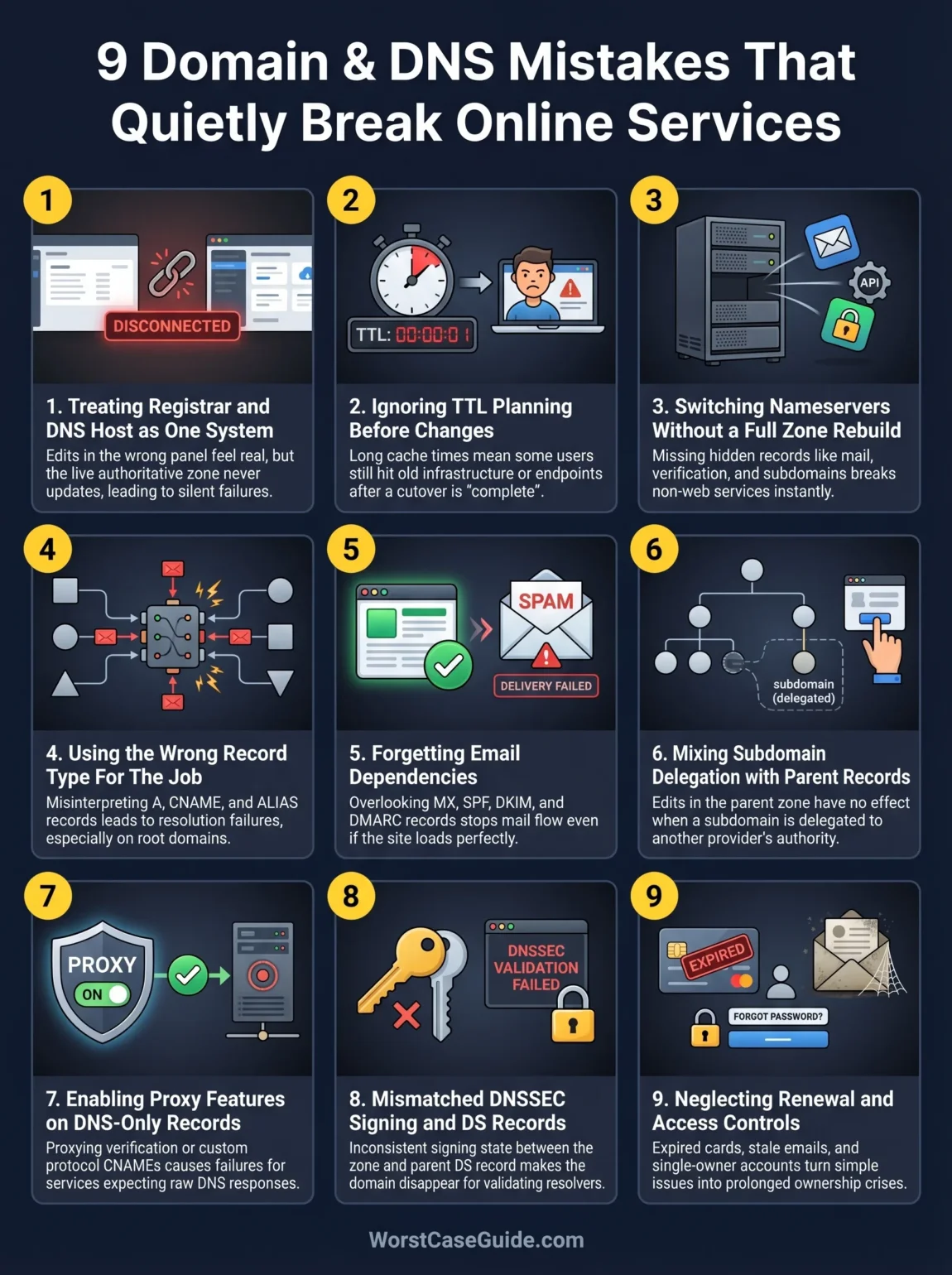
Mistake 1: Treating The Registrar And The DNS Host As One System
This is one of the oldest mistakes, and it still catches experienced teams. A domain can be registered with one company while authoritative DNS lives somewhere else. An edit in the wrong panel feels successful, but the public internet never sees it.
Why It Happens
Domain ownership, billing, nameserver assignment, DNS zone records, SSL, and CDN controls often grow in different tools over time. In smaller projects, one person may set this up and leave. In larger systems, ownership gets split between web, IT, and operations. The result is familiar: everyone thinks someone else controls the live zone.
Early Warning Signs
- You can edit records, but public lookups still show old answers hours later.
- The registrar dashboard shows one set of nameservers while the team is editing records somewhere else.
- No one is fully sure which account is authoritative.
Worst-Case Outcome
A live change is made in the wrong place during an outage or migration. Nothing updates. The team loses time, users see failures, and the real issue is discovered only after several false fixes. That is a bad moment to learn who actually controls the zone.
A Safer Approach
Separate domain ownership from DNS hosting in your documentation. Keep the registrar, active nameservers, live DNS host, billing owner, and recovery contacts visible in one place. If you are in this situation after an acquisition, agency handoff, or vendor change, this single step often removes half the confusion before any technical fix begins.
Mistake 2: Changing Records Without Planning Around TTL
TTL controls how long cached answers stay in use. When it is ignored, a change can be technically correct and still behave badly. Some users reach the new destination. Others keep seeing the old one. What actually failed first? Usually consistency.
Why It Happens
People focus on the record value and forget the cache window wrapped around it. During migrations, cutovers, and failovers, this becomes expensive. A record edited at the last minute may continue to serve stale answers long after the change.
Early Warning Signs
- Support reports are inconsistent by region, ISP, or device.
- One resolver shows the new answer while another still shows the old answer.
- The team starts using the word propagation as if it explains everything.
Worst-Case Outcome
A cutover appears half-finished. Users hit old infrastructure, old SSL endpoints, or retired load balancers. Sessions fail, payment callbacks miss their target, and the rollback becomes messy because two states are active at once.
A Safer Approach
Plan the timing before the edit, not during the incident. Lower TTLs ahead of a known change, wait long enough for old cache durations to age out, then switch. After the new state is stable, TTLs can move back to calmer values. A DNS change with no TTL plan is a bit like repainting lane lines while traffic is still moving.
Mistake 3: Switching Nameservers Before Rebuilding Every Record The Service Needs
Nameserver changes are not just another record edit. They hand authority to a new DNS provider. If the new zone is missing even a few records, the website might be the only thing that works for a while.
Why It Happens
Teams copy the obvious records first: root A, www, maybe one TXT entry. Less visible records are easy to miss. Mail routing, verification tokens, redirect hosts, service discovery, custom subdomains, and environment-specific entries often appear later, usually when something breaks.
Early Warning Signs
- The website loads, but mail stops or third-party verification fails.
- Webhook providers, SSO platforms, or analytics endpoints start reporting domain errors.
- The new DNS zone was built by export/import, but nobody checked unsupported or skipped records.
Worst-Case Outcome
The cutover works just enough to create false confidence. Then email, callbacks, or tenant subdomains fail one by one. Recovery is slower because the team now has to reconstruct what the old zone was doing under live pressure.
A Safer Approach
Build the destination zone as a service map, not a flat record list. Group records by function: website, email, verification, internal tooling, customer subdomains, redirects, and security TXT records. If you are moving a small brochure site, the list may stay short. If you are moving a product stack, the hidden records are often the ones that matter most.
Mistake 4: Using The Wrong Record Type For The Job
DNS panels make record creation look simple, but record type decides how resolvers interpret the answer. A root domain, a verification flow, and a subdomain do not all behave the same way.
Why It Happens
Copy-paste setup steps are often written for one provider. Another provider may use alias records, flattening, or special root-domain handling instead. A setup that works for www.example.com may not work for example.com. That difference gets missed all the time.
Early Warning Signs
- The root domain behaves differently from the www host.
- A verification record exists, but the service still says the domain is unverified.
- The team uses CNAME, alias, flattened CNAME, A, and AAAA as if they were interchangeable.
Worst-Case Outcome
The zone resolves in a provider-specific way that hides risk until a migration, failover, or verification check exposes it. Root redirects break, IPv6 behaves oddly, or a third-party token check keeps failing because the record is being transformed by a feature the team forgot was enabled.
A Safer Approach
Match the record type to the service behavior, not to a copied screenshot. For root-domain routing, note whether the provider uses alias-style handling or flattening. For validation records, confirm whether the target must stay DNS-only and whether any transformation layer sits in front of it.
Mistake 5: Forgetting That Email Depends On DNS Too
This one is common because the website is visible and email is not. Teams launch or migrate a site, see the homepage working, and assume the domain is healthy. Then invoice mail disappears, password resets stall, or outbound mail lands in spam.
Why It Happens
Email needs its own record set: MX for routing, SPF for sender policy, DKIM for signed mail, and DMARC for policy and reporting. These are easy to miss during a nameserver move because they are not always visible in web hosting workflows.
Early Warning Signs
- Inbound mail bounces after a DNS change.
- Outbound mail suddenly lands in spam or fails provider checks.
- Mail-related TXT records exist, but they were copied with formatting errors, split strings, or wrong hostnames.
Worst-Case Outcome
Customer communication fails while the site still looks fine. That can block onboarding, billing, support, and account recovery at the same time. In some cases, weak or missing authentication also makes spoofing easier, which turns a DNS oversight into a trust problem.
A Safer Approach
Treat mail as its own service during any DNS review. If you are in this situation with one mailbox and a small team, the list is short but still worth checking line by line. If the domain sends transactional or marketing email from several platforms, record ownership matters just as much as record correctness.
Mistake 6: Mixing Subdomain Delegation With Parent-Zone Records
Subdomains are where many calm-looking DNS setups become confusing. A parent domain can delegate a child zone with NS records. Once that happens, edits in the parent zone may stop mattering for that subdomain. People often miss this and keep fixing the wrong place.
Why It Happens
Teams split environments over time: marketing on one provider, app traffic on another, support center on a third. Then someone adds a child zone for api, blog, or status. Months later, nobody remembers the delegation boundary.
Early Warning Signs
- Changes to a subdomain record have no effect.
- Public lookups show NS records for the child host.
- Parent-zone records and child-zone records both exist for the same label.
Worst-Case Outcome
A service outage drags on because the team is changing records in a non-authoritative zone. In larger systems, this can affect only one product area, one country endpoint, or one environment, which makes the issue look random when it is really structural.
A Safer Approach
For every important subdomain, note whether it is merely a record in the parent zone or a delegated child zone. That one distinction saves a lot of wasted effort. It also helps during audits, because overlapping records are easier to spot before they become live incidents.
Mistake 7: Turning On Proxy Or CDN Features For Records That Should Stay DNS-Only
Proxy layers are useful, though they change behavior. They can sit between the client and the origin, alter returned answers, or interfere with services that expect plain DNS resolution. This is especially messy for verification CNAMEs, mail-related hosts, and non-HTTP services.
Why It Happens
Dashboards make proxy toggles feel harmless. A team may enable them for performance or protection, then forget that some records should stay untouched. Later, a provider asks for a raw CNAME response, not a proxied one, and the validation fails.
Early Warning Signs
- Domain verification fails even though the record is present.
- Mail or custom protocol endpoints behave strangely after a proxy change.
- A team member says, “The DNS record is there, so why can’t they see it?”
Worst-Case Outcome
Third-party onboarding stalls, certificate issuance fails, SaaS callbacks stop, or a service that never should have been proxied becomes unreachable. The failure is easy to misread because the dashboard still looks tidy.
A Safer Approach
Review each DNS record by protocol and purpose. Web traffic may need proxy features. Verification hosts, many mail-related records, and some direct service endpoints often do not. If a setup includes flattening or provider-specific transformations, note that too. Small toggles can behave like hidden rewrites.
Mistake 8: Changing DNSSEC Without Matching The DS And Signing State
DNSSEC raises the assurance level of DNS, yet it is unforgiving when the pieces do not line up. This is not a cosmetic setting. A mismatch between zone signing and the DS record at the parent can turn a working domain into one that validating resolvers reject.
Why It Happens
DNS provider changes, registrar changes, and signing migrations are easy places to make this mistake. A team enables signing in one place, forgets the parent-zone DS record, or leaves an old DS value behind after moving providers.
Early Warning Signs
- The zone looks correct in the provider dashboard, yet some users see it as nonexistent.
- The issue appears right after a DNS provider move or DNSSEC toggle.
- Different resolvers return very different answers for the same name.
Worst-Case Outcome
The domain effectively disappears for validating resolvers. That can take down the website, API, and mail flows in one move. The painful part is that the records may still look healthy to someone checking only the zone editor.
A Safer Approach
Make DNSSEC changes part of a tested cutover sequence, not an afterthought. Track who publishes the DS record, who signs the zone, and when the old state is removed. If you are running a simpler site with no DNSSEC today, the risk may be low. If DNSSEC is already in play, the sequencing risk is not low at all.
Mistake 9: Letting Renewal, Contacts, And Recovery Access Decay
Many outages blamed on “DNS” begin as an ownership problem. The payment card expired. The admin contact left the company. The recovery email points to an inbox nobody reads. The domain is still live, until it is not.
Why It Happens
Domains are often bought early, then forgotten because they rarely need attention. Renewal, transfer, and access controls sit quietly in the registrar layer, away from day-to-day product work. That makes neglect easy.
Early Warning Signs
- Only one person can access the registrar account.
- Billing and recovery contacts use personal or stale email addresses.
- No one has reviewed renewal status, transfer lock, or backup contact paths in a long time.
Worst-Case Outcome
A renewal is missed or a transfer cannot be completed during a live event. Recovery becomes slow, expensive, or uncertain. If the domain moves farther into expiration or release, the problem stops being a simple outage and starts touching ownership risk.
A Safer Approach
Keep domain access boring and durable. Two admins are usually better than one. Shared operational ownership is usually better than personal ownership. Renewal status, billing method, admin email, and recovery path deserve the same calm review as DNS records themselves.
Risk Patterns That Show Up Again And Again
The same patterns sit underneath most domain and DNS outages. The record itself may not be the real problem. The real problem is often unclear authority, hidden dependencies, or bad change timing.
- One visible service hides three invisible ones. The homepage works, but mail, SSO, callbacks, or validation fail.
- Ownership is blurred. The team can edit something, just not the live thing.
- Provider-specific behavior gets mistaken for DNS itself. Alias handling, flattening, and proxies are useful, though not universal.
- The root cause starts before the outage window. High TTLs, stale contacts, and undocumented delegation make the incident worse later.
- Testing is too narrow. A single laptop, office network, or browser session is not enough to judge DNS health.
A Useful Operational Habit
For domains that matter, it helps to review them as a stack: registrar access, nameserver authority, zone records, email records, delegated subdomains, and security settings. That sequence is plain, almost dull. That is why it works.
FAQ
How long can a DNS change take to settle?
It depends on cache timing, old TTL values, resolver behavior, and whether the change was a record edit or a nameserver move. A change can look done in one place while old answers still appear elsewhere.
Can a DNS mistake break email while the website still works?
Yes. Websites and email rely on different record types. A site may keep loading while MX, SPF, DKIM, or DMARC records are missing, malformed, or left behind during a move.
Why does a record look correct in the dashboard but fail publicly?
The edit may have been made in a non-authoritative system, the answer may still be cached, the subdomain may be delegated elsewhere, or a proxy or flattening feature may be changing what resolvers see.
Is the root domain handled the same way as a subdomain?
No. Root-domain behavior is often more limited, and some providers use special handling such as alias-style records or flattening to make certain setups work.
What makes DNSSEC outages hard to spot?
The zone can look normal in the editor while validating resolvers reject it because the signing state and parent DS record do not match. That makes the failure feel mysterious until the chain is checked end to end.
What is the quietest domain risk that teams miss?
Access decay. Old recovery email addresses, expired cards, and single-owner registrar accounts do not look technical, though they can turn a normal DNS issue into a long ownership incident.