A deployment can fail even when the application code looks almost untouched. Dependencies change on their own timeline: direct packages, transitive packages, container images, OS libraries, registries, install flags, runtime versions, and cached artifacts all shape what actually goes live. That is why dependency mistakes are hard to spot early. They often stay quiet in local development, pass one CI run, then break during release, rollback, scale-out, or the next clean build.
For teams that ship often, the real risk is not just a red pipeline. It is deployment uncertainty: not knowing whether the next build will reproduce the last known-good system. In smaller projects this may look like a sudden install error. In larger systems it can turn into mixed pod versions, failed rollbacks, startup crashes, or a release freeze while people compare lockfiles, registry settings, and build logs.
Why This Topic Is Risky
Dependency problems are awkward because they sit between code and infrastructure. They are neither fully inside the app nor fully outside it. A team may think, “We only changed one package,” while the actual deploy changed a whole tree of packages, a base image layer, a checksum, a private registry path, and the runtime that resolves all of it. That gap between what changed and what people think changed is where broken deployments start.
There is also a timing problem. Many dependency failures appear only in clean, repeatable environments such as CI, ephemeral preview builds, autoscaled nodes, or a disaster recovery rebuild. Local machines are messy in a forgiving way. Production is not.
A useful mental model: a deployment is not just “code plus config.” It is code plus the exact dependency graph plus the exact resolver behavior plus the exact runtime and image state. If one part drifts, the release can drift too.
Common Assumptions That Create Avoidable Failures
- “Semantic version ranges are safe enough.” They are often safe until a clean install resolves a newer transitive version than the one used in the last release.
- “If it works locally, the dependency graph is fine.” Local caches, old
node_modules, prebuilt wheels, or reused containers can hide missing or incompatible pieces. - “Only direct dependencies matter.” In many stacks, most of the graph is transitive. That means the bigger risk may be somewhere nobody added by hand.
- “The lockfile is the truth.” It helps, yes, though it is only one part of the truth. Install flags, package manager version, registry source, OS layer, and runtime still matter.
- “Container images solve reproducibility.” Only if tags, digests, OS packages, and build steps are handled with the same discipline.
- “Rollback is easy.” It is easy only when the old artifact, image, lockfile, registry access, and runtime are still available and still compatible.
| Failure Surface | What Teams Usually Watch | What Actually Breaks |
|---|---|---|
| Application packages | Direct version bumps | Transitive drift, peer mismatch, missing lockfile updates |
| Package resolution | Manifest file only | Different package manager, install mode, or resolver behavior in CI |
| Container layer | Image tag | Base image drift, OS package drift, mutable tags |
| Runtime | Local interpreter or Node version | Build-time and runtime version mismatch |
| Registry access | Public dependency availability | Expired token, moved scope, private package auth failure |
| Recovery path | Last release tag | Rollback cannot rebuild or cannot pull the previous artifact |
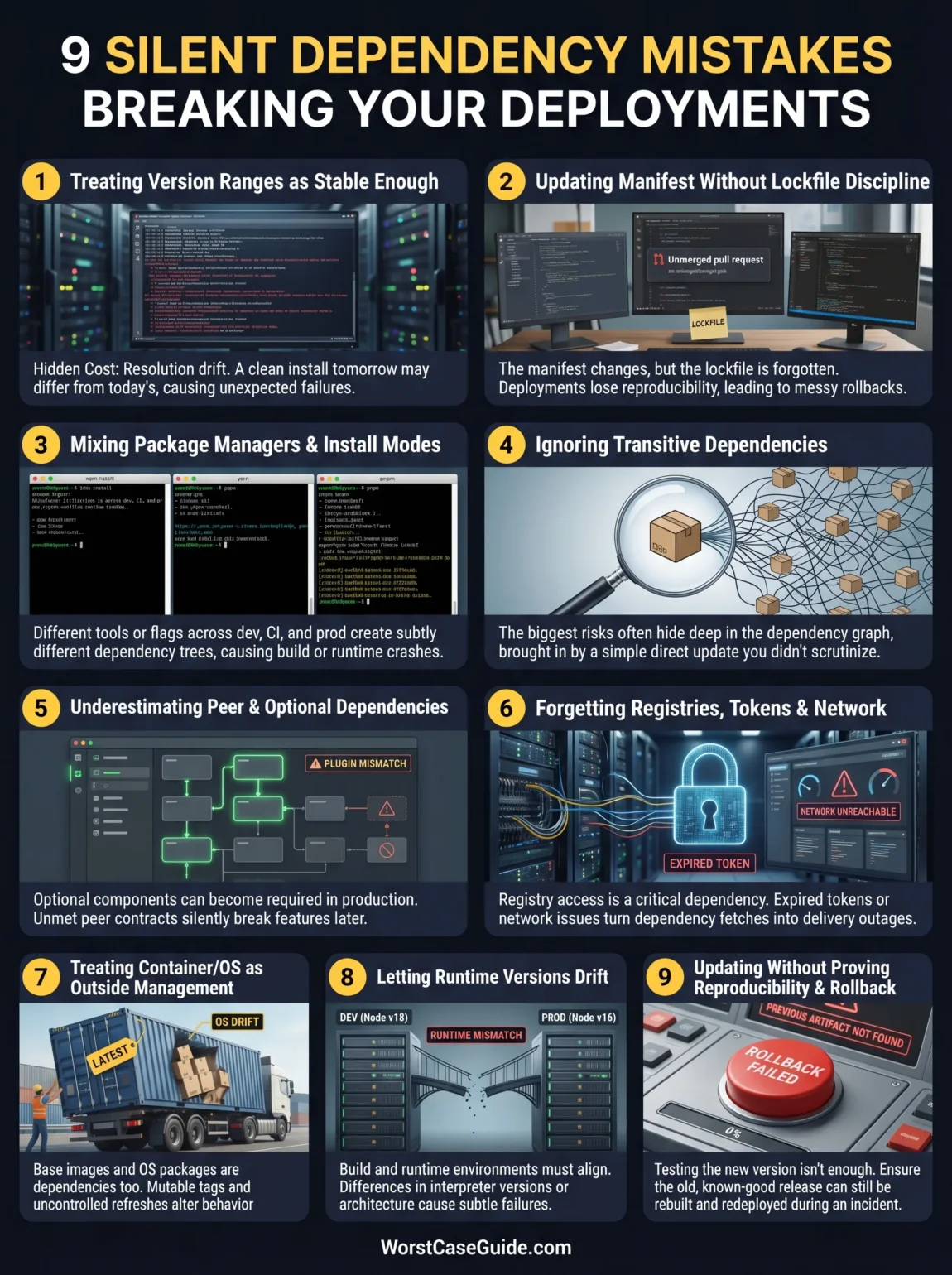
9 Software Dependency Mistakes That Break Deployments
Mistake 1: Treating Version Ranges As Stable Enough For Production
Version ranges feel convenient because they reduce manual maintenance. The hidden cost is resolution drift. A clean install next week may not produce the same graph as a clean install today, even when the application code is unchanged.
Why It Happens
Teams want patch and minor updates without friction. That makes sense. The trouble starts when ranges sit next to transitive dependencies, package metadata updates, or a different resolver path in CI. A deployment then depends on time, not just source control.
Early Warning Signs
- “No code changes” deploys that fail on fresh runners
- Preview builds behave differently from local builds
- One branch installs cleanly while another branch does not
- Unexpected package additions after a routine install
Worst-Case Result
A release becomes non-repeatable. One environment runs with one dependency set, another with a newer one. In distributed systems, that can mean mixed behavior across pods or instances, which is harder to debug than a full stop failure because symptoms vary by node.
A Safer Approach
For production-bound paths, teams usually benefit from deterministic installs rather than loosely bounded installs. In smaller projects this may simply mean tighter pinning and regular review. In larger systems, it often means treating dependency updates like releasable changes, not background noise.
Mistake 2: Updating The Manifest Without Lockfile Discipline
A manifest file says what is wanted. A lockfile says what got resolved. When those drift apart, the deploy pipeline becomes the first honest place in the process. That is late.
Why It Happens
People change package.json, requirements.txt, or similar files in a hurry, forget the lockfile, or regenerate it with a different toolchain than CI uses. In monorepos, one workspace may be updated while another still assumes the old graph. It looks minor. It is not always minor.
Early Warning Signs
- Pull requests with manifest edits but no lockfile changes
- Large, noisy lockfile diffs nobody reviews carefully
- CI failures that disappear after a second install locally
- “Works after deleting the lockfile” as a common fix
Worst-Case Result
Deployments stop being reproducible. One pipeline step resolves a different graph than the release that is already in production. Rollback becomes messy because the old artifact may depend on a graph that can no longer be reconstructed cleanly.
A Safer Approach
It usually helps to treat the lockfile as a release artifact, not an incidental file. Review it as part of the change. In systems with many contributors, a smaller update cadence with clearer lockfile ownership tends to reduce noisy failures.
Mistake 3: Mixing Package Managers, Install Modes, Or Resolver Flags Across Environments
Some teams build locally with one package manager, run CI with another, and publish in a container that uses a third install path. Others keep the same tool but change the flags. That is enough to alter the dependency tree.
Why It Happens
Tooling evolves gradually. One developer uses Yarn, another uses npm, CI uses pnpm, and the Dockerfile runs the default installer from the base image. Or the graph was generated with one compatibility flag, then installed later without it. Small differences in resolver behavior can produce very different results.
Early Warning Signs
- Multiple lockfiles appear in the same repo
- Build docs and Dockerfile use different install commands
- Peer dependency warnings are common and get ignored
- Workspace installs behave differently in CI than on laptops
Worst-Case Result
The team thinks it is deploying one graph while the runner assembles another. That can cause build failures, missing modules, wrong hoisting behavior, plugin loading errors, or runtime crashes that only appear after the image is built and promoted.
A Safer Approach
A single resolver path across local development, CI, and container build tends to lower risk. In larger repos, that also means being explicit about workspace boundaries, install commands, and compatibility settings rather than relying on tribal memory (which fades fast).
Mistake 4: Ignoring Transitive Dependencies Because “We Did Not Add Them”
Direct dependencies are only the visible part of the graph. The heavier part sits below the surface. That is where surprising breakage often lives.
Why It Happens
People review the top-level package diff and move on. Yet one direct update can pull in many transitive changes, each with its own compatibility and runtime assumptions. A patch that seems tiny in the manifest can be much wider in effect.
Early Warning Signs
- A one-line dependency bump produces a large lockfile diff
- Unexpected new native modules or post-install scripts appear
- Security alerts mention packages nobody recognizes
- Build size, cold start time, or startup logs change after a minor update
Worst-Case Result
A deploy passes basic tests, then fails under real workload because a transitive package changed behavior, dropped support for an older runtime, or introduced a different binary dependency. That kind of failure is slippery. The app code looks innocent.
A Safer Approach
Teams that stay calmer during releases usually inspect the dependency graph delta, not just the direct package delta. A PR that changes “one package” may deserve deeper review if the transitive tree changed far more than expected.
Mistake 5: Underestimating Peer Dependencies, Optional Dependencies, And Plugin Contracts
Not all dependencies behave like ordinary libraries. Some expect a host package. Some are optional until one environment makes them required. Some plugins assume a narrow version window of the tool they extend.
Why It Happens
Warnings are easy to wave away when the app still starts locally. Optional pieces may remain dormant until a production path, a specific OS, or a build plugin activates them. Then the failure feels random even though the mismatch was already there.
Early Warning Signs
- Repeated peer dependency warnings in install logs
- Plugins pinned more tightly than the host tool
- Production-only features fail while core routes work
- Build succeeds on one operating system but not another
Worst-Case Result
The deploy looks successful, then a late build step, SSR path, admin panel, or image-processing task breaks because the host package and plugin are quietly out of contract. This is common in UI tooling, build chains, and systems with native add-ons.
A Safer Approach
It often helps to treat peer and optional dependencies as first-class release conditions, not advisory noise. If a feature relies on them in production, they are not really optional from an operational point of view.
Mistake 6: Forgetting That Registries, Tokens, And Network Reachability Are Also Dependencies
Many deployment checklists stop at package names and versions. Real deployments also depend on registry URLs, scopes, auth tokens, mirrors, certificate trust, egress rules, and sometimes private network paths. A package can be “correct” and still be unreachable.
Why It Happens
Registry access is often configured once and forgotten. Then a token expires, a scope moves, a mirror falls behind, or a new runner does not inherit the old secret path. The app code did not change. The release still fails.
Early Warning Signs
- Builds pass on long-lived runners but fail on new runners
- Private packages install locally but not in CI
- Intermittent 401, 403, timeout, or checksum errors from registries
- Dependency bot updates fail for only some ecosystems or scopes
Worst-Case Result
A hotfix cannot be built during an incident because the pipeline can no longer reach or authenticate to a private dependency source. That turns a dependency issue into a delivery outage. The code may already be fixed. The organization still cannot ship it.
A Safer Approach
In smaller teams, a simple check of registry auth during every clean build may be enough. In larger organizations, release readiness usually improves when registry access, secret rotation, and mirror health are treated as part of the dependency system itself.
Mistake 7: Treating Container Base Images And OS Packages As Outside Dependency Management
A deployable artifact is not just application packages. It also includes the image it runs on, the system libraries inside it, certificate bundles, shell tools used in build steps, and any OS-level packages added along the way. Ignoring that layer is like checking the front door and leaving the side gate open.
Why It Happens
Teams mentally separate “application dependencies” from “container stuff.” Production does not care about that distinction. A mutable image tag, an unreviewed base image refresh, or a changed OS package source can alter behavior without touching app manifests at all.
Early Warning Signs
- Dockerfiles use broad tags such as
latestor a moving minor line - Build output changes after a base image refresh with no app code diff
- Native modules compile in one image but fail in another
- Runtime SSL, locale, libc, or timezone behavior changes after rebuild
Worst-Case Result
One deploy produces containers that start but behave differently from the previous release. In orchestrated environments, mutable tags can even create a mixed fleet where old and new nodes pull different image content under the same name. That is a nasty class of failure because the rollout looks normal at first glance.
A Safer Approach
Teams usually gain predictability when they track image and OS dependencies with the same care as language packages: explicit versions, controlled refreshes, readable diffs, and awareness of what actually changed inside the final image.
Mistake 8: Letting Runtime Versions Drift Away From Build Assumptions
Dependencies do not resolve in a vacuum. They resolve against a runtime: Node.js, Python, Java, .NET, system ABI, CPU architecture, and sometimes specific build tool versions. A package set that installs under one runtime may fail, warn, or behave differently under another.
Why It Happens
Local development moves faster than deployment images. One team upgrades the interpreter. CI stays behind. Production runs a different minor line. Prebuilt artifacts then differ, native bindings are rebuilt, or support windows no longer overlap cleanly.
Early Warning Signs
- Install warnings about engine, interpreter, or ABI support
- Native modules rebuild unexpectedly in CI
- Only ARM or only x86 images fail
- Tests pass in development but fail in containerized builds
Worst-Case Result
A release is built against one runtime contract and deployed into another. That may cause startup failure, subtle serialization differences, broken plugins, or runtime-only crashes under real traffic. In services that autoscale, new instances may fail while old ones stay alive, which creates confusing partial outages.
A Safer Approach
If build and runtime environments are meant to be interchangeable, they need the same dependency assumptions. In practice that often means aligning the runtime version, architecture, and build image rather than trusting “close enough” compatibility.
Mistake 9: Updating Dependencies Without Proving Reproducibility And Rollback
Teams often test whether the new dependency set works. They do not always test whether the old known-good release can still be rebuilt, redeployed, or pulled back quickly. That missing check only hurts when something goes wrong. That is exactly when it hurts most.
Why It Happens
Forward motion gets more attention than reverse motion. Release processes are optimized for shipping, not for reproducing last week’s artifact under today’s registry, cache, token, and image conditions.
Early Warning Signs
- No regular clean rebuilds of older release branches
- Rollback depends on “whatever is still in the registry”
- Artifacts are not retained long enough to support incident recovery
- Dependency updates are approved without a clear revert path
Worst-Case Result
The new release fails and the rollback path fails too. A previous image tag points to moved content, a private package is no longer available, or the old branch cannot rebuild because the dependency ecosystem moved on. That is how a normal release issue becomes a prolonged outage.
A Safer Approach
Safer teams tend to ask two separate questions: “Can the new graph ship?” and “Can the last good graph still be restored?” Those are related questions, though not the same one. Treating both as release conditions reduces ugly surprises.
General Risk Patterns Behind Dependency-Driven Deployment Failures
Across stacks, the same patterns show up again and again:
- Hidden state beats declared state. Cached layers, old local installs, reused runners, and stale registry config make one environment kinder than another.
- Teams control less of the graph than they think. The dependency tree is wider than the manifest.
- Release systems depend on external services. Registries, mirrors, token stores, image hosts, and certificate chains all sit in the path.
- Operational rollback is often weaker than forward deploy. That is a planning issue, not a bad-luck issue.
- Warnings get normalized. Repeated peer, engine, and auth warnings stop feeling urgent until they become blocking failures.
One pattern worth remembering: pinning alone does not solve deployment risk. A pinned package with an unpinned base image, drifting runtime, or fragile private registry path can still produce a broken release.
FAQ
Are lockfiles enough to prevent dependency-related deployment failures?
Not by themselves. A lockfile improves repeatability, though deployments can still fail when the package manager changes, install flags differ, the runtime drifts, the registry becomes unavailable, or the container base image changes under the build.
What is the most overlooked dependency risk in real deployments?
Many teams focus on application packages and miss the rest of the path: registry auth, mirrors, base images, OS packages, runtime versions, and rollback availability. Those pieces often decide whether a release is actually deployable.
Why do dependency issues often appear only in CI or production?
Local machines usually contain hidden state: caches, previously installed modules, long-lived credentials, and reused artifacts. Clean environments remove that hidden padding, so missing or incompatible dependencies become visible there first.
Do transitive dependencies really matter that much?
Yes. A direct update can change a much larger transitive tree. That can alter native bindings, runtime support, plugin compatibility, image size, startup behavior, or security posture even when the top-level change looks small.
Can container images make deployments fully reproducible?
They help, though only when the image inputs are controlled too. Mutable tags, drifting OS packages, changing build commands, and runtime mismatches can still make two builds behave differently.
Why is rollback part of dependency management?
Because a rollback depends on old artifacts, old image references, registry access, and the ability to reproduce or redeploy a known-good dependency graph. If that path is weak, a normal release failure becomes harder to contain.