Automation scripts rarely fail in a cinematic way. More often, they keep running, return a polite success message, and leave behind missing files, duplicated records, stale reports, or half-finished jobs. That is what makes silent failure hard to catch. A broken script is visible. A script that looks healthy while doing the wrong thing can sit in production for days, sometimes weeks, before anyone notices.
In a small setup, that may mean a delayed backup or an empty export. In a larger system, it can mean dashboards drifting away from reality, customers getting duplicate emails, or cleanup tasks deleting the wrong thing. The code may not look dangerous. The assumptions around it usually are.
Why This Topic Matters: Silent failures create a false sense of safety. The script did not crash, no one got paged, and logs may even look tidy. Yet the business outcome is wrong. That gap between technical success and real-world success is where avoidable damage starts.
Why Silent Failures Are Harder Than Loud Failures
A loud failure interrupts attention. A silent one blends into the background. Teams tend to trust green check marks, routine schedules, and “last run completed” messages. That trust is reasonable at first. Then it becomes expensive.
The real problem is not only that something failed. It is that the system did not make failure legible. A script without visibility is a smoke alarm with no battery. It is still on the ceiling. It just does not help much.
| What The Team Sees | What Is Actually Happening | Where It Surfaces Later |
|---|---|---|
| Job status says “success” | Only part of the work finished | Missing rows, stale files, broken follow-up tasks |
| No alert was sent | No alert condition was defined | Failure is found by a human, not the system |
| Output file exists | File is empty, partial, or structurally wrong | Reporting, imports, or audits fail later |
| Retry fixed the timeout | Retry created duplicates or side effects | Duplicate records, repeated messages, double processing |
| Logs contain no errors | Errors were swallowed or never captured | Long debugging sessions with little evidence |
Common Assumptions That Lead To Trouble
- If the script exits cleanly, the job succeeded. Exit status only tells part of the story.
- If it worked in the terminal, it will work on schedule. Scheduled environments often differ in path, shell, timezone, permissions, and variables.
- If there is logging, there is observability. Logs that nobody reads are not a safety system.
- If retries exist, reliability exists. Retries without idempotency can turn one fault into many.
- If no one complained, no damage happened. Some failures stay quiet until a weekly report, a billing cycle, or an audit.
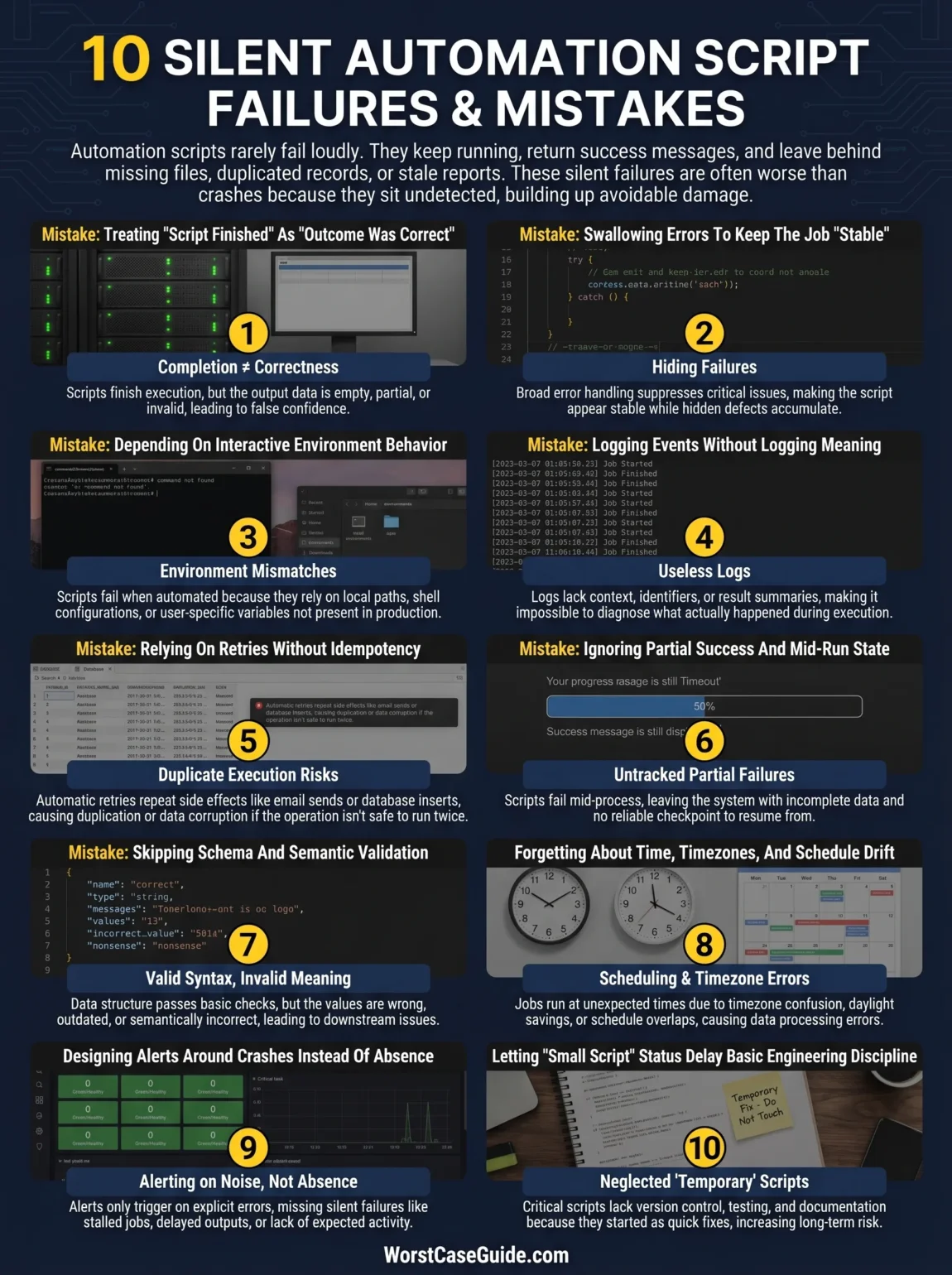
10 Mistakes That Create Silent Failures
Mistake 1: Treating “Script Finished” As “Outcome Was Correct”
Many scripts are built around process completion, not outcome verification. The command ran. The file was written. The API returned 200. Everything seems fine. Yet the exported file may be empty, the response may contain a warning payload, or the job may have skipped half the records because a filter changed.
Why It Happens
It is easier to check technical completion than business validity. Teams often stop at the first success signal because it is simple to automate.
Early Warning Signs
- Outputs exist, but no one checks row counts, file size, or freshness.
- Success is defined as “no exception thrown.”
- Users say results “look a bit off” before anyone sees an error.
Worst-Case Outcome
The script keeps producing plausible but wrong data. That is often worse than a crash because bad output travels downstream and gains credibility each time it is reused.
Safer Approach
Success checks tend to be safer when they include output validation: expected count ranges, non-empty payloads, checksum or schema checks, and freshness checks tied to the job’s real purpose.
Mistake 2: Swallowing Errors To Keep The Job “Stable”
A surprisingly common pattern is broad error handling that catches everything, logs little, and moves on. It feels tidy. It also hides the only clue that something broke. This shows up in shell scripts, Python tasks, no-code automations, scheduled serverless functions, and glue code written in a hurry on a Friday afternoon.
Why It Happens
Teams often want the job to keep running, especially when one bad record should not stop a batch. That goal is reasonable. The problem starts when recovery logic and silence get mixed together.
Early Warning Signs
- Generic catch-all blocks with vague messages like “something went wrong.”
- Warnings without context, record IDs, or step names.
- Jobs that “never fail” even though users report missing outputs.
Worst-Case Outcome
The automation becomes quietly untrustworthy. It still runs, so nobody revisits it. The hidden defect becomes normal.
Safer Approach
Selective error handling is usually safer: skip what is truly skippable, capture enough context to trace it later, and promote repeat or high-impact failures into alerts instead of burying them in logs.
Mistake 3: Depending On Interactive Environment Behavior
This is the classic “works on my machine” problem, only quieter. Scheduled jobs often run with a different shell, a reduced PATH, missing environment variables, different working directories, or another user context. A script that behaves perfectly in a terminal can fail when automation removes that comfort layer.
Why It Happens
The script was tested manually, not under the same execution conditions it will face in production. In cron-like systems, even small differences in shell or PATH can break commands without much ceremony.
Early Warning Signs
- Relative paths inside scripts.
- Reliance on profile files, aliases, or manually exported variables.
- Jobs that fail only when scheduled, not when run by hand.
Worst-Case Outcome
Backups never upload, cleanup tasks never run, or security rotations quietly stop because the automation cannot find the command, secret, or directory it expects.
Safer Approach
Automation is safer when it uses absolute paths, explicit shells, defined environment loading, and test runs under the same scheduler, container, or runtime that will own the job later.
Mistake 4: Logging Events Without Logging Meaning
There is a difference between “we have logs” and “we can explain what happened.” Many scripts log start and finish messages, then little else. That may help with uptime vanity, not with diagnosis. If a run says “completed” but does not mention which inputs were processed, how many items changed, what got skipped, or which external call slowed down, the evidence is thin.
Why It Happens
Minimal logging feels clean and cheap. Detailed logging feels like extra work. Then the first incident arrives, and the team has a postcard instead of a map.
Early Warning Signs
- Logs show start time and end time only.
- No correlation IDs, batch IDs, filenames, or record counts.
- No separation between info, warning, and failure states.
Worst-Case Outcome
The failure is found late, and root cause analysis turns into guesswork. The team spends more time reconstructing the event than fixing it.
Safer Approach
Structured logs with step names, identifiers, counts, durations, and result categories tend to age better than generic text lines. Not perfect. Just much more useful.
Mistake 5: Relying On Retries Without Idempotency
Retries are often presented as reliability. Sometimes they are. Sometimes they are just duplicate execution with optimism. If a task sends an email, creates an invoice, updates inventory, or appends rows, a retry can repeat the side effect unless the operation is safe to run twice.
Why It Happens
Transient failures are real, so retries get added early. Idempotency comes later, if at all. In distributed systems and scheduled jobs, that order creates risk.
Early Warning Signs
- The job can be triggered again before previous effects are confirmed.
- There is no unique operation key or deduplication rule.
- Partial writes happen before the final success signal.
Worst-Case Outcome
One timeout becomes many side effects: duplicated records, repeated customer messages, doubled imports, or cleanup steps that run twice and remove too much.
Safer Approach
If the script may retry, replay, or overlap, it is usually safer when each operation has a stable identity and the system can tell whether that exact work was already done.
Mistake 6: Ignoring Partial Success And Mid-Run State
Not every failure is binary. A script may process 8,000 records, fail on 2,000, and still produce a file. It may update one table and miss another. It may upload data but fail to mark the checkpoint. From the outside, the job can look alive. Under the hood, it is split in half.
Why It Happens
Teams often model jobs as pass-or-fail because that is how schedulers think. Real workflows are messier. Mid-run state matters.
Early Warning Signs
- Checkpoints are missing or unreliable.
- There is no record of which items were completed, skipped, or pending.
- Recovery means “run the whole thing again.”
Worst-Case Outcome
Re-runs either duplicate the first half or keep failing in the second half. The system is stuck between missing work and repeated work. Neither feels safe.
Safer Approach
Smaller atomic steps, resumable checkpoints, and explicit state tracking tend to reduce damage. In smaller projects this can be a simple processed-items ledger. In larger systems, it may mean workflow-level state transitions.
Mistake 7: Skipping Schema And Semantic Validation
Some automations fail without breaking structure. The JSON is valid. The CSV still has columns. The AI step returns text in the right shape. Yet the values are wrong, fields moved, types changed, or the meaning drifted. That is a subtle class of failure, and many shorter articles miss it.
Why It Happens
Teams often validate syntax and stop there. But a script can pass basic structural checks while still routing to the wrong destination, populating the wrong column, or acting on stale assumptions.
Early Warning Signs
- Upstream vendors or internal teams change field names, types, or optional values often.
- Business rules live in people’s heads, not in automated checks.
- Outputs look neat but require human “sanity checks” every week.
Worst-Case Outcome
The pipeline does not fail. It succeeds with the wrong data. That green status can act like a cardboard door: it looks solid until someone leans on it.
Safer Approach
Safer automations usually validate both shape and meaning: allowed value ranges, expected null behavior, route sanity, known field contracts, and simple business rules that reveal bad data before it spreads.
Mistake 8: Forgetting About Time, Timezones, And Schedule Drift
Scheduling mistakes are not limited to a wrong cron expression. Timezone mismatches, daylight saving changes, queue delays, long-running overlaps, and assumptions about “daily” behavior can all distort execution. The script still runs. Just not when the team thinks it does.
Why It Happens
Time feels simple until systems cross regions, cloud schedulers, containers, and local expectations. Then “midnight” starts to mean different things to different layers.
Early Warning Signs
- Reports arrive late but not late enough to trigger alarms.
- Jobs overlap during heavy load.
- Daily windows are defined loosely, not as explicit time boundaries.
Worst-Case Outcome
Data is processed twice, skipped entirely, or processed for the wrong business day. In reporting, billing, retention, or compliance-adjacent work, that can become a messy cleanup.
Safer Approach
Explicit timezones, concurrency guards, cutoff definitions, and lag-aware checks tend to reduce this risk. If a job is schedule-sensitive, “ran today” is usually too vague.
Mistake 9: Designing Alerts Around Crashes Instead Of Absence
Many teams alert when a script emits an error. Fewer teams alert when a script simply does not arrive, does not finish in time, or produces nothing. That gap matters because silent failures often look like absence, not noise. No webhook. No file. No heartbeat. No fresh row.
Why It Happens
Error-triggered alerts are easier to add than missing-signal alerts. Yet missed runs and stale outputs are often the very symptom that users discover first.
Early Warning Signs
- Monitoring checks CPU, memory, or host health, but not job freshness.
- The only success evidence is a line in a local log file.
- No one can answer, quickly, “what should have arrived by now?”
Worst-Case Outcome
Failure is discovered by a customer, a manager, or the weekly review meeting. By then, recovery is larger because the missing work spans multiple cycles.
Safer Approach
A safer pattern is to alert on missing expected behavior: no heartbeat, stale file age, missed checkpoint, delayed completion, unexpected item count, or no downstream confirmation.
Mistake 10: Letting “Small Script” Status Delay Basic Engineering Discipline
This is the trap behind many of the others. The script starts as a one-off helper, then survives long enough to become production behavior. Because it still looks small, it does not get versioned properly, reviewed, tested under failure conditions, or documented with ownership. What could go wrong? Quite a lot, actually.
Why It Happens
Small scripts often solve real pain quickly. That speed is useful. The risk appears when temporary code becomes permanent operations without a matching rise in care.
Early Warning Signs
- No clear owner.
- No test case for bad input, duplicate input, or missing dependencies.
- Secrets, schedules, and behavior are documented informally, if at all.
Worst-Case Outcome
The automation becomes operationally important while staying socially invisible. When it breaks, the first task is figuring out who even owns it.
Safer Approach
If a script touches production data, customer-facing actions, scheduled jobs, or recurring business tasks, it usually deserves a few boring safeguards: ownership, version control, failure-path testing, secrets handling, and a clear definition of success and rollback.
Risk Patterns That Show Up Again And Again
Across home automations, business workflows, cron jobs, serverless tasks, and internal scripts, the same patterns keep repeating.
- Visibility is weaker than execution. The script can run more easily than it can explain itself.
- Success signals are too shallow. Systems check for completion, not correctness.
- Recovery is riskier than failure. Retries, reruns, and manual fixes create side effects because the work is not idempotent or resumable.
- Environment assumptions leak into production. The scheduled runtime behaves differently from the developer’s shell.
- Small tools grow into real systems. The engineering care does not always grow with them.
A Practical Reading Of The Risk: A healthy automation does not merely run on time. It makes its intent visible, its outputs verifiable, its failures traceable, and its retries safe. When one of those pieces is missing, silence starts to look normal.
FAQ
What is a silent failure in an automation script?
A silent failure happens when the script appears to run normally, but the intended result is missing, incomplete, delayed, duplicated, or wrong. There may be no crash, no obvious error message, and no alert.
Why are silent failures often worse than visible crashes?
A visible crash usually stops trust right away. A silent failure can keep producing believable output, which lets bad data or missed work spread further before anyone checks it closely.
Are cron jobs more exposed to silent failure than other automations?
They often are, mainly because scheduled jobs may run with different shells, paths, environment variables, working directories, and timing conditions than manual runs. The same pattern also shows up in serverless jobs, workflow tools, and queue workers.
Is logging enough to prevent silent failures?
No. Logging helps, but only when it captures useful context and when the system also checks freshness, output validity, missing runs, and downstream confirmation. Logs alone do not prove the outcome was correct.
What makes retries dangerous in automation?
Retries can repeat side effects. If the operation is not safe to run more than once, a timeout or partial failure may lead to duplicate records, repeated messages, or conflicting state changes.
How can a script “succeed” with wrong data?
That usually happens when structure is valid but meaning is off: field types change, optional values drift, mappings break, or business rules are no longer true. The file still looks neat, so the problem survives longer.