Cookie and privacy setup can look finished while the website behaves very differently underneath. A banner may appear, a privacy page may exist, and the visitor may even click “Reject All,” yet analytics, advertising, embedded services, or other trackers can still activate. The real risk comes from the gap between what the website says, what the visitor chooses, and what the browser actually does.
That gap is easy to create. Websites change constantly. Plugins are added, advertising systems are replaced, analytics tools move into tag managers, themes introduce external services, and old scripts remain after nobody remembers why they were installed. A privacy setup that was accurate six months ago may no longer describe the site that exists today.
Why Cookie and Privacy Setup Can Fail Quietly
Many privacy mistakes do not break the visible website. Pages still load. Forms still work. Ads may still appear. Analytics dashboards may continue receiving data. That makes these problems unusually easy to miss during normal site maintenance.
A technically healthy website can therefore have a privacy configuration problem without showing an obvious error to the owner. The visitor’s browser, network requests, stored cookies, local storage, consent signals, and third-party scripts often reveal more than the front-end banner does.
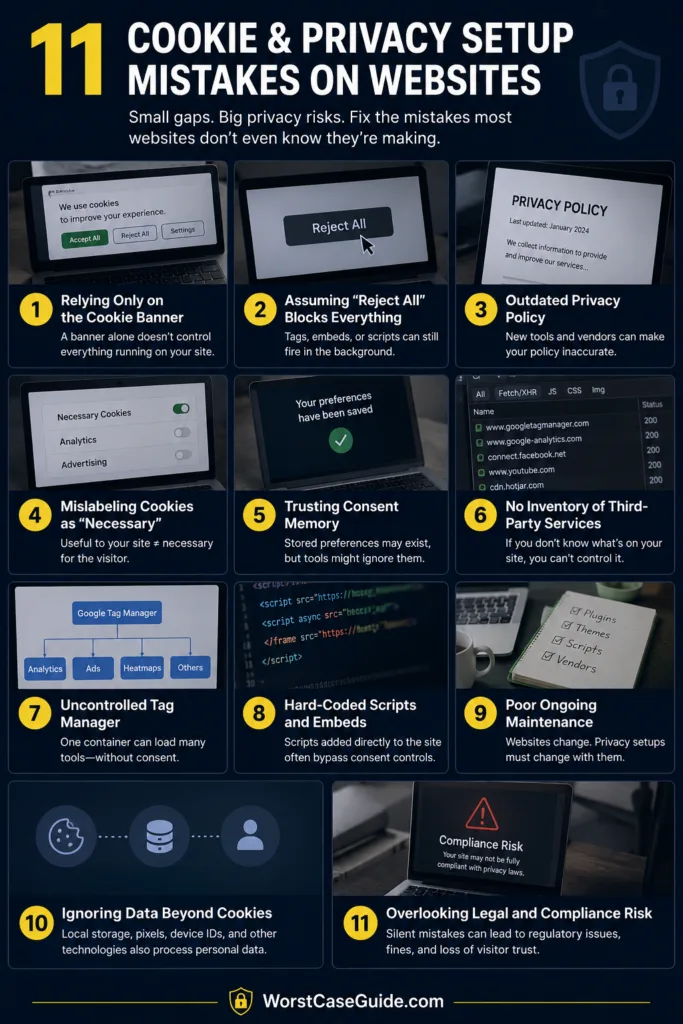
Common Assumptions That Create Problems
| Assumption | What Can Actually Happen |
|---|---|
| “I installed a cookie banner, so the setup is finished.” | The banner may not control every script that stores or reads information. |
| “Reject All means nothing loads.” | A tag manager, plugin, embed, or hard-coded script may still activate. |
| “My privacy page was written once, so it stays accurate.” | New plugins and vendors can make the published description outdated. |
| “Necessary cookies are anything my site benefits from.” | A useful service is not automatically technically necessary for the visitor’s requested function. |
| “If the banner remembers consent, everything is working.” | The stored preference may exist while individual tools ignore it. |
Mistake 1: Treating the Cookie Banner as the Entire Privacy Setup
A consent banner is the visible control surface. It is not the entire system. Behind it may sit Google Tag Manager, analytics services, advertising tags, social embeds, video players, heatmaps, affiliate tools, form services, comment systems, CDN features, and WordPress plugins.
Why It Happens
Installing a consent management platform can feel like completing the task because the most visible privacy element immediately appears. The harder part is connecting every relevant service to the visitor’s choice.
Early Warning Signs
- The website has several analytics or advertising plugins.
- Scripts are also inserted through the theme or header/footer settings.
- Google Tag Manager is running alongside separately installed Google tags.
- Nobody maintains a current list of third-party services.
Worst-Case Outcome
The banner records one preference while the website behaves another way. Visitors believe they declined optional tracking, but one or more services continue operating outside the consent mechanism. The site owner may not notice because nothing visibly breaks.
A Safer Approach
A better setup connects the visible consent interface with an actual inventory of scripts, cookies, storage technologies, embeds, and vendors. The banner then becomes one part of a working system rather than decoration placed over an uncontrolled tag stack.
Mistake 2: Letting Optional Trackers Run Before the Visitor Chooses
One of the easiest implementation errors is allowing analytics or advertising technology to start during the first page load and asking for a choice afterward. By the time the visitor sees the banner, the relevant request may already have happened.
Why It Happens
Load order matters. A consent tool added near the bottom of the page cannot reliably control a tracker that has already executed higher in the document. The same problem appears when a plugin injects code independently from the site’s main consent system.
Early Warning Signs
- Analytics requests appear before any banner choice.
- Marketing cookies exist on a fresh browser session before interaction.
- A tracker is hard-coded into the site’s header.
- The consent platform loads after a tag manager or advertising script.
Worst-Case Outcome
The visitor’s later refusal cannot undo every request that already occurred. The website can end up with a banner that looks correct while its initial page-load behavior contradicts the available choice.
A Safer Approach
Testing can begin with a completely fresh browser state and no prior consent record. Optional services can then be observed before any choice, after rejection, after acceptance, and after a granular preference change. That sequence exposes timing errors that ordinary browsing rarely reveals.
Mistake 3: Making Acceptance Easier Than Refusal
A banner can technically contain a refusal option while making that option difficult to find. A large “Accept All” button beside a faint settings link is not the same experience as presenting understandable choices with similar ease.
Why It Happens
Website owners sometimes optimize only for acceptance rate. Design choices then begin nudging the visitor rather than explaining the available options. The banner becomes a conversion device instead of a preference control.
Early Warning Signs
- “Accept All” is obvious but “Reject All” requires opening another screen.
- The refusal option has much weaker visual prominence.
- Closing the banner is treated as acceptance.
- The wording suggests that continuing to browse automatically means consent.
Worst-Case Outcome
Visitors may make a choice they did not really intend to make. Even apart from regulatory concerns, this can damage trust because the interface appears to be asking a question while steering toward one answer.
A Safer Approach
Accepting and refusing optional tracking can be offered with comparable ease. Settings can still provide finer category controls for visitors who want them, but the primary decision should not require a small obstacle course.
Mistake 4: Using Vague Cookie Categories
Labels such as “Other,” “Enhanced,” or “Experience” can hide more than they explain. Visitors usually need plain descriptions of what a category does, particularly when analytics, advertising, personalization, or third-party services are involved.
Why It Happens
Generic CMP templates make setup fast. They also make it tempting to leave default names and descriptions untouched, even when those descriptions do not match the services installed on the website.
Early Warning Signs
- Category descriptions could apply to almost any website.
- Analytics and advertising tools are grouped together without explanation.
- Third-party vendors appear in the browser but not in the preference interface.
- Cookie purposes are described with technical names rather than understandable functions.
Worst-Case Outcome
The visitor receives controls without enough context to understand them. A beautifully designed preference center can still fail its basic job if its labels do not explain what selecting a category actually changes.
A Safer Approach
Category descriptions can focus on purpose rather than jargon: whether a tool measures site usage, remembers optional preferences, supports advertising, or connects content from another provider. Specific language is usually easier to understand than technical padding.
Mistake 5: Assuming the Cookie Inventory Never Changes
Cookie inventories age quickly. A new advertising partner, analytics plugin, embedded map, CAPTCHA service, video player, optimization tool, or WordPress extension can introduce new requests without anyone intentionally editing the privacy setup.
Why It Happens
Privacy configuration is often treated as launch work. Website development is treated as ongoing work. Those two timelines eventually drift apart.
Early Warning Signs
- The last cookie scan happened long before recent plugin changes.
- Old vendors remain listed after their tools were removed.
- New domains appear in network requests but nowhere in the cookie information.
- Development and marketing teams add tools without a shared review process.
Worst-Case Outcome
The site’s published information slowly becomes a description of an older version of the website. Meanwhile, previously unknown services may operate outside the categories configured in the CMP.
A Safer Approach
Periodic scanning is useful, but scans alone are not enough. Changes to plugins, tags, advertising systems, forms, embeds, and marketing tools can also trigger a privacy review. That keeps the inventory connected to actual site maintenance.
Mistake 6: Publishing a Privacy Notice That Does Not Match the Website
A privacy notice copied from another site may sound professional while describing services the website does not use and omitting services it does. The opposite problem occurs when an old notice survives several years of technical changes.
Why It Happens
Policies are visible text, so they are easy to treat as a writing task. Yet an accurate notice depends on understanding forms, accounts, analytics, advertising, email systems, hosting, embedded services, logs, and other data flows.
Early Warning Signs
- The notice contains company names or services that are no longer used.
- The website has contact or newsletter forms that the notice never mentions.
- Advertising or analytics tools exist but their purposes are absent.
- The text contains generic statements that nobody can connect to a real site feature.
Worst-Case Outcome
The website tells visitors one story while its technical configuration tells another. That inconsistency can become particularly difficult to untangle when several third-party systems are involved.
A Safer Approach
The privacy notice can be reviewed against the site’s actual features rather than against another template. Each important data flow should have a real counterpart on the website. If a paragraph cannot be connected to something the site actually does, it deserves another look.
Mistake 7: Allowing Different Tag Sources to Ignore the Same Consent Choice
A single service can sometimes be installed more than once. Google Analytics, for example, might appear through a WordPress plugin, a theme integration, Google Tag Manager, and manually inserted code. One installation may respect consent while another does not.
Why It Happens
Websites accumulate technology. A developer installs one method, a marketing tool adds another, and a later plugin creates a third. Each change makes sense in isolation, but together they create duplicate or conflicting behavior.
Early Warning Signs
- The same measurement ID appears in several locations.
- Analytics events arrive even after the analytics category is declined.
- Network requests are duplicated during one page view.
- Removing one integration does not stop the service from loading.
Worst-Case Outcome
Consent testing produces confusing results because there is no single source controlling the service. The owner fixes one tag and assumes the problem is solved while another copy continues loading.
A Safer Approach
A cleaner setup gives each service a known installation path and owner. Duplicate tags can be removed, and the remaining implementation can be tested against every relevant consent state rather than only the accepted state.
Mistake 8: Making Consent Easy to Give but Hard to Change
A visitor’s first decision should not become permanent simply because the banner disappears. Preferences can change, and a usable website needs a recognizable route back to the consent settings.
Why It Happens
Many implementations focus heavily on the first visit. Once the banner has been dismissed, little attention is given to what happens if the visitor wants to revise that decision a week later.
Early Warning Signs
- There is no persistent cookie-preference link or control.
- The only way to see the banner again is to clear browser storage.
- Changing a preference updates the interface but not loaded services.
- Previously created optional cookies remain active after withdrawal.
Worst-Case Outcome
A visitor can say “yes” easily but cannot meaningfully say “not anymore.” The consent interface then functions more like a one-time gate than a continuing preference system.
A Safer Approach
A visible “Cookie Settings,” “Privacy Choices,” or similarly clear control can remain accessible throughout the site. When a preference changes, the underlying tools should respond to that new state as well.
Mistake 9: Never Testing Reject, Partial Consent, and Withdrawal
Testing only “Accept All” is like checking a door by confirming that it opens but never seeing whether it closes. Consent systems have several states, and failures often appear in the states owners test least.
Why It Happens
Acceptance is convenient during development because it removes the banner and allows every integration to run. Developers can then continue working without repeatedly resetting cookies.
Early Warning Signs
- No documented test exists for a visitor who makes no choice.
- “Reject All” has never been inspected through browser developer tools.
- Individual categories have not been tested separately.
- No one has checked what happens after consent is withdrawn.
Worst-Case Outcome
The only path known to work correctly is full acceptance. Real visitors using other choices can encounter tracking that should be inactive, missing controls, inconsistent storage states, or services that unexpectedly break.
A Safer Approach
Testing can cover at least five states: fresh visit with no choice, accept all, reject optional categories, mixed preferences, and later withdrawal. A private or incognito window can help, although browser developer tools provide a clearer view of cookies, storage, and network activity.
Mistake 10: Forgetting That Consent Records and Website Configuration Both Age
Remembering a visitor’s choice can improve usability, but old preferences should not be treated as timeless. The website itself may have changed since the choice was recorded.
Why It Happens
A CMP is often configured to remember a preference for a fixed period. That timer may continue running even after a new vendor, purpose, advertising setup, or tracking category is introduced.
Early Warning Signs
- A new third-party service was added without reviewing existing consent.
- Consent records exist, but nobody knows what version of the setup they relate to.
- The banner text has changed while old preference data remains untouched.
- There is no review process for major changes to tracking purposes or vendors.
Worst-Case Outcome
An old “yes” may be treated as permission for a materially different setup that the visitor never saw. Even when the technical record exists, its meaning becomes uncertain.
A Safer Approach
Consent records can be connected to the configuration under which they were collected. Major changes to purposes, vendors, or tracking behavior may justify reviewing whether an existing preference still describes the same choice.
Mistake 11: Ignoring Advertising and Consent Platform Integration
Advertising websites have an extra layer to manage. A general-purpose cookie banner may store preferences correctly while failing to pass the signals expected by the advertising stack.
Why It Happens
Consent management, advertising delivery, tag management, and analytics are separate systems even when they appear connected in the dashboard. Installing each product does not guarantee that they exchange the visitor’s choices correctly.
Early Warning Signs
- The site uses Google publisher products but the CMP configuration has never been reviewed.
- Consent signals are missing from some ad requests.
- The CMP is active on some templates but absent from others.
- Tag behavior differs between desktop, mobile, AMP, search pages, or other site sections.
- The site assumes that a CMP being installed automatically means it is correctly integrated.
Worst-Case Outcome
The website can experience restricted personalization, incomplete consent signals, inconsistent ad behavior, or measurement gaps even though visitors still see a normal-looking banner. For publishers, this is a technical problem as well as a privacy-management problem.
A Safer Approach
Publishers using Google advertising products can verify whether their CMP meets Google’s current requirements for their traffic regions and whether the expected consent information reaches the ad system. Where Google Consent Mode is used, the stored choice and the consent signals sent by the site should tell the same story.
A Useful Test: Compare Three Versions of the Same Website
A privacy review becomes much clearer when the site is treated as three separate experiences rather than one:
- Before a choice: what loads during a completely fresh visit?
- After rejection: which optional scripts, cookies, storage entries, and requests remain?
- After acceptance: what additional services become active?
If those three states look almost identical in the browser despite very different visitor choices, the consent mechanism deserves closer inspection.
Risk Patterns That Appear Across Most Privacy Setup Failures
The individual mistakes tend to come from a smaller set of repeating patterns. One is configuration drift: the website changes while its privacy controls remain frozen. Another is fragmented ownership, where advertising, analytics, development, and content teams each control separate pieces of the same data flow.
A third pattern is testing the interface rather than the behavior. Seeing a “Reject All” button confirms only that the button exists. It does not confirm what happens after somebody clicks it.
There is also a tendency to classify tools by reputation instead of function. A familiar analytics, advertising, security, or embedded-content provider still needs to be evaluated according to what that particular implementation does. The name of the tool does not determine the entire privacy setup.
Smaller Sites and Larger Systems Fail Differently
On a small WordPress site, the problem may be a single plugin that inserts analytics before consent. The technical fix can be narrow, but discovering the plugin is the hard part.
On a larger website, the challenge is often coordination. Separate teams may manage the CMP, tag manager, advertising platform, analytics configuration, forms, embedded services, and privacy notice. Each component may appear correct individually while the combined system produces contradictory behavior.
Privacy Setup Is Better Treated as a Maintained Website Function
Cookie controls are not very different from caching, security, analytics, or accessibility in one practical sense: changes elsewhere on the site can affect them. A setup that is never revisited eventually depends on the hope that nothing around it has changed.
A more dependable pattern is modest and repeatable: know which services are present, understand when they activate, keep visitor-facing descriptions aligned with actual behavior, and retest after material website changes. That catches many problems before they become deeply embedded.
Questions Website Owners Commonly Have
Is having a cookie banner enough?
No. The banner is only the visitor-facing control. Its choices still need to affect the relevant cookies, scripts, storage technologies, tags, and third-party services used by the website.
Should analytics automatically be treated as necessary?
Not simply because analytics is useful to the website owner. “Necessary” should be assessed according to the purpose and applicable requirements rather than convenience. Different analytics configurations may also behave differently.
How can a site tell whether Reject All actually works?
A fresh-session test can compare cookies, local storage, network requests, and loaded scripts before a choice and after rejection. Testing only what the banner displays does not reveal the full behavior.
Does installing Google Consent Mode replace a cookie banner or CMP?
No. Consent Mode communicates consent states to supported Google services. The visitor still needs an appropriate mechanism for making privacy choices, and publishers using Google advertising products may have additional CMP requirements depending on their traffic and setup.
When should cookie and privacy settings be reviewed again?
A review can be useful after changes involving analytics, advertising, tag management, plugins, embedded services, forms, membership systems, marketing tools, or other technologies that affect data collection or storage. Periodic checks can also catch changes introduced indirectly by updates.