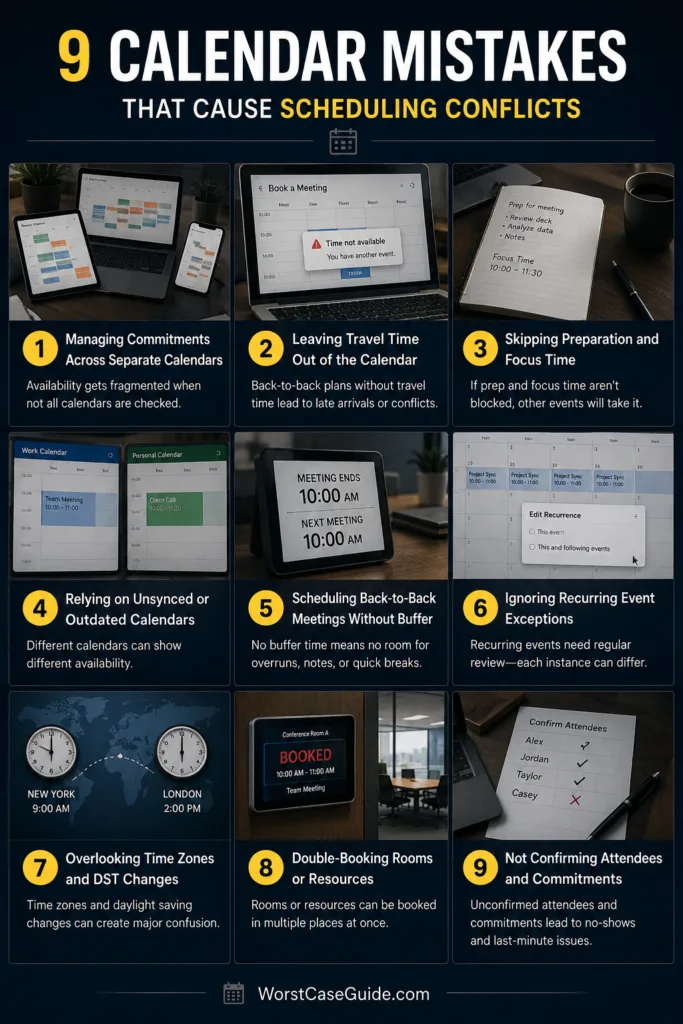
A calendar can look organized and still be unreliable. Scheduling conflicts often begin long before two meetings visibly overlap. A calendar may show an open hour while ignoring travel, preparation, another calendar, a shared room, or a commitment that was never entered. The problem is usually not one bad click. It is a calendar management habit that makes availability look more certain than it really is.
For an individual, that can mean arriving late, moving appointments repeatedly, or losing protected work time. For a team, the same habits can create double bookings, unavailable rooms, confused attendees, missed handoffs, and recurring conflicts that keep returning week after week.
Why Small Calendar Errors Turn Into Scheduling Conflicts
A scheduling conflict is not limited to two events occupying exactly the same time slot. A calendar can also fail when commitments are technically separate but cannot realistically coexist.
- A video call ends at 10:00 and an in-person appointment starts at 10:00 somewhere else.
- A meeting is booked during time that was supposed to be reserved for focused work.
- Two calendars show different versions of the same person’s availability.
- A recurring meeting remains on the calendar even though one occurrence should have moved.
- A room appears available even though another group has already reserved it elsewhere.
The calendar may accept every one of these arrangements. Reality may not.
Common Assumptions That Make Calendar Conflicts More Likely
Several assumptions make calendar problems harder to notice because they sound reasonable at first.
- “If the slot is empty, I am available.” Empty time may still be needed for travel, preparation, meals, focused work, or another calendar.
- “My calendars are synced, so they must agree.” Different services, accounts, devices, and booking tools may not update in the same way or at the same moment.
- “Back-to-back meetings save time.” They remove the space needed for overruns, notes, setup, and movement.
- “A recurring event only needs to be checked once.” Holidays, travel, deadlines, staffing, and room availability can make individual occurrences behave differently.
- “Everyone sees the meeting time the way I do.” Time zones and daylight-saving changes can make that assumption unsafe.
9 Calendar Management Mistakes That Create Scheduling Conflicts
Mistake 1: Managing Commitments Across Separate Calendars Without Reliable Conflict Checking
Personal calendars, work accounts, project calendars, booking platforms, and shared calendars can each contain legitimate commitments. Problems begin when availability is calculated from only one of them.
Why It Happens
People often create separate calendars intentionally. The separation may make sense for privacy or organization, but availability becomes fragmented when a scheduling system cannot see every calendar that contains busy time.
Early Warning Signs
- Appointments need frequent manual corrections.
- A booking page sometimes offers time that is occupied elsewhere.
- People regularly check two or three apps before accepting a meeting.
- Events are copied manually between calendars.
Worst-Case Result
Two people can receive valid confirmations for commitments that require the same person at the same time. One event eventually has to move, sometimes after other attendees have already organized their day around it.
A Safer Approach
If several calendars are necessary, availability can be based on all calendars that contain genuine commitments. Where automatic conflict checking is unavailable, one designated calendar can act as the scheduling reference instead of relying on memory.
Mistake 2: Treating Every Empty Calendar Slot as Real Availability
An empty rectangle between two meetings looks available. That does not mean another commitment will fit inside it.
Why It Happens
Calendars record scheduled events well. They do not automatically understand every activity surrounding those events. Preparation, commuting, equipment setup, follow-up notes, meals, and short recovery periods may remain invisible.
Early Warning Signs
- Meetings regularly start a few minutes late.
- Notes from one meeting are completed during the next one.
- Travel is calculated only after an appointment has been accepted.
- Short gaps disappear as soon as the day begins.
Worst-Case Result
The calendar remains technically conflict-free while the real day becomes impossible to follow. Delays then spread from one appointment to the next like a row of falling dominoes.
A Safer Approach
Availability can include the time around the event, not just the event itself. A meeting that requires preparation or travel may reasonably occupy more calendar space than its official duration suggests.
Mistake 3: Scheduling Meetings Back-to-Back With No Buffer
A calendar filled from 9:00 to 12:00 with three consecutive one-hour meetings looks efficient. It also assumes that every meeting starts instantly, ends exactly on time, requires no notes, and involves no transition.
Why It Happens
Calendar views make adjacent meetings look clean. In practice, even a minor overrun can consume the opening minutes of the next appointment.
Early Warning Signs
- The phrase “I have to jump to another call” appears repeatedly.
- Meetings begin while someone is still leaving another one.
- Attendees join without having reviewed the next agenda.
- Lunch or short breaks vanish from busy days.
Worst-Case Result
One delayed meeting can push several later commitments off schedule. For client-facing work, that may also mean repeated apologies or rushed conversations.
A Safer Approach
Where transitions are predictable, a small buffer can be included when availability is defined. The amount does not need to be identical for every event. A remote check-in may need little transition time, while an in-person appointment may need much more.
Mistake 4: Ignoring Time Zones When Scheduling Across Locations
“Tuesday at 3:00” is clear only when everyone agrees on what 3:00 means.
Why It Happens
Remote teams, clients, travel, device settings, and daylight-saving changes can turn a familiar meeting time into a different local time for someone else. A copied time in a message can also lose the automatic conversion provided by a calendar invitation.
Early Warning Signs
- Meeting times are discussed mainly through messages rather than calendar invitations.
- Attendees frequently ask, “Is that my time or yours?”
- A recurring international meeting suddenly appears unusually early or late.
- People travel while keeping the same recurring schedule.
Worst-Case Result
An attendee can miss the meeting entirely while believing they followed the agreed schedule correctly.
A Safer Approach
For cross-region meetings, the calendar invitation can remain the reference point, with the intended time zone checked before sending. Recurring meetings deserve another look when seasonal clock changes or travel affect participants.
Mistake 5: Creating Recurring Meetings and Rarely Reviewing the Series
Recurring events reduce repetitive scheduling work, but they can also preserve outdated assumptions for months.
Why It Happens
Once a weekly or monthly series exists, individual dates receive less attention. Yet future occurrences may collide with leave, travel, deadlines, changed working hours, room bookings, or another recurring series.
Early Warning Signs
- Individual occurrences are moved frequently.
- A recurring meeting remains even when attendance has become inconsistent.
- Exceptions are communicated in chat but not reflected on the calendar.
- A room or resource changes for only some dates.
Worst-Case Result
The series becomes less trustworthy. People begin checking messages to discover whether a calendar event is still real, which weakens the calendar’s value as the shared schedule.
A Safer Approach
Long-running series can be reviewed periodically, with exceptions changed on the affected occurrence rather than leaving a known conflict in place. If a meeting no longer needs to recur indefinitely, a defined end date may also keep old events from lingering.
Mistake 6: Leaving Tentative Commitments Outside the Calendar
Not every commitment begins as a formal invitation. Someone may agree verbally to “keep Thursday afternoon open” or tell a colleague that 11:00 will probably work.
Why It Happens
People sometimes avoid creating an event until every detail is settled. During that gap, the calendar continues to advertise the same time as available.
Early Warning Signs
- Messages contain phrases such as “hold that time for me.”
- People rely on memory for appointments awaiting confirmation.
- Several meetings are described as “probably happening.”
- A confirmed invitation later replaces something that had never been recorded.
Worst-Case Result
The tentative commitment becomes confirmed after another person has already booked the same slot. Both parties may reasonably believe they were first.
A Safer Approach
A temporary hold or clearly marked tentative event can make uncertain commitments visible without pretending that every detail is final. If the plan falls through, the time becomes available again.
Mistake 7: Forgetting That Rooms, Equipment, and People Can Have Separate Conflicts
A meeting is not always schedulable just because the attendees are free. Some events also depend on a room, vehicle, piece of equipment, specialist, or other shared resource.
Why It Happens
The organizer checks personal availability first and treats the resource as a detail to arrange later. In smaller teams, resources may also be reserved informally rather than through a shared calendar.
Early Warning Signs
- A meeting invitation says that the room is “to be confirmed.”
- Shared resources are tracked in separate messages or spreadsheets.
- Two teams occasionally arrive expecting the same room.
- Organizers change locations shortly before meetings.
Worst-Case Result
Every attendee may be available while the meeting itself still cannot happen as planned. A room collision can force a move, delay the start, or require a new date.
A Safer Approach
When an event depends on a shared resource, resource availability can be treated as part of the scheduling decision rather than a later administrative step.
Mistake 8: Updating a Meeting in One Place but Not Everywhere People Rely on It
A schedule can become inconsistent after a meeting has already been created. The organizer changes the time in one system, mentions the change in a group chat, or sends a new link while an older invitation remains active.
Why It Happens
Rescheduling often happens under time pressure. A fast message feels sufficient, especially when the group is small. The old calendar record then becomes a second version of the plan.
Early Warning Signs
- Attendees ask which invitation is current.
- Old conference links remain in active events.
- Two events with similar names appear on the same day.
- Meeting changes are communicated mainly through chat.
Worst-Case Result
Different attendees follow different versions of the schedule. Some arrive at the old time, some at the new time, and the organizer may not realize the split until the meeting begins.
A Safer Approach
When the original invitation is still usable, changing that event can keep the calendar record, attendee list, location, and meeting link tied to one source. Extra messages can explain the change without becoming a competing schedule.
Mistake 9: Filling the Calendar to Its Maximum Visible Capacity
A calendar with no unused space has almost no room to absorb change. A call runs long. A train is late. An urgent task appears. A colleague needs ten minutes. None of these events must be dramatic to disrupt a tightly packed day.
Why It Happens
Open time can look unproductive, so it gradually gets converted into meetings and appointments. Availability is then measured by whether a slot exists, rather than whether the day can absorb another commitment.
Early Warning Signs
- Nearly every working hour is occupied several days ahead.
- One cancellation feels like the only opportunity to catch up.
- Routine tasks are repeatedly pushed to evenings or another day.
- Minor delays require several later events to be moved.
Worst-Case Result
The schedule becomes brittle. One unexpected change can require several other changes, turning a small disruption into an afternoon of rescheduling.
A Safer Approach
Not every open period has to become bookable time. In a meeting-heavy role, some uncommitted capacity can function as practical scheduling margin. In a quieter schedule, less may be needed. The useful amount depends on how often the day changes after it has been planned.
How These Calendar Mistakes Differ
| Calendar Mistake | Early Problem | Likely Conflict |
|---|---|---|
| Separate calendars | Incomplete availability | Double booking |
| Treating empty time as free | Hidden preparation or travel | Impossible transitions |
| No buffers | Minor delays accumulate | Back-to-back overruns |
| Time-zone mistakes | Different interpretation of the same time | Missed or mistimed meeting |
| Unreviewed recurring events | Outdated future assumptions | Repeated collisions |
| Unrecorded tentative plans | Calendar shows false availability | Two legitimate commitments |
| Ignored shared resources | Attendees are free but resource is not | Room or equipment collision |
| Changes made in different places | Multiple versions of the schedule | Attendees follow different times |
| Maximum calendar capacity | No room for ordinary disruption | Cascading rescheduling |
Risk Patterns Behind Repeated Scheduling Conflicts
When scheduling conflicts happen repeatedly, the visible overlap is often only the final symptom. Several broader patterns tend to sit underneath it.
The Calendar Is Not the Complete Record
If commitments live in messages, memory, secondary accounts, spreadsheets, or informal conversations, the calendar cannot provide reliable availability. A scheduling tool can only protect time it knows exists.
The Schedule Has No Margin for Real Life
Some conflicts are not true double bookings. They are transition conflicts: the events technically fit, but the person cannot realistically move from one to the next in the available time.
Availability Rules Do Not Match Actual Working Patterns
A booking system may be configured for broad working hours even though only part of that period is suitable for meetings. This becomes especially noticeable when focused work, travel, split shifts, or different working locations are part of the week.
Exceptions Are Being Managed Outside the Main Schedule
“This Wednesday is different” sounds harmless. Enough exceptions handled through messages, though, and the official calendar stops reflecting the actual plan. That is when people begin checking multiple places before trusting a date.
When a Scheduling Conflict Is a Warning About the System
An occasional collision can happen even with careful planning. Repeated conflicts tell a different story. If double bookings, late starts, room changes, or rescheduling happen every week, the useful question is not only “Which meeting should move?” It is also: “Why did the calendar allow these commitments to compete in the first place?”
For one person, the answer might be two calendars that do not share availability. For a small team, it may be informal room reservations. In a larger operation, booking channels, shared resources, working hours, and calendar permissions may all affect what appears available.
The safer scheduling pattern is usually the one that reduces hidden information. Commitments become visible, changes stay attached to the real event, relevant calendars are considered, and the schedule contains enough breathing room to survive ordinary delays.
Questions About Calendar Management and Scheduling Conflicts
What is the most common calendar mistake behind double booking?
Using an incomplete view of availability is one of the most common causes. A work calendar may appear open while another account, tentative commitment, booking system, or shared resource already occupies the same time.
Can a schedule have conflicts even when no meetings overlap?
Yes. Travel time, preparation, meeting overruns, resource availability, and back-to-back commitments can make two technically separate events incompatible. These are often harder to notice because the calendar itself may show no overlap.
How much buffer time should be left between calendar events?
There is no single amount that suits every schedule. A short online meeting may need little transition time, while an appointment involving travel or setup may need much more. The useful buffer depends on what normally happens before and after that type of event.
Why do recurring meetings create calendar conflicts?
A recurring series assumes that the same time will continue working in the future. Individual dates may later collide with leave, travel, deadlines, working-hour changes, rooms, or other recurring events. Reviewing exceptions helps keep the series aligned with the real schedule.
Why does a booking page sometimes show time that is not really available?
The booking system may not be checking every calendar or resource that contains busy time. Availability settings can also be broader than the person’s real meeting hours. When several systems are involved, the calendar used for conflict checking matters as much as the booking page itself.