A system setup can look “done” on day one and still plant long-term technical issues that show up months later as slowdowns, outages, or security surprises. The tricky part is that early success often masks fragile assumptions that only break under real load, real people, and real change.
Whether this is a home lab, a business workstation fleet, a SaaS environment, or an internal production stack, the same pattern repeats: small setup shortcuts become hard-to-reverse defaults. That is where technical debt becomes technical drag.
Why System Setup Is Risky In The First Place
Setup decisions are foundational. They define identities, permissions, networking, storage, observability, update paths, and recovery options. If those foundations are implicit instead of explicit, later fixes can require downtime, migration work, or a chain of risky changes that nobody wants to touch.
In smaller projects, a mistake may stay hidden until one critical moment: a drive fails, a password is lost, or an update breaks compatibility. That’s when single points of failure become visible.
In larger systems, setup flaws tend to amplify through scale: more users, more integrations, more data, more moving parts. The cost shows up as operational friction and repeat incidents.
Common Wrong Assumptions
- Defaults are fine because “they’re industry standard.” Defaults are often optimized for speed of installation, not long-term resilience.
- If it boots, it’s stable. Early stability can be accidental, especially without monitoring and change tracking.
- Backups exist because there’s “some copy” somewhere. A copy that cannot be restored under pressure is not a real recovery plan.
- Security can wait until later. “Later” tends to arrive right after exposure increases: new users, remote access, vendor tools, or public endpoints.
- One person will remember how everything works. Memory-based operations do not scale; they decay into tribal knowledge and guesswork.
Risk framing that stays useful: the question is rarely “Will something fail?” It’s “When something fails, will the setup produce clear signals and safe recovery, or will it produce confusion and irreversible loss?”
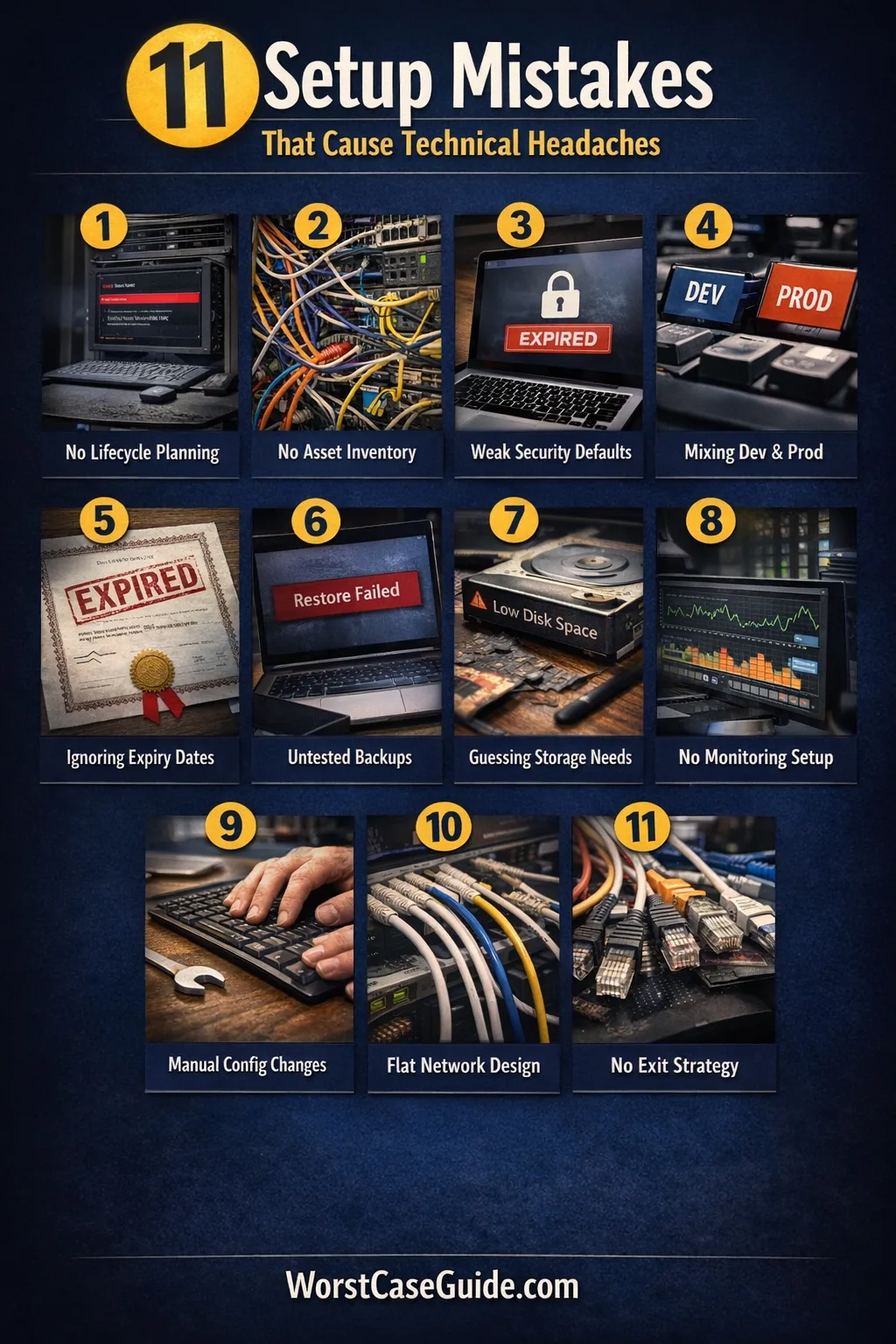
System Setup Mistakes That Cause Long-Term Technical Issues
Mistake 1: Treating Setup As A One-Time Task Instead Of A Lifecycle
Many setups start with a “get it running” mindset. The hidden cost is that the system never gets a defined maintenance rhythm, a change process, or a rollback path.
Why It Happens
- Setup is seen as a project milestone rather than an operating model.
- Ownership is unclear, so routine work is nobody’s job.
Early Warning Signs
- Updates happen only when something breaks; patches feel like emergencies.
- No one can answer “What changed last week?” with evidence.
Worst-Case Outcome
A routine update becomes a major outage, because there’s no tested rollback and no safe maintenance window. The system becomes frozen on old versions until a forced upgrade turns into a risky migration.
A Safer Approach
It can be safer to define a basic lifecycle at setup time: who owns updates, how changes are recorded, what “normal” looks like in metrics, and what the rollback boundary is for each component.
Mistake 2: Skipping A Written Inventory Of What Exists
When the system grows, missing inventory turns everyday operations into archaeology. Unknown dependencies create surprise coupling and unsafe changes.
Why It Happens
- Inventory feels administrative and not “technical.”
- Tools auto-discover some assets, which creates a false sense of coverage.
Early Warning Signs
- Multiple “mystery” services are running with unclear purpose; ports are open “just in case.”
- Credentials exist in scattered places; no single source of truth.
Worst-Case Outcome
A migration or incident response stalls because nobody knows what depends on what. A quick fix knocks out a hidden integration, causing cascading failures and data inconsistencies across systems.
A Safer Approach
A minimal inventory can still be powerful: list components, versions, owners, network exposure, and where secrets live. The goal is not perfection; it is operational visibility.
Mistake 3: Building On Defaults Without A Threat And Access Model
Defaults often ship with convenience in mind: broad permissions, open services, permissive network rules. Without an access model, the setup becomes overexposed by accident.
Why It Happens
- It’s unclear who needs access to what, so everything stays wide open.
- Security is deferred because there is no shared baseline for hardening.
Early Warning Signs
- Single “admin” accounts are used for daily work; no role separation.
- Remote access exists without clear boundaries (VPN, IP allowlists, MFA), and it keeps expanding.
Worst-Case Outcome
A compromised account gains full control because privilege boundaries were never designed. Incident recovery becomes painful: rotating shared credentials, auditing unknown access, and cleaning up persistent footholds.
A Safer Approach
It can be safer to start with a simple model: define roles, default to least privilege, and document what “remote access” means. Even a small setup benefits from account separation and auditable changes.
Mistake 4: Mixing Environments And Data Boundaries
Using one environment for dev, test, and production feels efficient. Over time it produces configuration drift, accidental data edits, and unreliable debugging.

Why It Happens
- Cost and speed pressure encourages “one box does it all.”
- It is hard to define boundaries when naming, networking, and identity weren’t designed for separation.
Early Warning Signs
- Test changes “temporarily” land in production settings.
- Logs are noisy and ambiguous; it’s unclear which environment a message belongs to.
Worst-Case Outcome
A test script modifies production data or a debugging change weakens production security. The result may be silent corruption that is discovered late, when backfill and reconciliation are hard.
A Safer Approach
If full environment duplication is unrealistic, it can still be safer to separate identities, datastores, and network paths. Clear naming and explicit “do-not-touch” boundaries reduce accidental crossovers.
Mistake 5: Not Designing For Time, Certificates, And Identity Expiry
Time sync, certificate renewal, and token lifetimes are easy to ignore until they break. They tend to fail on a schedule: at 2 a.m., during a holiday, or right after a key person is unavailable.
Why It Happens
- Expiry is “future work,” so nobody owns it.
- Time services and certificate automation feel like optional polish.
Early Warning Signs
- Intermittent auth failures; TLS warnings; clock drift between nodes.
- Renewals rely on calendar reminders instead of observable automation.
Worst-Case Outcome
A certificate expires and critical connections fail at once: APIs, dashboards, agents, backups, or SSO. Recovery becomes high-pressure because the system rejects fixes until trust chains and time coherence are restored.
A Safer Approach
It can be safer to treat “time and identity” as core infrastructure: consistent time sources, monitored certificate expiry, and explicit credential rotation paths. The goal is fewer surprises and predictable renewals.
Mistake 6: Creating Backups Without Proving Restores
Backups that are never restored in practice are a common trap. The setup looks safe, but the first real restore can reveal missing permissions, incomplete datasets, or unworkable recovery time.

Why It Happens
- “Backup succeeded” is treated as the end state, not an intermediate checkpoint.
- Restore testing feels disruptive and is postponed.
Early Warning Signs
- There is no documented restore procedure; only a vague idea.
- Backups are stored on the same system or same account with broad access.
Worst-Case Outcome
A failure event turns into permanent data loss or a multi-day outage because restores are incomplete or too slow. In some setups, a ransomware event can encrypt both primary data and reachable backups.
A Safer Approach
Restore testing can be scoped: restore a small representative set, validate integrity, and measure time. It can also be safer to separate backup access from daily admin identities and to track restore success as a first-class signal.
Mistake 7: Setting Storage And Capacity By Guesswork
Capacity rarely fails all at once. It fails as degradation: slow queries, stuck updates, log floods, and subtle performance regressions. If storage is planned by guesswork, the system drifts toward fragile margins.
Why It Happens
- Early usage is small, so growth feels abstract.
- Teams assume “we can expand later,” without knowing the actual expansion constraints.
Early Warning Signs
- Disk usage alerts do not exist, or thresholds are set too late.
- Logs and caches grow without retention rules; backups keep getting bigger and slower.
Worst-Case Outcome
A full disk stops writes, corrupts indices, or breaks upgrades mid-flight. Recovery may require emergency cleanup that deletes useful history, or a rushed migration that introduces new faults.
A Safer Approach
It can be safer to define capacity in terms of growth drivers: log volume, file uploads, database size, and backup footprint. Simple dashboards and retention policies often prevent the “slow squeeze” that leads to sudden failure.
Mistake 8: Leaving Monitoring And Logging As An Afterthought
Without monitoring, the system’s first visible symptom is often user pain. Without usable logs, the first investigation becomes guesswork under time pressure.
Why It Happens
- Monitoring is seen as a “mature” feature, not a setup requirement.
- Teams collect logs, but not in a searchable, consistent, retention-managed way.
Early Warning Signs
- There are no baseline metrics (CPU, memory, disk, latency, error rate) for “normal.”
- Incidents end with “we think it was X,” not “we saw X in data.”
Worst-Case Outcome
Problems compound silently: resource leaks, retry storms, or intermittent failures. By the time it is obvious, the system is unstable and the root cause is buried. That can lead to repeated outages and confidence loss in operations.
A Safer Approach
It can be safer to choose a few high-signal indicators early: uptime checks, latency, error rate, storage, and backup health. Logs become more useful when they include consistent context (service name, environment, request IDs) and have a defined retention plan.
Mistake 9: Allowing Manual, Untracked Configuration Drift
Manual edits are fast. They are also easy to forget, hard to reproduce, and almost impossible to audit later. Over time, drift turns the setup into a unique snowflake that cannot be safely changed.
Why It Happens
- There is no agreed place to store configuration, so people “just fix it on the server.”
- Automation feels heavy for small systems, so drift accumulates quietly.
Early Warning Signs
- Two supposedly identical machines behave differently.
- Rebuilds fail because “it worked last time,” but nobody knows what was changed.
Worst-Case Outcome
A rebuild after hardware failure becomes a multi-day effort because the system cannot be reproduced. Emergency fixes pile up, and the environment becomes unpatchable without breaking unknown dependencies, increasing security risk.
A Safer Approach
Even lightweight change tracking helps: record “what changed, why, when, by whom.” When possible, expressing configuration as code (or at least as versioned files) reduces drift and makes restores and migrations repeatable.
Mistake 10: Designing Networking Without Isolation And Failure Boundaries
Flat networks make things connect easily. They also make failures and exposures spread easily. Without boundaries, a small issue becomes a system-wide issue.
Why It Happens
- Segmentation feels like “enterprise complexity,” so everything shares one trust zone.
- Rules get added over time without a consistent model.
Early Warning Signs
- Many services are reachable from places they don’t need to be.
- Firewall rules are “temporary,” but they never get removed.
Worst-Case Outcome
A compromised device reaches sensitive services, or an internal misconfiguration creates a broad outage. Fixing it later is harder because segmentation requires changing assumptions baked into services, monitoring, and deployments, raising downtime risk.
A Safer Approach
It can be safer to start with simple boundaries: management interfaces separate from user traffic, production separate from test, and least-exposed ports by default. If you are in a home or small office setup, even a basic “trusted vs guest” separation can reduce blast radius and cleanup effort.
Mistake 11: Choosing Tools And Platforms Without An Exit Plan
Tool choice is a setup decision that becomes a long-term constraint. If data formats, integrations, and operational skills become tied to a single vendor or niche platform, the system may become stuck even when needs change.
Why It Happens
- The evaluation focuses on features today, not migration friction later.
- Short-term speed beats long-term portability.
Early Warning Signs
- Key data lives in proprietary formats or is hard to export reliably.
- Only one person knows the platform deeply; operational knowledge is fragile.
Worst-Case Outcome
A required change (compliance requirement, cost increase, product end-of-life, performance limit) forces a rushed migration. The rush increases the chance of data loss, broken integrations, and an extended period of unstable operations.
A Safer Approach
An exit plan can be lightweight: confirm export paths, document critical dependencies, and keep data models understandable outside a single tool. It can also be safer to design integrations around replaceable interfaces rather than platform-specific shortcuts.
Quick Risk Map
| Mistake | Early Signal | Long-Term Impact | Safer Direction |
|---|---|---|---|
| Lifecycle ignored | Updates feel like emergencies | Frozen versions, risky upgrades | Define ownership + rollback |
| No inventory | “Mystery” services and ports | Unsafe changes, stalled recovery | Minimal asset + dependency list |
| Default access | Admin used for daily work | Privilege escalation, weak audit | Roles + least privilege |
| Mixed environments | Test changes leak to prod | Corruption, unreliable debugging | Separate identities + data paths |
| No restore proof | Backups exist, restore unknown | Data loss, long outage | Test restores + measure time |
Small check that prevents big pain: if a system cannot be rebuilt from known steps and known configuration, it is already drifting toward fragility. That does not mean “rewrite everything.” It means identifying the few setup choices that create irreversible dependency and reducing them.
General Risk Patterns To Watch
- Hidden coupling: two components depend on each other in undocumented ways, so changes create surprises and blame loops.
- Unowned fundamentals: backups, updates, certificates, and monitoring exist without clear ownership, so they decay quietly.
- Drift as default: manual changes and “temporary” fixes slowly become the real configuration, reducing repeatability.
- Single-person reliability: systems run because one person remembers. That produces operational risk and brittle handoffs.
- Boundary erosion: networks, roles, and environments start separate, then grow porous through ad-hoc exceptions, increasing blast radius.
FAQ
Which setup mistake tends to create the most expensive fixes later?
Issues tied to recovery and reproducibility often become expensive because they force high-pressure work: rebuilding environments, recovering data, and restoring service under time constraints.

How can someone tell if their “backup” is actually usable?
A usable backup is one that has a proven restore: a documented procedure, a test restore that completes, and a check that the restored data is complete and consistent.
Is environment separation still worth it for small systems?
In small systems, full duplication may be unrealistic, but separation of identities, data stores, and network exposure can still reduce accidental damage and speed up troubleshooting.
What is a practical first step if monitoring is currently “none”?
A practical first step is choosing a few high-signal checks: service availability, error rate, storage usage, and backup health. Those signals build a baseline that makes later investigations less speculative.
Why do defaults become risky over time if they worked initially?
Defaults often assume a narrow scenario: a single admin, minimal exposure, and low change frequency. As users, integrations, and remote access grow, those assumptions break, and the system inherits overly broad permissions and exposure.
How can teams reduce configuration drift without heavy tooling?
Even without complex tooling, recording what changed, why it changed, and where the authoritative config lives can reduce drift. The aim is repeatability and auditability, not perfection.