Backups often look “done” right up until a restore is needed. The risky part is not that systems fail, but that many backup strategies are built around quiet days, not stressful incidents. When something breaks, people discover that their coverage, access, or timelines were assumptions.
This topic attracts “set-and-forget” thinking because backups feel like an insurance policy. In digital systems, the details decide whether a restore is a minor interruption or a service-wide outage. The goal here is clarity, not fear: which oversights create irreversible outcomes, and which signals show up early.
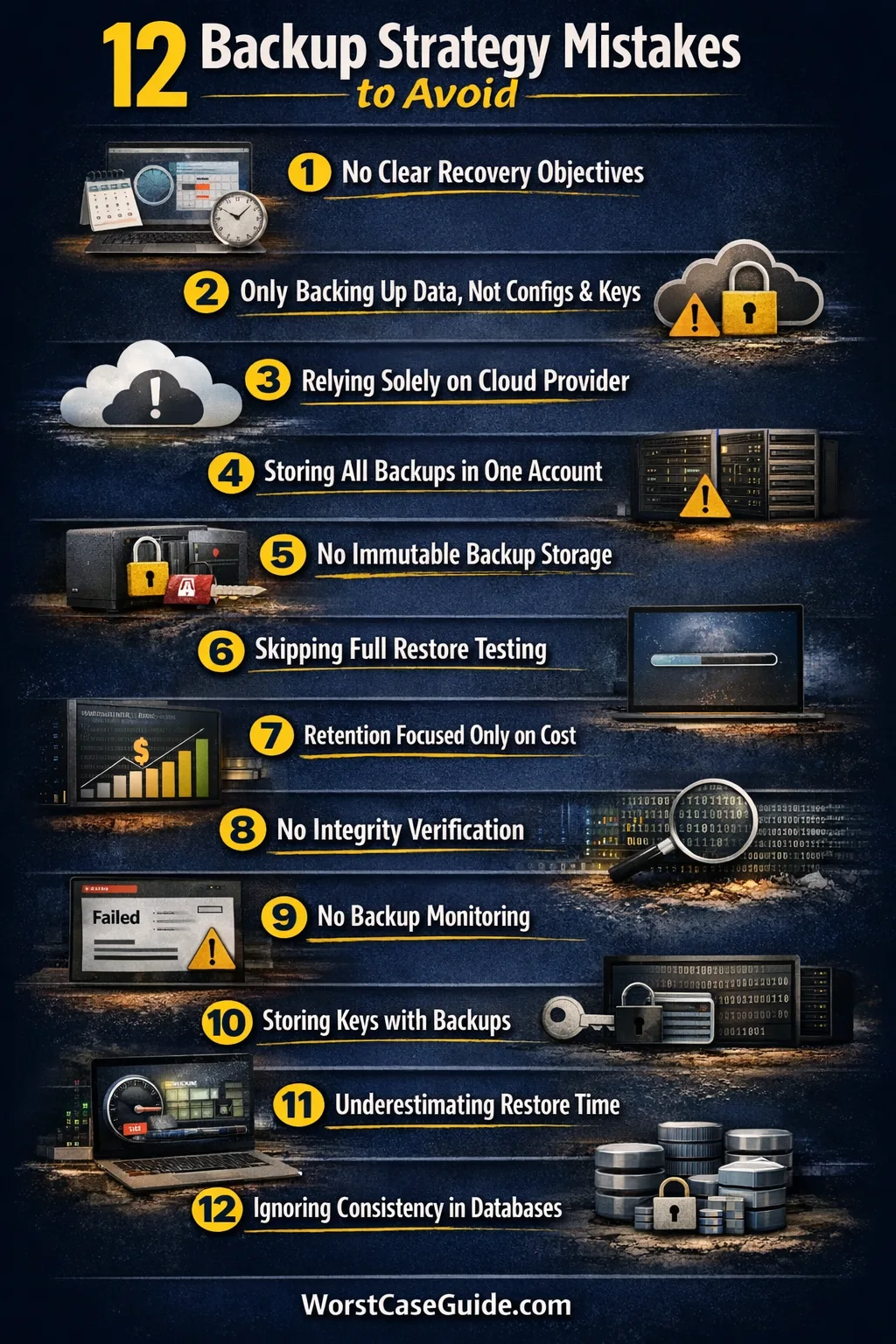
Why Backup Strategy Oversights Become High-Impact Problems
Backup work lives at the intersection of time pressure, complex dependencies, and limited visibility. The “worst case” rarely comes from one missing file; it comes from a chain: the wrong thing was backed up, the right thing was not, access is blocked, and the window to act is short.
In smaller setups, a backup mistake can mean a few hours of rework. In larger systems, the same oversight can spread across multiple services, shared identities, and automation that faithfully replicates the error. The cost is not only data loss; it is also lost trust and a long tail of cleanup.
Common Assumptions That Create Blind Spots
- “If backups are running, restores will work.” Execution and recoverability are not the same.
- “We can rebuild servers, so we only need data.” Configuration, identity, and secrets often decide if rebuilding is realistic.
- “Cloud means the provider has it covered.” Providers handle infrastructure durability, not always your accidental deletes.
- “We’ll figure it out during the incident.” Under stress, undocumented steps become missing knowledge, not flexibility.
- “Ransomware is a security issue, not a backup issue.” If backups share a blast radius, they become part of the same failure domain.
A Quick Map Of Oversights And Their Failure Modes
| Oversight Area | What People Assume | What Breaks First | Safer Signal To Check |
|---|---|---|---|
| Scope | “All important data is included.” | Configs, SaaS exports, and secrets are missing. | Inventory that names systems + data types, not just “servers.” |
| Access | “Admins can restore anytime.” | Credentials are locked, rotated, or deleted. | Separate break-glass access tested in a restore drill. |
| Integrity | “If the job succeeded, the backup is good.” | Corruption is discovered during restore. | Automated verification plus periodic full restore. |
| Isolation | “Backups are safe in the same cloud account.” | Ransomware or admin mistakes delete everything. | Independent storage boundary and immutable retention. |
| Time | “Restore speed will be fine.” | Network, tooling, or data size makes it slow. | Measured RTO from rehearsal, not guesswork. |
Context box: A backup strategy is less about how many copies exist and more about whether a specific failure still leaves a usable copy within an acceptable time window. Two teams can “have backups” and still have very different risk profiles.
The Mistakes That Create The Worst Backup Outcomes
Mistake 1: Leaving Recovery Goals Unstated (RPO/RTO By Accident)
Why it happens: Teams default to tool settings and assume “daily” is acceptable. Without explicit recovery point and recovery time targets, the backup cadence becomes a habit, not a decision.
- Early warning signs: People use vague language like “recent enough” or “should be quick”.
- Worst-case outcome: After an incident, the newest usable restore point is older than expected, and the system is down longer than stakeholders can tolerate.
- Safer approach: Treat RPO/RTO as system-level requirements. In mixed environments, different services can carry different targets rather than one blanket rule.
Mistake 2: Backing Up “Data” But Not The Things That Make Data Usable
Why it happens: File backups are visible and easy to measure. What gets missed is the configuration, infrastructure-as-code state, identity mappings, and secrets that make a restore functional.
- Early warning signs: The backup inventory lists servers and folders, not services and dependencies.
- Worst-case outcome: Data exists, but authentication, permissions, and service wiring cannot be reconstructed quickly, extending downtime and increasing the chance of restoring into an unsafe state.
- Safer approach: Define “restorable unit” per system: data + config + identity + keys as a single package, even if stored in separate places.
Mistake 3: Assuming Cloud And SaaS Providers Cover Your Specific Recovery Needs
Why it happens: “It’s in the cloud” gets translated into “it’s backed up.” Many platforms protect against hardware loss, not against accidental deletion, bad sync, or mis-scoped admin actions.
- Early warning signs: The plan references provider durability, while export/restore steps are undocumented or untested.
- Worst-case outcome: A tenant-level change propagates everywhere, and there is no clean point-in-time rollback for your specific dataset.
- Safer approach: Separate “platform resilience” from customer recovery. For SaaS, that often means periodic exports plus a tested re-import path.
Mistake 4: Keeping All Copies Inside One Administrative Boundary
Why it happens: Centralizing backups in one account feels efficient. It also creates a single control plane where one compromised identity or one mistaken policy change can affect everything.
- Early warning signs: The same admins, the same SSO, and the same network can reach production and backup storage.
- Worst-case outcome: A security incident or a misclick deletes both the primary data and the backups, leaving no trusted restore source.
- Safer approach: Create an independent boundary: separate account, separate credentials, and ideally separate policy ownership for backup retention.
Mistake 5: Skipping Immutability And Treating Backups As Editable Storage
Why it happens: Many storage systems allow deletion, overwrite, and lifecycle changes by default. Without immutability, backups can be altered by malware or by legitimate admin actions during a chaotic incident.
- Early warning signs: Backup repositories allow immediate deletion and changes to retention without multi-party review.
- Worst-case outcome: The organization discovers that the backups were encrypted, deleted, or tampered with at the same time as production data.
- Safer approach: Favor write-once or immutable retention where feasible, and treat retention changes as high-risk operations with clear audit trails.
Mistake 6: Never Running A Full Restore Test Under Realistic Conditions
Why it happens: Backup success is easier to report than restore success. Restore testing can feel disruptive, especially when environments are complex and time is tight. The problem is that unknown gaps remain invisible until the worst moment.
- Early warning signs: Tests are limited to file-level restores or “spot checks,” not a system-level recovery.
- Worst-case outcome: During an outage, the team discovers missing steps, missing keys, incompatible versions, or dependency issues that make the restore fail repeatedly.
- Safer approach: Periodic end-to-end rehearsals that mirror real constraints: limited access, realistic time targets, and the same tooling used in incidents.
Mistake 7: Designing Retention Around Storage Costs Instead Of Failure Reality
Why it happens: Retention often becomes a cost optimization exercise. That can be rational, yet it can ignore the way failures unfold: long-running silent corruption, delayed detection, or slow-moving data errors that require older restore points.
- Early warning signs: Retention is uniform across systems despite different data volatility and detection times.
- Worst-case outcome: The incident is discovered after the “good” restore points have expired, leaving only corrupted or incomplete versions.
- Safer approach: Retention that matches how quickly problems are noticed. Some systems benefit from short frequent points plus a smaller set of longer history.
Mistake 8: Trusting Backup Completion Without Integrity Verification
Why it happens: “Job succeeded” usually means the process ran, not that the output is usable. Corruption can appear from disk issues, transport errors, or application-level inconsistencies, then sit quietly until restore day.
- Early warning signs: No checksum validation, no periodic restore sampling, and no clear definition of what “verified” means.
- Worst-case outcome: The team restores a backup that looks complete but fails mid-way or produces corrupted data, forcing repeated attempts and longer downtime.
- Safer approach: Add automated verification where possible, and couple it with human-visible evidence from restore tests.
Mistake 9: Letting Backups Fail Quietly (No Monitoring, No Useful Alerts)
Why it happens: Backup systems can generate noisy alerts, so teams mute them. Over time, “normal failure” becomes accepted. The risk is that the backup history develops gaps that only show up when a restore is needed.
- Early warning signs: Alerts are based on job count, not on freshness, coverage, and successful verification.
- Worst-case outcome: The organization believes it has weeks of backups, then discovers the last successful restore point is far older than expected.
- Safer approach: Monitor “can we recover?” signals: last good backup, last verified backup, and last tested restore for each critical system.
Mistake 10: Storing Keys And Credentials In The Same Place As The Failure
Why it happens: Convenience pushes everything into the same identity system: encryption keys, backup admin roles, and production credentials. If access is lost, revoked, or compromised, the backups can become unreachable or untrustworthy.
- Early warning signs: There is no distinct break-glass process, and restore access depends on the same SSO that might be down or locked.
- Worst-case outcome: Backups exist but cannot be decrypted, accessed, or trusted, turning a data recovery problem into an access recovery problem.
- Safer approach: Separate restore credentials from daily admin paths. Where encryption is used, ensure keys are recoverable under incident constraints and stored with clear ownership.
Mistake 11: Underestimating Restore Time, Bandwidth, And Hidden Dependencies
Why it happens: Backup time is measured regularly; restore time is often guessed. Real restores depend on network throughput, system rebuild steps, version compatibility, and external services. In large datasets, the bottleneck is often transfer, not tooling.
- Early warning signs: RTO is expressed as a hope rather than a measured result, and restore runbooks omit dependency order.
- Worst-case outcome: The restore technically works, yet it takes so long that the business impact approaches that of permanent loss.
- Safer approach: Measure restore performance periodically. For large systems, explore tiered recovery where core services return first and less critical data follows.
Mistake 12: Treating Point-In-Time Consistency As Optional In Databases And Distributed Systems
Why it happens: Many backups are “crash-consistent” by default. In systems with multiple components, that can capture mismatched states: one service reflects an earlier moment, another reflects a later one. The restore then produces subtle failures rather than obvious errors.
- Early warning signs: The plan does not mention application-consistent snapshots, quiescing, or coordinated capture for multi-node systems.
- Worst-case outcome: The restored environment boots, then exhibits data anomalies, missing records, or broken relationships that are hard to detect and harder to fix.
- Safer approach: Use consistency methods appropriate to the platform: database-native backup tools, transaction logs, or coordinated snapshots, then validate with integrity checks during restore rehearsals.
Risk Patterns That Show Up Across Backup Failures
- Single shared failure domain: Backups live inside the same account, identity, or network as production, so one event hits both.
- Evidence-free confidence: Plans rely on job success rather than restore evidence and verification.
- Scope drift: New services appear, data moves to SaaS, and the backup inventory stays unchanged.
- Time blindness: Recovery is discussed as “possible,” not as “possible within RTO.” Bandwidth and dependency chains get ignored.
- Control-plane fragility: Restores depend on systems that may be degraded during incidents, like SSO, ticketing, or centralized secrets.
A practical mental check: If an incident removes admin access, damages production data, and creates time pressure at the same time, does the backup plan still hold? If the answer depends on “someone remembers,” that dependency is part of the risk.
FAQ
How often should backups run for a digital system?
Frequency is usually tied to tolerable data loss (RPO) and how quickly the system can be restored (RTO). A system that changes constantly may need more frequent points than one that changes slowly, while a system with slow restores may need extra planning even if backups are frequent.

Is “3-2-1 backup” always necessary?
It is a useful risk lens because it forces thinking about multiple copies and at least one independent location. Some environments reach similar resilience with different designs, yet the underlying question stays the same: can one event remove all copies?
What is the difference between backup and disaster recovery?
A backup is a recoverable copy of data or system state. Disaster recovery is the broader ability to restore service within a target time, including people, runbooks, infrastructure, dependencies, and testing. A team can have backups and still have weak DR if restores are slow or undocumented.
Do cloud snapshots count as a complete backup?
Snapshots can be valuable, especially for fast rollback. Whether they are “complete” depends on scope: do they include all required components, do they have retention that matches detection time, and are they isolated from the same admin boundary that could delete them?
What does “restore testing” usually miss?
Tests often miss the ugly parts: credentials, dependency order, performance constraints, and database consistency checks. A test that restores a file is useful, but it does not prove that a full system can return to a stable state within RTO.