Internal links are one of the few website elements you fully control, yet they often fail quietly. The risk is rarely “a site crash.” It’s wasted content, missed discovery, and pages that never earn their place in your site’s ecosystem. When internal linking is inconsistent, search engines and humans both get a distorted map of what matters.
Discoverability is fragile because it depends on pathways, not just pages. A good page with weak internal links can feel like a locked room: it exists, but it’s not reachable in normal browsing patterns, and it doesn’t receive enough context to be understood.
This topic gets riskier as a site grows. In small sites, internal links are often “good enough” by accident. In larger content systems, small linking mistakes compound until entire sections become orphaned, or rankings concentrate around a few obvious hubs.
Why Internal Linking Is Risky In Practice
Internal linking decisions happen everywhere: editors add contextual links, templates add navigation links, product teams add modules, and old content accumulates legacy structure. The risk comes from distributed ownership and invisible outcomes: you don’t “feel” the damage until performance or user flow is already constrained.
If you are in a situation where content is produced faster than it is maintained, internal linking can drift into a pattern where new pages receive attention and older pages gradually lose connectivity. Discoverability doesn’t disappear overnight. It fades.
Common Wrong Assumptions
- “If it’s in the sitemap, it’s discoverable.” (Sitemaps help crawling, not meaningful pathways.)
- “Navigation links are enough.” (Users and crawlers still rely on contextual links to understand relationships.)
- “If a page is good, it will earn links naturally.” (Internal links don’t appear unless someone places them.)
- “More links always means better discovery.” (A page can be overlinked into noise.)
- “Templates solve it.” (Templates can create uniformity, but also repeat the same mistakes at scale.)
Mistakes That Limit Discoverability
Each mistake below describes what typically causes it, what you might notice early, the realistic worst-case outcome, and a safer way to approach the same intent without turning internal linking into a never-ending project.

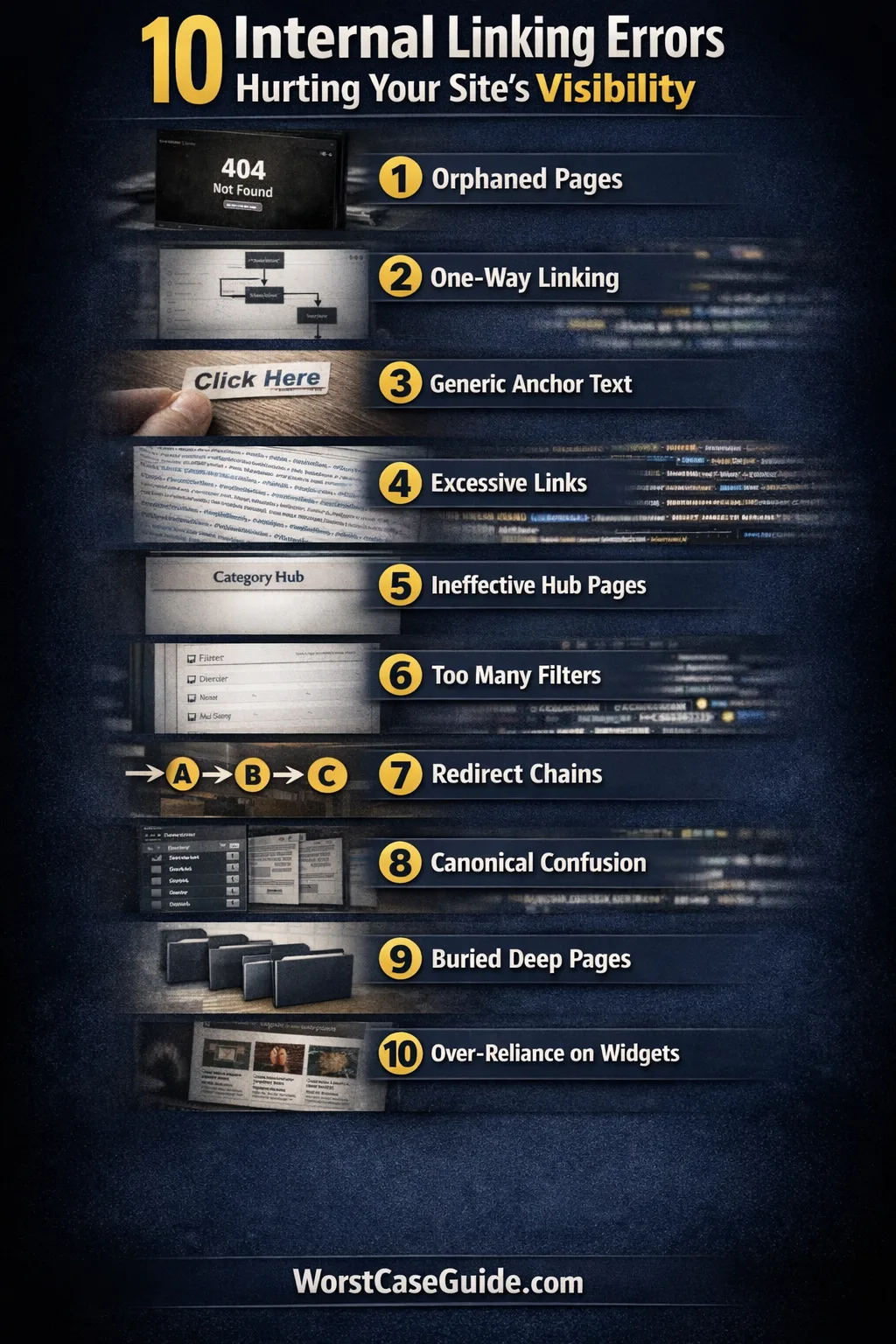
Mistake 1: Letting Important Pages Become Orphans
Why it happens: Pages get published through campaigns, seasonal pushes, or one-off releases, then fall out of editorial routines. If no one adds incoming links, the page relies on search or direct URLs.
Early warning signs: Low internal referral traffic, high bounce rates from search, or “good engagement but low reach.” Another sign is content teams saying “We have a guide for that,” but no one can find it without searching.
Worst-case outcome: High-value pages sit outside the internal link graph, meaning they don’t accumulate authority, don’t get recrawled reliably, and rarely appear as “next steps.” The site slowly becomes a collection of isolated articles rather than a connected system.
A safer approach: If you are in a smaller project, a simple habit works: ensure every new page receives at least a few relevant links from existing pages. In larger systems, think in “homes”: identify the category or hub that should link to it, and the adjacent pages that should cross-link naturally.
Mistake 2: Linking Only “Downward” And Never Back Up
Why it happens: Many sites link from hubs to articles, but not from articles back to hubs. Editors often focus on “related reads” at the end, not structural return paths that help navigation and context.
Early warning signs: Users reach an article and stop. You see long sessions from a few hubs, but the majority of pages behave like dead ends. Crawlers also get fewer reinforcing signals about hierarchy.
Worst-case outcome: Your architecture becomes one-way. Deep pages are easy to reach once, but hard to navigate through. This reduces topic clustering and makes it harder for search engines to recognize which hub is the authority for a topic.
A safer approach: Build a gentle “return path” pattern: in-article references to the hub when it’s truly helpful (not just a breadcrumb copy), and occasional cross-links to peer pages when the relationship is real. In larger systems, a consistent section like “Where this fits” can work when it stays concise and relevant.
Mistake 3: Using Generic Anchor Text That Erases Meaning
Why it happens: Writers default to “click here,” “learn more,” or “this guide” because it feels tidy. Sometimes templates auto-generate anchors that look consistent but carry almost no semantic value.
Early warning signs: In content reviews, you see repeated anchors that could point to almost anything. In user behavior, people skip links because they don’t know what they’ll get. In larger audits, you find dozens of different pages linked with the same anchor phrase.
Worst-case outcome: Internal links stop communicating topic relationships. Search engines lose clarity on what the destination page is about, and users lose confidence in where a link leads. Discoverability suffers because links become decorations instead of signposts.
A safer approach: Anchor text can stay short while still being specific. If you are in a smaller content team, a simple standard helps: the anchor should describe the destination in a way that still makes sense out of context. In larger systems, avoid a single template phrase that appears everywhere; a little variation reduces ambiguity.
Mistake 4: Overlinking Until The Page Becomes Noise
Why it happens: Internal links get treated like a checklist: “add more links.” Editors add links to every possible related term, or plugins auto-link keywords aggressively. The page becomes saturated with choices, not guidance.
Early warning signs: Paragraphs contain multiple links that compete with each other. Users don’t click them, or clicks look random. Editorial discussions start sounding like “we should link to everything” rather than “what should the reader do next.”
Worst-case outcome: Link equity and attention get diluted across too many destinations. Readers lose their sense of a recommended path, and important links become harder to notice. In extreme cases, pages feel spammy even if everything is internal.
A safer approach: Think in tiers: a few primary links that define the journey, and a small number of secondary links for edge cases. If you are dealing with a large library, it can help to limit contextual links to those that materially change what the reader can do next, not merely those that are “related.”

Mistake 5: Building Hubs That Don’t Actually Distribute Discovery
Why it happens: “Hub pages” get created as category landing pages, but remain thin, outdated, or not deeply connected. Sometimes the hub is a visual layout with minimal contextual text, so it doesn’t convey relationships well.
Early warning signs: Hubs have low engagement and low click-through to deeper content. Editors link around the hub instead of through it. Users bypass it via search and never return.
Worst-case outcome: The hub becomes a decorative layer. Instead of improving discoverability, it competes with article pages and creates a second “entry point” that doesn’t help users navigate. Search engines may also get conflicting signals about which page is the center of the topic.
A safer approach: A hub works when it clarifies scope and routes people with intent. If you are in a smaller site, a hub can be a curated list with short explanations of why each link matters. In larger systems, hubs need maintenance rules: what gets featured, how often it’s updated, and how it links to sub-hubs without creating dead ends.
Mistake 6: Relying On Infinite Facets Or Filters As “Internal Links”
Why it happens: Product and content platforms often generate many filtered views (tags, facets, parameters). Teams assume those views create discoverability because they produce lots of URLs and navigable states.
Early warning signs: Filtered pages appear in analytics but have inconsistent engagement. Crawl patterns feel unpredictable. The internal link structure becomes hard to explain without diagrams.
Worst-case outcome: Your discoverability “map” becomes unstable. Important pages compete with countless near-duplicates, and internal linking energy gets spent on pages that don’t deserve to exist as destinations. The site risks becoming crawl-heavy and priority-light.
A safer approach: If you are in this situation, the safer framing is: filters can help users explore, but only a subset of views should be treated as durable destinations. A stable set of curated category or tag pages (with meaningful internal links) tends to produce clearer discovery than unlimited permutations.
Mistake 7: Creating Internal Redirect Chains And “Soft” Dead Ends
Why it happens: Content gets updated, slugs change, categories are restructured, and redirects pile up. Internal links often keep pointing to old URLs because “the redirect handles it.” Over time, you get chains: A → B → C.
Early warning signs: Editors report that links “work” but feel slow. Crawls show many redirected internal URLs. Analytics show inconsistent landing behavior where a page’s URL changes but references don’t.
Worst-case outcome: Discovery slows down. Crawlers spend time resolving internal redirects instead of exploring new pages. Users end up on unexpected versions of content. In larger systems, redirect chains can mask broken paths until they become widespread.
A safer approach: Treat internal links differently than external links. External sites may keep pointing to old URLs, but internal links can usually be updated. If you are operating at scale, periodic checks for internal links that return redirects can reduce hidden friction without requiring a full re-architecture.
Mistake 8: Making Canonical Pages Harder To Reach Than Variants
Why it happens: Teams create multiple versions of similar content: printer-friendly pages, localized variants, “updated” copies, or near-duplicate guides. Internal links end up pointing to whichever version is newest or easiest to find, not the one that should be the primary destination.
Early warning signs: Multiple URLs rank or get traffic for the same topic. Editors disagree on which page to link to. Internal link anchors for a topic point to different destinations depending on who wrote the article.
Worst-case outcome: Discovery fragments. Users land on “okay” pages instead of the best one, and internal links stop consolidating around a clear canonical destination. Search engines receive mixed signals about which page is the authority.
A safer approach: In smaller projects, a lightweight “link target rule” can help: define a single preferred page for each core topic, and link to it unless there’s a specific reason not to. In larger systems, maintain a short list of canonical targets for high-stakes topics and use that as an editorial reference.
Mistake 9: Burying Key Pages Too Deep In The Click Path
Why it happens: The site grows by adding layers: categories, subcategories, pagination, archives. No single change seems harmful, but the result is that some important pages require many steps to reach through normal navigation and linking.
Early warning signs: High-value pages get little internal referral traffic despite being relevant. Users arrive via search but rarely find those pages by browsing. Editors rarely surface them as recommended reading because they’re not top-of-mind.
Worst-case outcome: Discovery becomes biased toward shallow sections. Deep pages may still exist, but they function like a hidden archive. In larger systems, this can lead to a misleading perception of what the site covers, because what’s reachable isn’t aligned with what’s valuable.
A safer approach: Depth is not automatically bad, but it becomes risky when it’s unintentional. If you are in a content-heavy site, it can help to identify a small set of “discovery routes” where key pages are intentionally surfaced: hub pages, cornerstone guides, or curated collections that link deeper than the main navigation typically does.
Mistake 10: Treating “Related Posts” Widgets As A Strategy
Why it happens: Automated related-content modules are easy to add, and they feel like a complete solution. The algorithm may rely on tags, recency, or shallow similarity, which can be useful but also inconsistent.

Early warning signs: The widget often suggests the same few pages, or it suggests loosely related content that doesn’t match user intent. Editors start assuming discovery is handled by automation and stop adding contextual links inside the content itself.
Worst-case outcome: Discovery becomes random. The internal link graph is shaped by a module that optimizes for surface-level relevance rather than a coherent journey. High-value pages may never get featured if they don’t match the widget’s rules, which can create a silent bias toward popular or recent content.
A safer approach: Automated widgets can act as a safety net, not the core. In smaller sites, a short manual “next steps” section can outperform generic related posts because it reflects intent. In larger systems, a hybrid approach often works: automation for long-tail discovery, plus editorial links for critical pathways.
Quick Risk Map
| Pattern | What It Looks Like | Discoverability Impact | Safer Direction |
|---|---|---|---|
| Isolation | Orphans, dead ends, one-off pages | Good content stays invisible | Add incoming links from relevant existing pages |
| Ambiguity | Generic anchors, inconsistent targets | Weak topic signals, low confidence | Use specific anchors and stable canonical targets |
| Dilution | Too many links, too many variants | Attention and authority spread thin | Prioritize primary pathways |
| Automation Drift | Widgets and facets shape the graph | Random discovery, uneven coverage | Pair automation with editorial structure |
General Risk Patterns To Watch
Most internal linking failures share a few patterns. They rarely come from bad intent; they come from default behaviors that go unchallenged.
- Ownership gaps: No one “owns” internal links over time, so the graph reflects who published last, not what matters.
- Local optimization: Each page links to what seems useful locally, but the system lacks a global map of priorities.
- Recency bias: New content gets linked, old content decays, even when the older content is the better destination.
- Uniform templates: Template links add consistency, but also replicate blind spots across thousands of pages.
- Ambiguous intent: Links exist, but they don’t communicate what the user will gain by clicking.
Small Check That Often Reveals The Real Problem
If you pick one high-value page and trace how a normal person would reach it (without search), you often discover the real issue fast: either the path doesn’t exist, it’s too long, or it relies on links that are unclear and easy to miss. This kind of simple pathway thinking tends to surface systemic gaps without needing a full audit.
FAQ
Do internal links matter if users mostly arrive from Google?
They can still matter because internal links shape what people do after landing. If a visitor arrives on a deep page, internal links influence whether they discover related pages, trust the site’s scope, and stay long enough to explore. They also help search engines understand relationships between pages.
How many internal links on a page is “too many”?
There isn’t a universal number that fits every page. The risk tends to appear when links stop acting like guidance and start acting like clutter. If you see multiple links competing for the same decision, or users rarely click any of them, it may indicate overlinking rather than helpful discovery.
Are navigation menus enough for internal linking?
Menus help with access, but they often don’t explain why one page is related to another. Contextual links inside content can carry more meaning, especially for topic clusters and deeper discovery paths.
Do breadcrumbs replace contextual internal links?
Breadcrumbs can clarify hierarchy, but they usually point to broad levels rather than specific next steps. They are often a navigation aid, not a discovery engine. Contextual links can introduce peer pages, deeper guides, or the canonical destination for a topic.
Should older content be updated mainly for internal links?
It depends on the role of the page. If an older page is a strong match for current intent, internal links can help it stay connected and discoverable. If the page is outdated or redundant, adding links may simply keep the wrong content alive. The safer framing is to link toward the best destination, not the most convenient one.