A renovation schedule can look simple on paper, then stretch for weeks because the timeline is really a chain of dependencies. One late decision, one missing inspection, one trade arriving out of order—each can ripple across the whole plan. The goal here is not to predict disaster, but to make delay risk visible so timing choices feel informed and controlled.
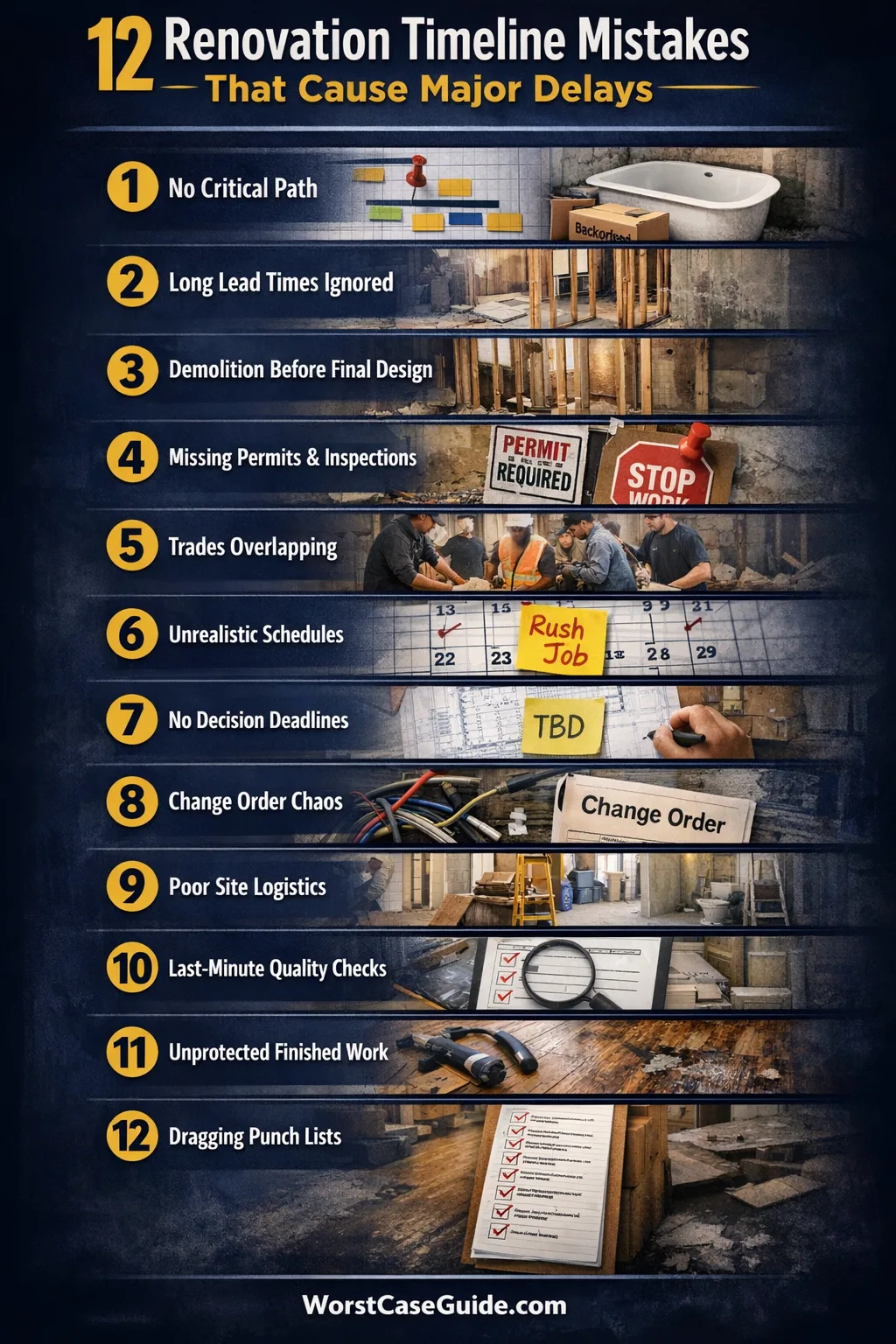
Most delays are not caused by “bad luck.” They come from avoidable planning gaps, unclear scope, and optimistic assumptions about availability. A timeline becomes safer when it reflects real lead times, real handoffs, and real constraints.
Why Renovation Timelines Become Risky
Renovations mix sequential work (one step must finish before the next) with variable work (each home, wall, and subfloor behaves differently). Add external gates like permits, inspections, and deliveries, and the schedule stops being a straight line. A plan that ignores these gates often creates idle days, surprise rework, and compressed finishing stages.
Timing risk rises when the project is “mostly done” but waiting on one blocker: a backordered fixture, a missing approval, or a trade that can only return in two weeks. These blockers feel small, yet they can freeze the entire critical path and push every downstream milestone.
Common Wrong Assumptions That Create Delays
- “The schedule is mostly about labor; materials are easy.” Lead times and returns often say otherwise.
- “Trades can swap days freely.” Many work in fixed routes with tight stacks of jobs and limited crew size.
- “Permits and inspections are just paperwork.” They can be hard gates that stop progress until approved.
- “Design decisions can happen later.” Late choices tend to trigger change orders, reordering, and rework.
- “A ‘buffer’ means adding a few days at the end.” Buffers matter more at handoffs and unknowns than at the finish line.
Renovation Timeline Mistakes That Delay Entire Projects
The mistakes below are ordered the way they tend to appear in real projects: early planning gaps first, then execution issues, then finishing-stage traps. If the project is small, some items stay contained. If it is a larger system (kitchen + bath + flooring, or structural work), these mistakes often stack and amplify schedule slip.

Mistake 1: Building A Timeline Without A Real “Critical Path”
Why it happens: Renovation timelines are often written as a list of tasks, not a map of dependencies on the critical path. The plan looks complete while the true blockers remain hidden. Early warning signs: many tasks “start soon,” few have fixed start dates, and trade sequencing is vague.
Worst-case result: a single missed prerequisite (like a rough-in not finished) freezes multiple trades, creating idle time and rebooking gaps that add weeks rather than days. Safer approach: treating the schedule as a dependency chain—what must be done before what—tends to reveal the few steps that actually control completion.
Mistake 2: Underestimating Lead Times For Long-Pole Items
Why it happens: People assume fixtures and finishes are “off-the-shelf,” then discover special sizes, colors, or matching sets have weeks of lead time. Appliances, custom cabinetry, windows, tile lots, and specialty hardware frequently behave like long-pole items. Early warning signs: product choices aren’t finalized, SKU details are missing, or “estimated delivery” is the only date in the plan.
Worst-case result: the job reaches a finishing stage, then stalls because one item is unavailable, forcing temporary workarounds and extra visits. Safer approach: the timeline becomes sturdier when any item that could stop downstream work is tracked by order date, confirmed ship date, and arrival check—not just a hope that it shows up.
Mistake 3: Scheduling Demolition Before Design And Selections Are Locked
Why it happens: Demolition feels like “starting,” so it gets pulled forward even while layout decisions, fixture specs, and details are still fluid. This often creates a gap between what was removed and what the build actually needs. Early warning signs: the plan says “TBD” for key selections, drawings are still changing, or measurements are not yet verified on site.
Worst-case result: demo reveals constraints (plumbing routes, framing, uneven floors) that force redesign, causing reordering and rescheduling. Safer approach: a calmer start often comes from treating demolition as a commitment point: once walls are open, the project is exposed to unknowns that are costly to pause around. A timeline that waits for decision completeness tends to reduce midstream rework.
Mistake 4: Ignoring Permit And Inspection Gates In The Schedule
Why it happens: Permits and inspections are treated as “background admin,” so the timeline lists construction tasks but omits the approval steps that control when work may proceed. Even when everything is built correctly, the project can be stopped by a missing sign-off. Early warning signs: no inspection windows are shown, no one is responsible for booking, or required documentation is unclear.
Worst-case result: completed work sits untouched while the next step cannot legally or practically begin, and trades move on to other jobs. Safer approach: schedules tend to hold better when permit milestones and inspection bookings are treated like hard dates with realistic lead time and contingency for re-inspection.
Mistake 5: Overlapping Trades Without Clear “Ready Conditions”
Why it happens: To save time, multiple trades are stacked into the same days, assuming they can “work around” each other. In practice, many tasks have ready conditions: dry time, cured surfaces, protected areas, clear access, and a clean workspace. Early warning signs: frequent site congestion, tool-sharing conflicts, or repeated “we can’t start until…” messages from different crews.
Worst-case result: work quality drops, finished surfaces get damaged, and rework adds more time than the overlap saved. Safer approach: overlap tends to work only when the plan specifies exactly what “ready” means (e.g., walls primed, floor protected, power available) and who verifies that condition before the next trade arrives. That clarity lowers handoff friction and reduces schedule thrash.
Mistake 6: Planning For “Ideal Productivity” Instead Of Real-World Variability
Why it happens: Task durations are estimated as if everything is standard—flat floors, square walls, perfect access, and no interruptions. Homes often aren’t standard. Corners are out of plumb, old materials behave unpredictably, and small repairs appear once surfaces are opened. Early warning signs: the timeline has tight daily targets, no slack for corrections, and many tasks pinned to best-case production rates.

Worst-case result: early tasks slip by a day or two each, then the finish stage becomes compressed and stressful, with longer punch lists and re-visits. Safer approach: variability becomes easier to absorb when the schedule includes buffer time near unknown-heavy steps (demo, framing fixes, subfloor leveling) rather than only at the end. That makes the plan more resilient without becoming inflated.

Mistake 7: Not Defining Decision Deadlines And Ownership
Why it happens: Decisions are assumed to happen “as the project goes,” but choices that affect ordering, rough-ins, or layout often need to be made much earlier. Without a clear owner, decisions get delayed by small uncertainties, missed emails, or waiting for another opinion. Early warning signs: repeated “still deciding” updates, selection lists that remain incomplete, or approvals that happen verbally but aren’t confirmed.
Worst-case result: trades complete what they can, then pause, and returning later becomes a scheduling problem—especially when the pause is caused by a single missing spec. Safer approach: timelines are usually steadier when each decision has a deadline, a named decision-maker, and a fallback option if the preferred choice cannot be delivered within the needed window.
Mistake 8: Treating Change Orders As “Small Tweaks” With No Schedule Cost
Why it happens: A change order is often framed as a minor adjustment—move a light, swap a tile, shift a cabinet—without acknowledging the schedule impact of rework, reordering, and reinspection. The cost isn’t only the changed task; it’s the ripple through the sequence and booked trade days. Early warning signs: frequent late changes, unclear documentation, or “we’ll just fit it in” language around scope updates.
Worst-case result: work is undone and redone, the site becomes a cycle of revisits, and the finish date keeps moving because downstream trades can’t lock their slots. Safer approach: changes tend to be less disruptive when they are evaluated as schedule events: what must be redone, what approvals are needed, what materials must be reordered, and what the new critical path becomes. That framing supports predictability and reduces hidden delay debt.
Mistake 9: Forgetting Site Logistics That Control Work Speed
Why it happens: The plan assumes labor is available, but the site may not be: limited parking, building elevator rules, noisy-hour restrictions, dust control needs, disposal limits, or shared access in occupied homes. These constraints slow down daily production and create extra coordination steps. Early warning signs: crews arrive late due to access issues, materials are stored far from the work area, or cleanup consumes a large part of each day.
Worst-case result: trades shorten their on-site time, stretch tasks across more days, and avoid returning for small items—creating a longer tail of unfinished work. Safer approach: timelines tend to hold better when logistics are treated as part of the schedule: access windows, staging areas, waste runs, protection time, and who is responsible for keeping the site ready for the next task. This reduces avoidable friction and supports steady throughput.
Mistake 10: Leaving Quality Checks Until The Very End
Why it happens: Inspections and checks are postponed because the team wants to “keep moving.” Problems then surface late, when fixing them requires ripping out finished work. Small misalignments, wrong rough-in heights, and uneven surfaces are easier to address earlier. Early warning signs: punch list items are discovered in batches, new finishes cover unverified work, or measurements are assumed rather than confirmed.
Worst-case result: the project enters a rework loop: fix one item, uncover another, reorder parts, wait, and revisit. The finish stage becomes the longest stage. Safer approach: many delays shrink when checkpoints are placed at natural handoffs (after rough-in, after waterproofing, before tile, before paint). Frequent small validations reduce late surprises and help keep downstream tasks on their planned dates.
Mistake 11: Not Protecting Completed Work, Creating Rework And Re-Scheduling
Why it happens: Protection feels like extra time, so floors, counters, and newly painted surfaces are left vulnerable while other trades continue. Damage triggers repairs, touch-ups, and re-visits that rarely fit neatly into the existing plan. Early warning signs: scuffs appear quickly, dust control is inconsistent, or different crews have different expectations about what areas are “off limits.”
Worst-case result: the schedule fills with unplanned micro-tasks—patching, repainting, replacing trim—stretching the end date and increasing coordination overhead. Safer approach: timelines stay cleaner when protection is scheduled as a real task with clear responsibility and materials ready. A small investment in site discipline often prevents a long tail of touch-up work and rescheduling.
Mistake 12: Assuming The Final 10% Is Fast, Then Getting Trapped In Punch-List Drag
Why it happens: The last stage has many small dependencies: final fixtures, caulk, paint touch-ups, hardware, appliance hookups, and minor adjustments. Each item is quick alone, yet coordination between them is slow. If trades are scheduled tightly elsewhere, small punch-list items wait for the next open slot. Early warning signs: the plan has a short “finishing” block, incomplete delivery confirmations, or final walkthroughs are delayed because “a few things” remain.
Worst-case result: the project is functionally close to done but not usable or sign-off ready, extending living disruption and increasing the number of site visits. Safer approach: the finish stage is easier to manage when it is treated as its own mini-project with a defined list, clear acceptance criteria, and realistic time for coordination. That tends to reduce endless “one more trip” scheduling and keeps closeout from drifting.
Quick Diagnostic Table: Delay Triggers And What They Usually Mean
| Trigger | What It Often Signals | What To Clarify Next |
|---|---|---|
| “We’re waiting on one item.” | Critical-path blocker masked as a small detail | Which downstream tasks cannot proceed without it? |
| Trades keep “coming back later.” | Handoffs are unclear or site readiness is inconsistent | What ‘ready’ condition is missing each time? |
| Finishes start before checks. | Quality risk moving downstream | Which checkpoint could catch issues earlier? |
| Schedule has one big buffer at the end. | Unknowns not accounted for where they occur | Where are the true unknown-heavy steps? |
| Selections are “in progress” during build. | Decision latency likely to create gaps | Which decisions affect ordering and rough-ins? |
Common Delay Patterns That Repeat Across Projects
Hidden dependencies: Work looks parallel until one prerequisite becomes unavoidable. Many delays come from not naming the gate steps and their owners. Pattern clue: lots of activity, little visible progress.

Decision latency: The calendar can move faster than decision-making. When choices arrive late, the project pays in rework, rescheduling, and reordering. Pattern clue: the same question is asked repeatedly because no one feels confident to finalize it.
Revisit loops: Small incomplete items create repeated trips. Each revisit adds coordination overhead and often lands behind higher-priority work. Pattern clue: the project feels “almost done” for a long stretch with scattered unfinished details.
Compression at the end: When earlier steps slip, finishing tasks get squeezed. That stage then expands because many items need calm, clean conditions to complete well. Pattern clue: the timeline shows a short final phase, but the punch list grows daily and protection/cleanup becomes constant.
Small project vs. larger system: In a small refresh (paint + fixtures), a late delivery might add a few days. In a larger renovation (structural, multiple rooms, major MEP), the same delay can block multiple trades and push the entire sequence. The difference is usually the number of dependencies tied to one decision or one long-lead item.
FAQ
How early should long-lead items be selected to avoid schedule slip?
It depends on the critical path and the item’s confirmed lead time. Items that block rough-ins, cabinetry, or final hookups usually matter earlier than most people expect. A practical approach is to tie each long-lead choice to the latest order date that still supports the planned install window.
Why do projects slow down near the end even when “most work” is finished?
The final phase has many small dependencies and more coordination than visible construction. One missing part can pause multiple closeout tasks. When trades have to return for short items, the calendar often stretches due to rebooking friction.
Is it normal for inspections to change the schedule?
Inspections can act as gates that decide when the next step may begin. Even a well-built project can wait if booking windows are tight or if a recheck is needed. Timelines tend to be steadier when inspections are treated as scheduled milestones with time buffers.
What usually causes trades to miss planned dates?
Common causes include unclear ready conditions, site access issues, and upstream tasks slipping. Trades often schedule multiple jobs in a route, so a one-day slip can turn into a multi-day gap if the next slot is not available. Clear handoffs and confirmed materials reduce this risk.
How can change orders be handled without derailing the timeline?
Change orders tend to stay contained when their schedule impact is mapped, not guessed: rework steps, new lead times, and any approval gates. When the new critical path is visible, it becomes easier to understand which tasks shift and which ones remain stable. That visibility limits hidden delay debt.
What’s a realistic way to use buffer time in a renovation schedule?
Buffers usually help most when placed near unknown-heavy steps (demo discoveries, leveling, repairs) and at key handoffs between trades. A single large buffer at the end can mask problems until they become urgent. Distributed buffers support a more stable flow.