Configuration is the quiet layer that decides whether a digital workflow behaves like a reliable system or a fragile chain of assumptions. When a workflow fails, the “bug” often isn’t in the code—it’s in the settings, the environment, or the invisible defaults nobody revisited. The risk is rarely dramatic; it’s usually gradual drift, small mismatches, and one missing permission.
Digital workflows tend to span multiple tools, integrations, and handoffs. That makes configuration a high-leverage surface: a single change can alter data flow, access, or timing across everything connected to it.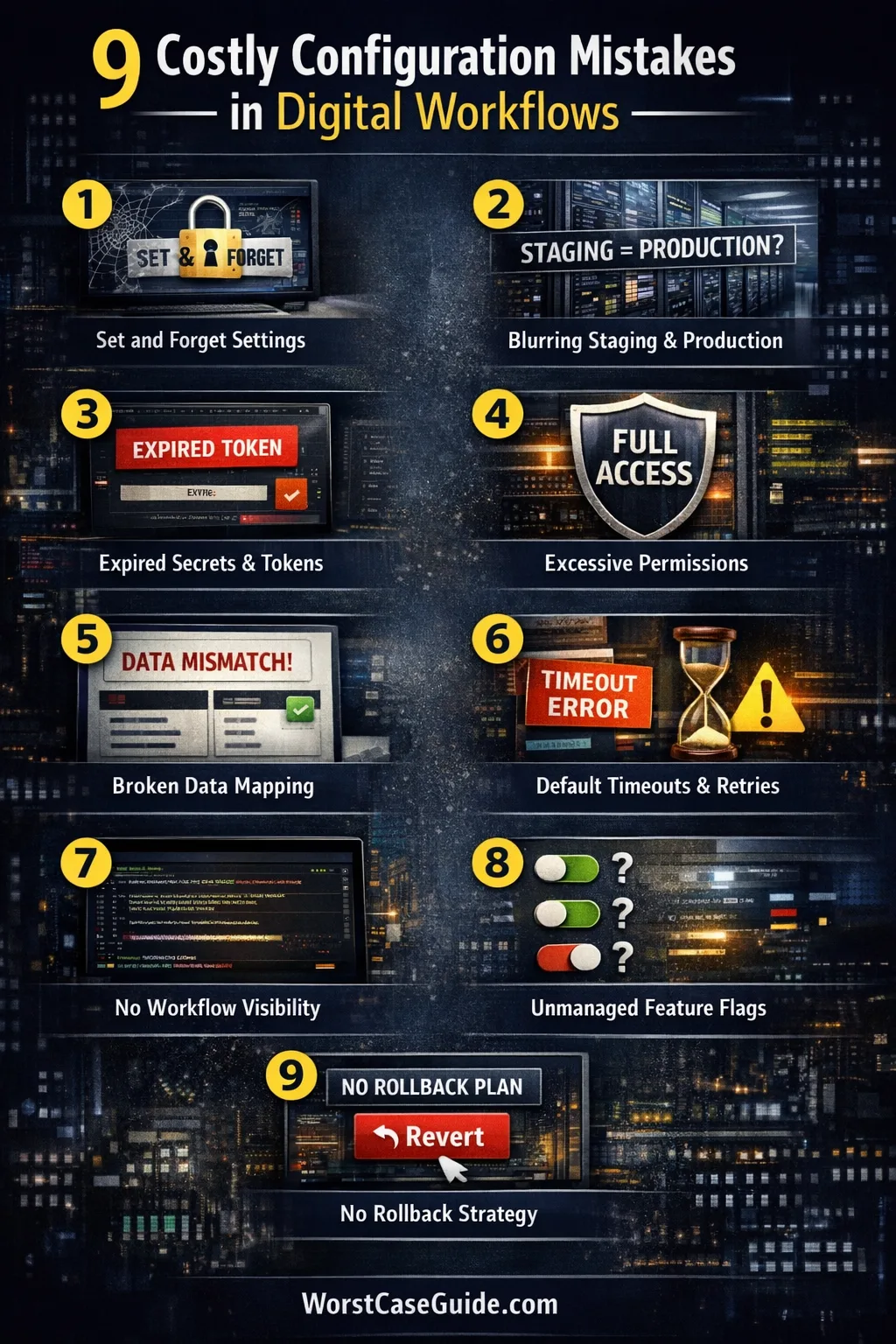
Why Configuration Breakage Is Hard To Notice Early
Configuration problems often hide behind partial success: one step works, the next quietly fails, and the workflow continues with missing data or stale state. In smaller setups, this looks like “occasional glitches.” In larger systems, it becomes silent corruption, unexplained delays, or unexpected access gaps.Another issue is ownership. Workflows frequently cross team boundaries—ops, product, IT, vendors—so configuration ends up split across dashboards, admin panels, and IaC repositories. Each part can be “correct” on its own while the overall workflow is misaligned in behavior and expectations.Common Assumptions That Quietly Create Disruptions
- “If it worked once, it will keep working.” Temporary credentials and timeouts disagree with that assumption.
- “Defaults are safe.” Defaults optimize for convenience, not always your workflow’s constraints or compliance needs.
- “A setting change is reversible.” Some changes alter data formats, permissions, or downstream expectations.
- “Staging matches production.” Many environments differ in secrets, identity, and traffic patterns.
- “Monitoring will catch it.” Monitoring often detects hard failures, not degraded correctness or missing events.
A Quick Risk Map Of Where Configuration Breakage Starts
| Area | Typical Misconfiguration | What Breaks | Quick Check |
|---|---|---|---|
| Identity & Access | Overly broad or missing roles | Automations fail or overreach | Audit least privilege vs real tasks |
| Environment Variables | Wrong endpoint or region | Calls go to the wrong system | Compare staging vs production values |
| Webhooks & Events | Invalid signature or filtered events | Workflows stop triggering | Verify event delivery and retries |
| Rate Limits & Timeouts | Timeouts too short / retries too aggressive | Random failures and backlog | Check latency distribution vs timeout |
| Data Mapping | Field names drift; schemas differ by version | Wrong data sent downstream | Validate payload at boundaries |
Practical framing: Most disruptive configuration failures are not “everything is down.” They are “everything is half-working” with incorrect outputs, delayed processing, or inconsistent access.

The 9 Configuration Mistakes That Disrupt Digital Workflows
Mistake 1: Treating Configuration As “Set And Forget”
Workflows evolve, but configuration often stays frozen as historical baggage. A setting that was fine with 200 tasks can fail with 20,000, especially when timeouts and quotas come into play.Why It Happens
- Configuration is seen as plumbing, not part of the system design or quality.
- Ownership is unclear: “IT owns it,” “Ops owns it,” “Vendor owns it.”
Early Warning Signs
- Increasing manual interventions to “unstick” queues or sync jobs.
- More “sporadic” failures during peak load or deployment windows.
Worst-Case Result
The workflow becomes unreliable by default, so teams build workarounds and parallel processes. Over time, the organization trusts people more than the system, and operational cost grows.A Safer Approach
Some teams treat configuration like living infrastructure: periodic reviews tied to volume changes, vendor updates, and new integrations. The goal is less “perfect settings” and more “settings that still fit today’s workflow.”Mistake 2: Mixing Environments Until “Staging” Isn’t Real Anymore
When staging shares credentials, endpoints, or data with production, tests stop representing reality. The workflow may “pass” in staging and still fail in production due to identity and traffic differences.Why It Happens
- Convenience: reusing API keys or webhook URLs saves time.
- Cost: limited vendor plans restrict separate environments.
Early Warning Signs
- Staging has unexpected access to production resources.
- Incidents start with “We tested it in staging” and end with “but production behaved differently.”
Worst-Case Result
Staging changes leak into production and cause data pollution, wrong notifications, or unintended access. The workflow stays “up,” but the outputs become untrustworthy and hard to undo.A Safer Approach
Where separate environments are feasible, a common pattern is hard isolation: distinct credentials, distinct endpoints, and a clear data boundary. Where it isn’t feasible, teams often rely on explicit safety rails (like non-production identifiers and blocked outbound actions).Mistake 3: Letting Secrets And Tokens Expire Without A Renewal Story
Many disruptions aren’t caused by a mistake in logic, but by expired credentials. API keys rotate, OAuth tokens expire, certificates reach end-of-life. If renewal is handled as an ad hoc task, the workflow depends on luck.Why It Happens
- Secrets are stored in too many places: dashboards, scripts, CI variables.
- Expiration dates are not visible to people who feel the outage.
Early Warning Signs
- Recurring “Unauthorized” or “Invalid token” spikes.
- Fixes involve copying keys from someone’s notes or old chat threads.
Worst-Case Result
A critical workflow stops at the worst time (end-of-month, release week, high-volume period). The recovery path requires multiple approvals or vendor support, so downtime extends into hours or days.A Safer Approach
Some setups reduce surprise by keeping secrets in a single managed place, tracking rotation windows, and validating renewal in a non-production environment first. The emphasis is on repeatable renewal, not heroics.Mistake 4: Over-Permissioning “To Avoid Breakage”
Granting broad permissions can make workflows start working quickly. It also makes it harder to understand what the workflow actually needs. When a credential is compromised or misused, the blast radius becomes larger than expected—without anyone realizing the configuration decision created it.Why It Happens
- Pressure to ship: “Give it admin for now.”
- Roles are confusing; least privilege feels like slow progress.
Early Warning Signs
- The automation account can access systems it doesn’t touch.
- There is no audit trail of which workflow uses which permission.
Worst-Case Result
A misfire (bad mapping, wrong environment, wrong script) performs high-impact actions: deletions, bulk updates, or sending data to the wrong place. Even without malicious intent, the incident looks like a security event and triggers costly response and trust loss.A Safer Approach
A safer pattern often starts with minimum viable permissions, then expands only when a real need is observed. Some teams also separate credentials by workflow step, so one misconfiguration does not automatically grant full-system impact.Mistake 5: Building “Magic Mappings” With No Contract For Data Shape
Many workflows rely on mapping fields between systems—CRM to ticketing, forms to spreadsheets, events to Slack. When mapping is done as a one-time setup without a contract for schema changes, it becomes fragile. A renamed field can turn correct automation into quietly wrong automation.Why It Happens
- UI-based mapping tools hide complexity behind friendly screens.
- Teams assume fields are stable, but vendors release changes and teams modify forms.
Early Warning Signs
- Downstream systems show empty or default values where meaningful data should appear.
- People start “fixing” records by hand after the automation runs.
Worst-Case Result
Bad data enters systems at scale: incorrect routing, wrong permissions, wrong statuses. The workflow still “runs,” but undoing it requires manual cleanup and careful verification, because not everything is easily reversible.A Safer Approach
Where possible, teams reduce ambiguity by defining a data contract: required fields, allowed formats, and validation at boundaries. For UI-based tools, periodic sampling of real payloads can reveal drift before it becomes systemic.Mistake 6: Relying On Default Retries, Timeouts, And Queues
Defaults are rarely tuned for your latency, your vendor limits, or your failure modes. Short timeouts can cause false failures; aggressive retries can create load spikes; long queues can hide problems until they become backlog crises.Why It Happens
- Timeouts and retries feel like “advanced settings.”
- Teams optimize for a single success case, not for degraded states.
Early Warning Signs
- Failures cluster during high traffic, while off-peak looks fine.
- Queue length grows slowly, then suddenly becomes unmanageable.
Worst-Case Result
Workflow processing becomes delayed by hours. Users receive outdated notifications, operations act on stale data, and multiple systems “disagree” about the current truth. This is a coordination failure more than a simple outage.A Safer Approach
Some teams treat retries and timeouts as business rules: “How late is too late?” and “What happens when a step can’t complete?” Tuning choices then match the workflow’s real tolerance for delay and error.Mistake 7: Making Configuration Changes Without Observability For The Workflow Itself
Many systems have logs. Fewer have workflow-level visibility: what was triggered, what ran, what failed, what was skipped, and what output was produced. Without this, a configuration change can degrade correctness while dashboards remain calm.Why It Happens
- Observability is implemented at the service level, not at the business workflow level.
- Integrations span vendors, making end-to-end tracing feel difficult.
Early Warning Signs
- People learn about failures from users, not from monitoring.
- Incidents take hours because nobody can confidently answer “What exactly happened?”
Worst-Case Result
A workflow runs incorrectly for days. Outputs are trusted until someone spots anomalies. Fixing the configuration stops future damage, but historical effects remain and require auditing and reconciliation.A Safer Approach
A safer approach often includes workflow traces (IDs, timestamps, key decisions), and meaningful alerts tied to outcomes, not only to system uptime. Even lightweight metrics—counts of triggers, successes, failures—can make configuration changes less blind.Mistake 8: Feature Flags And Toggles With No Clear Scope Or Expiry
Feature flags, toggles, and “temporary switches” are useful until they become permanent. When flags pile up, configuration turns into a hidden rule engine. People stop knowing which behavior is active where, and changes become risky because they interact with unknown states.Why It Happens
- Flags are created quickly, but retiring them is rarely prioritized.
- Scope rules (per region, per team, per plan) become complex and poorly documented.
Early Warning Signs
- Two environments behave differently and nobody can explain why.
- Rollbacks require toggling multiple settings with uncertain order.
Worst-Case Result
A configuration change activates an unintended combination of flags, producing unpredictable workflow behavior. The system becomes hard to troubleshoot because “reproducing the issue” requires recreating a specific state of toggles and conditions.A Safer Approach
Some teams reduce toggle risk by keeping flags scoped, documented, and time-bound. Even a simple practice—adding an “expiry expectation” and revisiting active flags periodically—can prevent configuration from turning into an unowned maze.Mistake 9: No Rollback Plan For Configuration, Only For Code
Deployments often have a rollback story. Configuration changes often don’t. When a configuration update breaks workflows, teams scramble to remember the previous values, which panel they were in, and which settings were related. That delay is where disruptions become costly.Why It Happens
- Configuration is changed directly in UIs without versioning.
- Rollback is assumed to be “just set it back,” even though there are dependencies.
Early Warning Signs
- Configuration history is missing or spread across screenshots and manual notes.
- Changes are made during incidents without a clear record of what was altered.
Worst-Case Result
A bad configuration change triggers a cascade: retries spike, rate limits get hit, data becomes inconsistent, and the “fix” introduces more changes. Even if the root issue is simple, the recovery becomes slow because the system state is no longer known.A Safer Approach
Teams that recover faster often treat configuration as a versioned artifact: snapshots, change logs, and “known-good” baselines. If the tooling is UI-only, a structured change record and a minimal “rollback checklist” can still reduce uncertainty.Small but important distinction: A rollback plan is not only about reverting a value. It’s about restoring a known workflow behavior and verifying the outputs match expectations.

General Risk Patterns Across Configuration Failures
- Hidden coupling: One setting changes behavior in multiple places, but the relationship is not visible in the UI.
- Drift over time: Defaults, vendor behavior, and environment differences accumulate into unexpected states.
- Partial failure: Steps succeed individually while the overall workflow produces wrong outcomes.
- Unowned complexity: Many toggles exist, but no one has a clear current map of what is active.
- Recovery uncertainty: Fixing becomes slow because previous values and dependencies are not documented.
A Pre-Change Checklist That Reduces “Unknown Unknowns”
- Which workflows depend on this setting, directly or indirectly?
- Is the change applied to the correct environment and correct identity?
- What does “success” mean—what output should change, and what should stay the same?
- What is the fastest rollback path if behavior becomes incorrect?
- Which signals would show partial failure (not just total failure)?